How to Phone with No Caller ID: A Practical Guide
Learn safe, legal ways to call without revealing your number. Your Phone Advisor guides you through built-in options, carrier services, and best privacy practices.


You can call with no caller ID by using built-in settings on your device, temporarily blocking your number for individual calls, or by using carrier services. The exact steps vary by device and region, but common methods include toggling Show My Caller ID off on iPhone, applying a hide-number option on Android, or dialing a prefix like *67 before the number.
Why hiding your caller ID can be useful (and when not to)
Hiding your number can protect personal privacy in situations where you don’t want your identity revealed. It’s commonly used for legitimate purposes like contacting businesses anonymously, testing systems where you don’t want to reveal your identity, or when a person needs sensitivity in a private conversation. However, it can also raise concerns if used to deceive or harass, and some recipients or emergency services may not accept anonymous calls. The Your Phone Advisor team emphasizes using suppression responsibly and only for ethical, legitimate reasons. In some regions, laws balance privacy with accountability, so use suppression only when you have a clear, justifiable purpose and you’re compliant with local rules. Avoid hiding your number for wrongdoing or to bypass screening processes.
How caller ID suppression works on a technical level
Caller ID suppression works by signaling the network to withhold or mask the number information that is normally transmitted with a call. When suppression is active, the network may present a blank, “Unknown,” or “Restricted” label to the recipient. Some networks override suppression for certain services (like emergency calls) or for calls to toll-free or 911-equivalent numbers. The effect can vary by region, carrier, and whether the call originates from a traditional line or a VoIP service. According to Your Phone Advisor, understanding these nuances helps you anticipate how calls will appear on the recipient’s device and avoid misunderstandings.
Built-in options on iPhone
iPhone users can control their outbound visibility from the device itself. In many regions, you can hide your number by turning off Show My Caller ID in the Phone settings. The option is not guaranteed to work on every carrier, and some networks may override this setting. If you don’t see the option, check your carrier’s app or contact support. After switching off Show My Caller ID, test a call to a trusted contact to confirm the display behavior. Be aware that some apps or VOIP services may still transmit your number if they manage calls independently from the iPhone’s native dialer.
Built-in options on Android devices
Android devices vary by manufacturer, but most offer a Show My Caller ID setting in the Phone app’s settings. On many phones, you’ll find it under Settings > Call settings > Additional settings > Show my caller ID, where you can select Hide number or similar. If your device or carrier blocks suppression, you may see an error or the option may be unavailable. After changing the setting, perform a test call to verify how your number appears. Some Android skins also provide a temporary-hide option for single calls.
Temporary blocking codes and carrier features
In many regions, you can suppress your number for a single call by dialing a temporary block code before the destination number (for example, dialing a prefix like *67 before the number). Codes and behavior vary by region and carrier, and some networks ignore suppression for certain types of calls (like international or emergency). To avoid surprises, test the feature with a trusted contact and check your carrier’s help pages for exact codes. Some carriers offer a per-call privacy option within their account portal as an alternative to dial codes.
Third-party apps and services: pros, cons, and risks
There are apps that offer masked calls or burner-number features, which can be useful for privacy or business testing. However, these services require broad permissions, may store call metadata, and could expose you to privacy risks or policy violations. If you choose a third-party option, prefer reputable providers with clear privacy policies and permissions controls. Relying on external apps can complicate your device’s security posture, so use them cautiously and only for legitimate purposes.
Testing your call anonymity and verifying results
Always test anonymity with a trusted contact before depending on it in real scenarios. Use multiple devices or networks if possible, since some systems may reveal your number under certain conditions. If you don’t see the expected display, revisit device settings, verify carrier support, and consider an alternate method (like a per-call code). Keeping a small log of when suppression works helps you stay consistent.
Legal and ethical considerations
Private number display is subject to local laws and carrier policies. In some regions, hiding your number can be illegal for specific types of calls or used in fraudulent activity, which can result in penalties or service restrictions. Always ensure you have a legitimate reason and avoid using suppression to misrepresent yourself or conceal abusive behavior. The Your Phone Advisor team recommends consulting local regulations before relying on suppression in any critical situation.
Troubleshooting common issues
If suppression isn’t effective, confirm the feature is enabled on your device, check the carrier’s account settings, and test on multiple networks. Some VOIP or calling apps route calls outside the native dialer, which may bypass your device-level suppression. If the recipient still sees your number, contact customer support for your carrier, and consider using a different method or a dedicated privacy app with transparent policies.
Best practices for privacy and security
Use caller ID suppression sparingly and only for legitimate privacy needs. Regularly review settings and keep your device software up to date to avoid leaks. When testing or sharing sensitive information, prefer secure channels and be mindful of the risk that suppression can create misunderstandings or miscommunication. If in doubt, err on the side of transparency and opt for alternatives like sharing a business number or using a dedicated privacy option through official carriers.
Regional differences and planning ahead
Practices and codes differ widely by country and carrier. Before relying on suppression, research the local regulations and your service provider’s terms of service. In some regions, emergency and government numbers may override suppression, and certain services may still display your number. Planning ahead—checking options, testing, and understanding regional rules—helps ensure you get the privacy you want without breaking local guidelines.
Tools & Materials
- Smartphone (iPhone or Android)(Any phone capable of changing caller ID settings)
- Active mobile carrier plan(Some features require carrier support)
- Trusted test contact(A contact who can confirm how your call appears)
- Access to carrier account or support(Helpful for verifying regional codes or enabling suppression)
Steps
Estimated time: 20-40 minutes
- 1
Define your goal
Clarify whether you want anonymity for a single call or a persistent setting. Understanding your intent reduces risk of misuse and helps choose the right method.
Tip: Keep a quick record of when you enable suppression and for what purpose. - 2
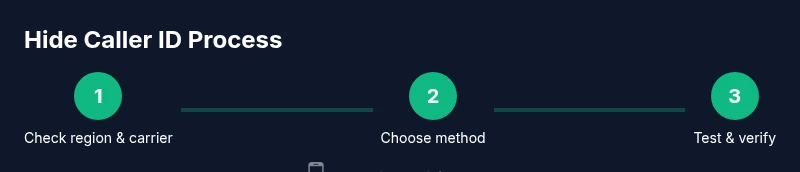
Check device and carrier support
Not all carriers honor suppression or per-call codes. Verify that your plan and device support hiding your number and note any regional caveats.
Tip: If uncertain, contact customer support to confirm capabilities before testing. - 3
Enable iPhone Show My Caller ID (if applicable)
On iPhone, go to Settings > Phone > Show My Caller ID and toggle off to hide your number for calls made from the native dialer.
Tip: Some carriers may override this setting; perform a test call after changing. - 4
Enable Android hide-number option (if applicable)
On Android, access the Phone app’s settings (path varies by brand) and choose Hide number or something similar.
Tip: If you don’t see the option, check carrier apps or contact support. - 5
Try a temporary block code before the number
Dial a per-call suppression code (like a prefix such as *67) before the destination number where supported.
Tip: Test with a trusted contact to confirm how your number appears. - 6
Test and verify the result
Call a friend or colleague and confirm whether your number is hidden. Repeat on different networks if possible.
Tip: Document results to track what works in your region. - 7
Be aware of limitations
Suppressing your number may not work for emergency calls or to certain services; some apps bypass suppression entirely.
Tip: Avoid relying on suppression for critical or sensitive communications. - 8
Choose an approach that fits your privacy goals
If you require ongoing privacy, consider a dedicated business line or a vetted privacy app with clear policies.
Tip: Regularly review your settings and update them as needed.
Got Questions?
Is it legal to hide my caller ID?
In many regions, hiding your caller ID for personal calls is legal, but there are restrictions—especially for harassment or fraud. Always check local laws and carrier terms before using suppression.
Hiding your caller ID is often legal, but always check local rules and use suppression responsibly.
Will blocking my number affect emergency calls?
Emergency calls usually require that the caller's number be available to responders. Suppression may be ignored for these calls in some regions, but this can vary by network and location.
Emergency calls may bypass suppression; consult local rules and test with trusted contacts.
Why does my number still show for some recipients?
Recipients’ networks or apps may override suppression, or the call may be routed through a service that bypasses your device settings. Always test and verify across different networks.
Some networks override suppression, so always test on several services.
Can I hide my number permanently for all calls?
Permanent hiding depends on your region and carrier and may require ongoing configuration. It’s not guaranteed across all networks or services.
Permanent hiding depends on your region and carrier; it isn’t universal.
Are there safer alternatives to mask calls?
If privacy is the goal, consider using a dedicated business line or a reputable privacy service with clear terms, rather than relying on ad-hoc suppression.
Consider a dedicated line or reputable privacy service for safer privacy.
How can I test if suppression works?
Call a trusted contact from a different network or device and confirm how your number appears. Keep records of results across conditions.
Test by calling a trusted contact and verify how your number appears.
Watch Video
What to Remember
- Know why you want to hide your number before acting
- Check device and carrier support to avoid surprises
- Test with trusted contacts to verify appearance
- Use suppression responsibly and legally