How to Block a Phone Number: A Practical Guide
Learn how to block a phone number on iPhone and Android, plus carrier and app options. Your Phone Advisor walks you through step-by-step methods to protect your privacy and reduce spam calls.


According to Your Phone Advisor, blocking a number is a quick privacy safeguard you can apply in minutes. On iPhone and Android, you can block calls and texts using built-in settings, or by using your carrier tools or a trusted third-party app. This guide walks you through steps for device blocking, carrier options, and post-block verification.
Why blocking a phone number matters
Blocking a phone number is a straightforward step to protect your privacy, reduce harassment, and preserve mental energy. If you’re asking how to block a phone number, the good news is that most modern phones offer built-in tools that work quickly, with no need to install extra software. According to Your Phone Advisor, using built-in controls is the most reliable first defense against unwanted calls and texts, especially when you’re dealing with spam, telemarketing, or potential scams. Blocking a number doesn't erase history or harm legitimate communication in your contacts; it merely stops incoming calls and messages from that line. For many users, this leads to better sleep, less anxiety when the phone rings, and more control over their digital life.
Across iPhone and Android, there are multiple layers you can use to block a number: device-level blocks, carrier-level blocks, and app-based restrictions. The choice depends on your goals, whether you want a quick pause or a durable barrier that survives resets and changes of SIM. The rest of this guide walks you through practical steps, common pitfalls, and best practices to ensure the block remains effective without disrupting needed communications.
boldnote:
Tools & Materials
- Smartphone (iPhone or Android)(Keep OS updated for the latest blocking features.)
- Phone number to block(The number you want to stop receiving calls from.)
- Access to Settings app(Needed for device-level blocking.)
- Carrier account login (optional)(Needed if you want to block at the carrier level.)
- Third-party blocking app (optional)(Used if you prefer app-based controls.)
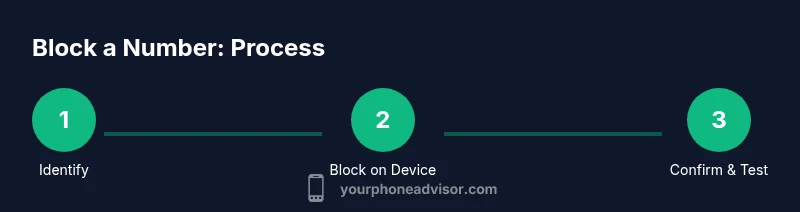
Steps
Estimated time: 8-12 minutes
- 1
Identify the number to block
Confirm the exact number you want to block, including country code if needed. If it’s a saved contact, consider whether you still want to block only the number or the contact entirely. This step prevents accidentally blocking a legitimate caller.
Tip: Double-check the digits and country code; a minor error can block the wrong person. - 2
Block on iPhone (device-level)
Open the Phone app, go to Recents or Contacts, tap the contact or number, and select Block this Caller. You can also go to Settings > Phone > Blocked Contacts and add numbers from there.
Tip: Blocking here stops calls and texts from that number across the system. - 3
Block on Android (device-level)
Open the Phone app, find the number in Recents, tap Details, and choose Block or Block/report spam. Some devices place this option under Settings > Apps > Phone > Blocked numbers.
Tip: Android options may vary by vendor; look for Block or Spam reporting to achieve the same result. - 4
Block in Messages (SMS/MMS)
If your text app separates SMS blocking, open the Messages app, locate the thread with the number, and choose Block contact or Block number. This ensures future messages from that number don’t appear.
Tip: Blocking in the messaging app complements device blocking for text-only harassment. - 5
Carrier-level blocking (optional)
Sign in to your carrier account or contact customer support to add the number to a block list. Carrier-level blocking can prevent the number from reaching your line even if they try to spoof a different caller ID.
Tip: Carrier blocks may take a few minutes to propagate; test after enabling. - 6
Block in popular apps (optional)
If you use messaging apps with their own blocking features, repeat the blocking step inside those apps for complete coverage. Some apps require separate blocking settings.
Tip: Apps like messaging or VoIP services may require independent blocks from device-level blocks. - 7
Test the block
After blocking, call or text the number from another line or ask a friend to verify. Ensure calls go to voicemail or are silenced as intended.
Tip: Keep a small list of numbers you’ve blocked for reference if you need to unblock later.
Got Questions?
Can I block a number without the caller knowing?
Yes. Blocking is typically private; the caller will not receive a notification. They may still reach voicemail if you don’t disable voicemail altogether, but the call will not ring through to you.
Blocking is private; the caller won't know when you block them unless you choose to tell them.
Will blocking stop calls from other numbers I don't recognize?
Blocking a specific number only stops that number. To reduce unknown calls, enable unknown caller silencing on your device or use a Do Not Disturb schedule with exceptions for contacts.
Blocking stops that number; unknown calls from different numbers may require broader settings.
Does blocking also stop messages or only calls?
Blocking blocks both calls and texts from the blocked number on most devices. Some apps may require separate blocks for messages.
Blocking usually covers both calls and texts from that number.
Can I unblock a number later if I change my mind?
Yes. You can remove a number from your blocked list at any time in the same settings area where you added it.
Unblocking is easy; you can reverse the block anytime.
What should I do if a blocked number keeps calling from a new number?
Consider a carrier-level block or Do Not Disturb with allowed contacts. You can also report the harassment to your carrier or relevant authorities if it continues.
New numbers can be tricky; broader controls help in persistent cases.
Is blocking effective across apps like WhatsApp or Facebook Messenger?
Blocking within your phone’s system blocks calls and SMS, but apps like WhatsApp require blocking within the app itself.
Apps often have their own blocking controls separate from the phone settings.
Watch Video
What to Remember
- Block at device, carrier, and app levels for best coverage
- Test after blocking to confirm the block is effective
- Know how to unblock if needed
- Regularly review blocked numbers for accuracy