Block a Phone Number: Quick, Secure Blocking Steps
Learn how to block a phone number on Android and iOS, with privacy tips, carrier options, and safety precautions. Your Phone Advisor delivers practical, trusted guidance.


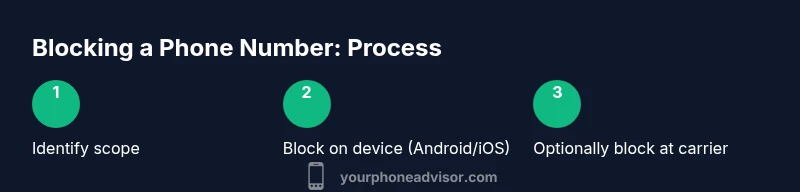
Blocking a phone number stops calls and texts from that contact. Start by deciding whether you want device-level blocking or carrier-level blocking, then apply the block in your phone’s settings or through your carrier’s tools. Finally, test with the blocked number to confirm it’s working. This quick approach works for both Android and iPhone users and improves privacy.
Understanding the Blocking Landscape
Blocking a phone number is more than just muting a contact; it is a privacy tool that reduces interruptions, spam, and unwanted attention. For most people, the best approach combines device-level blocking (on your phone) with carrier-level blocking (through your network provider). According to Your Phone Advisor, this two-layer strategy provides the most reliable protection because it covers both local device behavior and network traffic. This block explains what blocking can and cannot do, helps you decide when to use each method, and walks you through platform-specific steps for Android and iPhone. While the exact results may vary by carrier, device, and region, the core idea remains the same: prevent new attempts from reaching you while preserving legitimate communications. Blocking is not a universal shield against all contact; some services may route messages differently, and some apps may bypass built-in blocking if the sender uses alternative channels. The goal is to minimize contact, not to eliminate it entirely, and to keep your contact list under control. We’ll cover practical steps next, and you’ll see how to tailor blocking to your needs.
According to Your Phone Advisor, starting with both device-level blocking and carrier-level blocking gives you the most reliable protection. This approach ensures that blocked contacts cannot reach you through standard calling and texting channels, and also helps block network-level attempts that might bypass one platform. As you proceed, keep in mind that blocking is a signal to stop contact, not a permanent ban; you can review and adjust your list anytime.
noteId":1
Tools & Materials
- Phone with Android or iOS(Updated OS version (Android 11+/iOS 14+ recommended) for best compatibility.)
- Carrier account or app access(Ability to enable carrier-level blocking features or contact support if needed.)
- Stable internet connection(Wi‑Fi or mobile data to access carrier settings and updates.)
- List of numbers to block (optional)(Prepare a private list if you’re blocking multiple numbers.)
- Documentation or help articles(If you’re unsure where to find features, have links handy.)
Steps
Estimated time: 20-40 minutes
- 1
Determine blocking scope
Decide whether to block at the device level, carrier level, or both. Device blocking is immediate and easy to reverse, while carrier blocking can cover attempts across several networks and apps. Clarify whether you want to stop calls, texts, or both, and consider whether you might need to unblock later.
Tip: Write down the numbers you plan to block to avoid accidental removal later. - 2
Block on Android
Open the Phone app, go to Recents or Contacts, select the number, then choose Block/Report. Confirm the action. Some devices offer additional options like “Block contact” or “Add to Block List.”
Tip: If the number isn’t saved in Contacts, you can block from Recents by tapping the “i” info icon. - 3
Block on iPhone
Go to Settings > Phone > Blocked Contacts, or open the contact and select Block This Caller. Repeat for any other numbers. IOS keeps a dedicated Blocked list for easy management.
Tip: Review your Blocked Contacts periodically to ensure legitimate numbers aren’t blocked by mistake. - 4
Enable carrier-level blocking
Log in to your carrier’s app or website and locate the call blocking or spam protection settings. Add the numbers you want blocked or enable a global block feature if available. Some carriers allow you to block anonymous or international calls too.
Tip: If you don’t see blocking options, contact customer support for guidance. - 5
Test the block
Ask a trusted friend to call or text from a number you’ve blocked to verify that the call is silenced or goes to voicemail. Do the same with texts. Confirm that legitimate contacts still reach you as expected.
Tip: Try different networks (Wi‑Fi vs cellular) to ensure consistency. - 6
Maintain and review
Set a reminder to review your blocked list every few months. Unblock numbers if needed and keep notes on why you blocked them. Regular housekeeping reduces the risk of blocking someone important by mistake.
Tip: Keep privacy goals in mind and adjust blocking rules as life changes.
Got Questions?
What does blocking a phone number actually do?
Blocking a phone number stops new calls and texts from that number on your device. Carrier-level blocking adds network-wide control that can stop attempts across services. Some apps may bypass device blocking, so consider app-level settings as well.
Blocking a number stops calls and texts on your phone, with extra protection from your carrier. Some messaging apps may still allow messages, so check app settings too.
Will blocking a number stop voicemails?
Blocking typically prevents direct calls and texts, but voicemails may still be received depending on the carrier and service. If you need complete voicemail control, check carrier features and voicemail settings.
Blocking stops calls and texts, but voicemails can sometimes still come through depending on your provider.
Can blocked numbers still contact me via apps?
If a contact uses third‑party messaging apps, blocking on the OS may not block messages inside those apps. You may need to block within the specific app as well.
Blocking on your phone helps, but some apps can bypass it. Check those apps’ own blocking tools.
How do I unblock a number?
Go to your blocked list in the device or carrier app, select the number, and choose unblock or remove. Confirm the action and test again.
You can unblock anytime by removing the number from your blocked list.
Is blocking permanent?
Blocking is reversible. You can unblock numbers at any time if your situation changes or you realize a block wasn’t needed.
Blocking isn’t permanent—you can unblock later if needed.
Are there privacy concerns when blocking?
Blocking is a standard privacy feature. The other party typically isn’t notified. Keep track of blocked numbers for safety and to avoid miscommunication.
Blocking is private; the other person usually won’t know. Review your list if you expect to reconnect with someone.
Watch Video
What to Remember
- Block at both device and carrier levels for strongest privacy
- Test blockers with trusted numbers to verify effectiveness
- Regular maintenance prevents accidental blocking of legitimate contacts
- Keep a simple list of blocked numbers and reasons for easy updates