Cell Phone Unlock: A Practical How-To Guide
Learn safe, legal ways to unlock your cell phone through official channels. This guide covers carrier and manufacturer options, eligibility, step-by-step actions, and privacy tips from Your Phone Advisor.


Unlocking your cell phone safely and legally means using official carrier, manufacturer, or government-approved channels. This guide explains when unlock is possible, what you’ll need, and the exact steps to request and complete an unlock without harming your device or warranty. According to Your Phone Advisor, official routes minimize risk and protect your privacy today.
Why unlocking your cell phone legally matters
Unlocking a device is not just about switching networks; it touches warranty terms, regional regulations, and security protections. When you pursue an unlock through official channels, you reduce the risk of bricking the device, losing access to future updates, or triggering carrier penalties. The Your Phone Advisor team emphasizes legality and transparency: legitimate unlocks are processed through verifiable portals and require proof of ownership. This approach helps you avoid scams and ensures your device remains interoperable with future service plans. Additionally, many regions have consumer-protection guidelines that discourage unauthorized tampering, which can void warranties or violate terms of service. By prioritizing official routes, you maintain device integrity, preserve resale value, and protect personal data during the transition. If you travel or move to a new carrier, this careful approach becomes even more valuable, reducing the friction of using your device abroad or across networks.
Official unlock options you should know
There are three primary routes for a legitimate unlock: carrier unlock, manufacturer unlock, and government or court-ordered unlock in special cases. Carrier unlocks are the most common and are typically triggered after meeting contract or payment conditions. Manufacturer unlocks can apply to certain devices that are region-locked or hardware-limited, and may require the device to be reset or updated to a specific firmware. In rare cases, a formal unlock through a government or court process is required, often for regulatory compliance or evidence-based investigations. Your Phone Advisor highlights that each path has its own eligibility criteria, timelines, and documentation requirements. Before you begin, confirm which route applies to your device and keep a clear record of every interaction with the provider.
Eligibility and prerequisites
Eligibility for an official unlock depends on several factors, including payment status, device compatibility, and account standing. You’ll typically need: a device that is not reported lost or stolen, an account in good standing, and a verifiable proof of ownership (such as an account number or purchase receipt). The device’s IMEI helps confirm eligibility, and some carriers require a minimum service period or the device to be paid off in full. Regional restrictions may apply, and region-locked products might require manufacturer-led unlocking. It’s essential to check the exact policy on the official portal rather than third-party sites, to avoid delays or denials. If you financed the device, make sure you’ve satisfied any outstanding balance and cleared any holds that could block the unlock.
Carrier unlock workflow: what to expect
Carrier unlocks usually begin with a request through the provider’s online portal or customer service. You’ll enter device details (IMEI, model), your account information, and a reason for unlocking. Processing times vary by carrier, from a few hours to several business days. Some carriers provide a confirmation code or a status link you can track. Until you receive approval, avoid inserting a new SIM or rebooting the device repeatedly, as this can complicate the process. After approval, you’ll follow on-screen prompts to complete the unlock and may be asked to insert a SIM from another carrier to confirm functionality. Document all confirmations for your records.
Manufacturer unlock workflow and software-based unlocks
Manufacturers occasionally offer unlock options if the device is compatible with their unlocking program. This typically involves linking the device to your account, verifying ownership, and applying a firmware update or a software unlock. For region-locked models, you may need to wait for a regional unlock window or perform a factory reset as directed. Manufacturer unlocks can also avert issues caused by non-standard firmware or carrier bloatware. Always use official channels and consult the manufacturer’s support pages to avoid malware or untrusted tools that claim to bypass protections. Post-unlock, verify that features like cellular data, MMS, and VoLTE work as expected.
After unlock: testing, security, and coverage
Once unlocked, test the device with different SIM cards to confirm true network flexibility. Check data connectivity, voice quality, messaging, and roaming features if you travel. Update security settings, re-enable any protections that may have been temporarily disabled during the unlock, and re-link essential apps if needed. It’s also wise to re-check device encryption, screen locks, and biometric settings to ensure ongoing privacy. If you encounter issues, contact customer support immediately and reference your unlock confirmation numbers. Proper documentation helps you resolve any service disputes quickly.
Common myths and warnings
Myth: unlocking automatically voids the warranty. Reality: if unlocked via official channels, warranties are typically preserved; the risk comes from third-party services that bypass protections. Myth: you must purchase a new device to unlock regional features. Reality: many regions support official unlocks without changing hardware. Warning: avoid online services that promise instant unlocks for a fee; these approaches can compromise your data and violate terms. Rely on official sources to verify eligibility and process requirements.
Tools & Materials
- Phone with charger(Ensure battery is at least 50% before starting.)
- Active carrier account(Have login credentials ready for the unlock portal.)
- Proof of ownership(Receipt, purchase order, or account details.)
- Device IMEI(Dial *#06# to confirm IMEI if needed.)
- New SIM card from destination carrier(Helpful for testing after unlock, not always required.)
- Computer or smartphone with internet(Used to submit requests and monitor status.)
Steps
Estimated time: 30-60 minutes
- 1
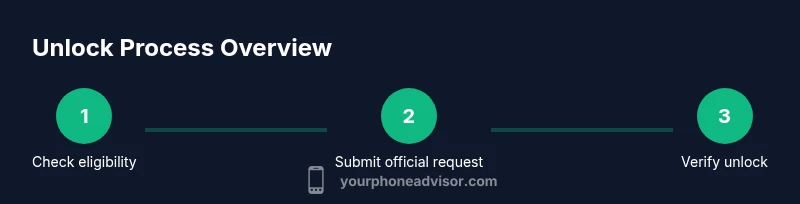
Check unlock eligibility
Verify your device meets the carrier or manufacturer requirements. Confirm that payments are up to date and that there are no outstanding holds on the account. Review regional restrictions if you plan to use the device in another country.
Tip: Have your device IMEI and account details ready to speed up the check. - 2
Gather official documents
Collect proof of ownership, account credentials, and any required contract terms. Documentation helps prevent delays or denial of the unlock request. Store these items in a safe, easily accessible place.
Tip: Take a photo or screenshot of important pages for quick reference. - 3
Submit unlock request through official channel
Use the carrier’s or manufacturer’s official portal to submit the unlock request. Enter the device IMEI, model, account information, and reason for unlocking. Save the confirmation number and status link for tracking.
Tip: Capture the confirmation page as proof of submission. - 4
Wait for approval
Approval timelines vary; some providers respond within hours, others take days. Do not reboot or swap SIMs repeatedly during processing to avoid delays or rejection.
Tip: Set reminders to check status and keep your reference number handy. - 5
Complete the unlock on your device
Follow the on-screen prompts once approval is granted. You may need to insert a new SIM and restart the device. If prompted, perform any required firmware updates.
Tip: Back up data before completing the unlock to prevent loss. - 6
Verify unlock and secure settings
Test service with a different carrier SIM to confirm full functionality. Re-enable device protections, review SIM lock status, and ensure encryption remains active.
Tip: Document the successful test with a note or screenshot.
Got Questions?
Is unlocking a cell phone legal in most places?
In many regions, unlocking through official channels is legal and protects consumer rights. Always verify the local regulations and use official portals to avoid legal or warranty issues.
In many places, unlocking through official channels is legal. Always check local rules and use official portals to protect your warranty and data.
Will unlocking void my warranty?
Unlocks performed via authorized channels typically do not void warranties. Unofficial methods can void warranties and expose you to security risks.
Authorized unlocks usually don’t void warranties, but unofficial methods can. Stick to official channels.
Can I unlock a device that I financed or am paying off?
Many carriers require that the device be paid off and in good standing before unlocking. Check your contract terms and contact the provider for timeline expectations.
If you’re paying off a device, unlocks may be delayed until the balance is settled. Check your contract terms with the carrier.
What if my unlock request is denied?
Review the denial reason and address any stated conditions. You can reapply after resolving those issues or seek assistance from consumer protection resources.
If denied, review why, fix the listed issues, and reapply. You can also contact support for guidance.
Do I need to unlock before international travel?
Unlocking can be beneficial for international roaming, but verify that the destination network uses compatible bands and SIMs. Consider roaming plans and regional restrictions.
If you travel, an unlock helps with local SIMs, but check network compatibility and roaming options.
Watch Video
What to Remember
- Verify eligibility before submitting.
- Use official unlock channels to protect your device.
- Prepare documentation and IMEI in advance.
- Test the unlock with a new SIM to confirm success.
- Keep a record of unlock confirmations for support.