Bark Phone vs iPhone: An Objective Comparison for Families
A thorough side-by-side analysis of Bark Phone and iPhone, focusing on safety, privacy, app ecosystem, cost, and everyday usability to help families decide which device fits their needs.


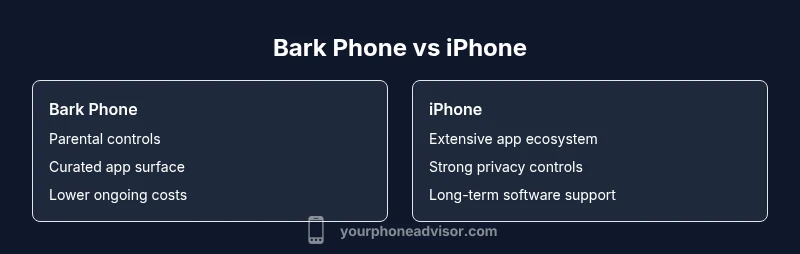
Bark Phone and iPhone cater to different priorities. Bark Phone emphasizes family safety, parental controls, and predictable costs, making it a strong choice for households with kids. iPhone offers a mature app ecosystem, robust privacy features, and long-term hardware/software support. For safety-first budgeting, Bark Phone is best; for privacy, ecosystem breadth, and device longevity, iPhone leads. Your choice should reflect your family’s priorities.
Introduction to the Bark Phone vs iPhone Landscape
When you compare Bark Phone vs iPhone, you’re evaluating two fundamentally different philosophies in the smartphone space. Bark Phone prioritizes family safety, curated app environments, and cost predictability, while iPhone emphasizes privacy, a vast app ecosystem, and long-term device resilience. For families, this isn’t just about hardware specs—it’s about how the device fits daily routines, education, communication, and screen time management. As you read, keep in mind that the goal is clarity: which device aligns with your household’s safety goals and technological comfort level? In this guide, we’ll dissect the key dimensions of Bark Phone vs iPhone to help you decide with confidence.
Safety Features and Parental Controls: Bark Phone Leads in Family Protection
Safety is the primary differentiator in the Bark Phone vs iPhone comparison for many households. Bark Phone ships with Bark OS’s parental controls baked in, offering granular controls over app access, screen time limits, and content filtering. The advantage is a predictable, kid-friendly experience that parents can adjust remotely. iPhone, by contrast, relies on Apple's Screen Time, Family Sharing, and a broad privacy framework. While powerful, these tools assume a degree of user setup and ongoing management that may feel less turnkey for families seeking a tightly supervised experience. The Bark Phone approach can reduce the guesswork of oversight, especially for younger children or new smartphone users.
Privacy and Data Handling: Privacy Maturity on Different Axes
When it comes to Bark Phone vs iPhone from a privacy standpoint, the landscape diverges. iPhone has built a reputation around on-device processing, app permission granularity, and transparent privacy labels, which many users interpret as stronger consumer privacy guarantees. Bark Phone emphasizes safety-first design, with data practices aligned to family protection and content monitoring. That design choice can mean fewer data signals being generated for cross-app advertising, but it may also involve more centralized data handling within the Bark ecosystem. The right choice depends on whether you prioritize ecosystem privacy sophistication (iPhone) or explicit family safety workflows (Bark Phone).
App Ecosystem and Customization: How Much Freedom Do You Need?
The Bark Phone vs iPhone debate highlights a critical difference in customization and app access. Bark Phone typically operates with a curated app surface and restricted installation options, prioritizing a distraction-free environment for children and simpler management for parents. iPhone, powered by iOS, offers an enormous app catalog, deeper customization, and a broader range of third-party services. If you value flexibility, cutting-edge apps, and advanced workflows, iPhone has a clear edge. If you want a safer, more predictable app environment with less risk of unvetted downloads, Bark Phone excels.
Cost and Total Cost of Ownership: Budget Clarity or Premium Perks?
In the Bark Phone vs iPhone cost comparison, you’ll notice a trade-off between upfront and ongoing costs versus feature breadth. Bark Phone tends to present lower ongoing costs thanks to simplified plans and a more controlled app surface, which can reduce incidental expenses from in-app purchases or data overages. iPhone setups can involve higher upfront hardware investment and potentially higher ongoing costs through services and accessories. Either way, compute the total cost of ownership over several years, including repairs, accessories, and software subscriptions, to determine which option delivers the best long-term value for your family.
Hardware Longevity and Build Quality: Physical Durability Matters
Hardware durability is a practical consideration in the Bark Phone vs iPhone conversation. Bark Phone devices are designed for safety-oriented usage, often with more conservative hardware expectations and a focus on steady performance for younger users. iPhone devices are renowned for consistent build quality, longevity, and strong resale value. In practice, this means iPhones may retain performance and resale value longer, while Bark Phones may prioritize predictable operation and a longer safety-focused lifecycle. If you anticipate upgrading every few years for the latest hardware, iPhone’s ecosystem advantages become more compelling.
Software Updates and Support Lifecycles: How Long Will It Last?
Software updates are a major factor in choosing between Bark Phone and iPhone. Apple provides regular, long-term OS updates for supported devices, often extending many years beyond the initial release. This longevity means older iPhones can continue to receive security patches and new features. Bark Phone's update cadence is tied to Bark’s release schedule and the partnership with hardware vendors. While updates can be timely, the cadence may not match Apple’s four- or five-year update horizon. Consider how important continued security updates, new features, and compatibility with future apps are for your household.
Ecosystem Integration and Cross-Device Use
A key dimension in Bark Phone vs iPhone is how each device fits into a broader technology strategy. iPhone users often benefit from seamless integration with other Apple devices—Mac, iPad, Apple Watch, AirPods—creating a cohesive, user-friendly experience across the family’s digital life. Bark Phone offers strong integration with Bark’s family-safety ecosystem and cloud-based supervision but may not provide the same level of cross-device continuity. If your home already leans into Apple hardware, iPhone integration offers more value; if your priority is a safety-centered, self-contained environment, Bark Phone shines.
Real-World Scenarios: Who Should Consider Each?
For families prioritizing control and budgeting, Bark Phone is frequently the practical choice. It reduces the risk of overuse and exposure to inappropriate content through a curated experience and adjustable controls. For users who demand extensive app variety, the best privacy protections, and a device designed for longevity and resale value, iPhone is typically the stronger option. In schools or family plans with tech-savvy teenagers, the decision may hinge on how much flexibility you want versus how much you want to limit distractions.
Quick Decision Checklist: Make Your Pick with Confidence
- Define your safety priorities and how hands-on you want to be with supervision.
- Assess the importance of app variety and platform flexibility.
- Consider long-term updates, warranties, and resale value.
- Evaluate ecosystem alignment with other devices in your home.
- Review total cost of ownership over 3–5 years.
- Think about transition logistics and data migration when switching devices.
Setup Tips and Transition Guidance
If you’ve decided to move forward with Bark Phone or iPhone, plan a staged setup: 1) establish family safety rules and Screen Time limits; 2) configure essential privacy settings and permissions; 3) install necessary apps and services; 4) educate all family members about device etiquette and security hygiene. For transitions, prepare data migration strategies, backups, and optional trade-in options to minimize friction. A thoughtful rollout can improve adoption and reduce resistance among younger users.
Comparison
| Feature | Bark Phone | iPhone |
|---|---|---|
| Safety features and parental controls | Built-in Bark OS with granular controls and remote management | Comprehensive Safety and Screen Time with Family Sharing; long-standing parental options |
| Parental controls customization | High customization within Bark’s safety framework | Moderate to high flexibility via iOS controls and app settings |
| App ecosystem and customization | Curated app surface; limited third-party access | Vast app catalog; extensive customization and integration |
| Privacy controls | Safety-first approach with Bark data practices | Industry-leading privacy controls and transparency labels |
| Software updates and support | Cadence tied to Bark platform; device updates vary | Regular, long-term OS updates with strong ecosystem support |
| Cost structure | Lower upfront and straightforward plans | Higher upfront hardware cost; broader service options |
| Device longevity and resale | Sufficient longevity with consistent performance | Strong resale value and long-term software support |
| Cross-device integration | Bark ecosystem integration; limited cross-device parity | Deep integration across Apple devices (Mac, iPad, Watch) |
| Customer support and warranty | Family-focused Bark support with safety emphasis | Broad AppleCare and expansive retail support network |
The Good
- Great for family safety with built-in parental controls
- Lower ongoing costs due to simplified plans and usage restrictions
- Predictable, kid-friendly app surface reduces distractions
- Strong for caregivers who want minimal configuration and oversight
- Clear transition paths for families new to smartphones
Drawbacks
- Limited app ecosystem and customization compared to iPhone
- Potentially lower resale value and hardware prestige
- Fewer cutting-edge hardware features and camera capabilities
- Dependency on Bark’s update cadence for new safety features
Bark Phone is the better choice for safety-first families on a budget, while iPhone remains the superior option for privacy, app variety, and long-term ecosystem value.
If safety controls and predictable costs are your top priorities, Bark Phone delivers a compelling package. If you prioritize privacy, the breadth of apps, and long-term device longevity, the iPhone is the stronger candidate. The best decision depends on which factors you value most in everyday family life.
Got Questions?
What is Bark Phone and who is it intended for?
Bark Phone is a safety-focused smartphone offered by Bark that includes built-in parental controls and a curated app experience. It is intended for families seeking predictable usage limits and simpler oversight for children. It’s designed to reduce distractions while maintaining essential communication.
Bark Phone is a safety-first option for families, with built-in parental controls and a curated app set. It helps keep kids focused and safer online.
Can I install any app on Bark Phone the way you can on Android or iPhone?
Bark Phone uses Bark OS with a curated app surface and restricted installation options. This reduces the risk of unvetted apps and distractions, but it also limits certain third-party apps and features. If broad app access is important, iPhone offers more flexibility.
Bark Phone restricts apps to a safe, curated set, unlike full Android or iOS stores.
Is Bark Phone secure against malware and data breaches?
Security on Bark Phone benefits from a safety-centric OS and controlled app access. While it minimizes exposure to unsafe apps, no device is immune to threats; ensure regular updates and strong passcodes. iPhone also emphasizes strong malware defense through its app review and sandboxing.
It focuses on safety-first security, but you still need good habits and updates.
How does privacy compare between Bark Phone and iPhone?
iPhone emphasizes privacy with on-device processing and transparent controls. Bark Phone prioritizes family safety and controlled data flows within its ecosystem. Your choice depends on whether you value enterprise-grade privacy controls (iPhone) or family-centered safety workflows (Bark Phone).
iPhone is generally strongest for privacy, while Bark Phone focuses on family safety features.
Which is better for kids and families on a budget?
For families prioritizing budget and controlled usage, Bark Phone often provides a more predictable cost structure with safety features built-in. iPhone can be more expensive upfront and over time but offers broader learning apps and capabilities.
Bark Phone is usually better for families watching costs and safety.
What should I know about transitioning to or from Bark Phone to iPhone?
Transitioning requires data migration planning, backups, and possibly cloud service transfers. Moving from Bark Phone to iPhone involves setting up Apple ID, app repurchases, and reconfiguring safety settings to match the new ecosystem. Planning ahead minimizes friction.
Plan the switch with backups and setup steps to keep data safe.
What to Remember
- Prioritize family safety features when screen time and content control are critical
- Weigh total cost of ownership, not just upfront price
- Consider ecosystem alignment with other devices in your home
- App variety favors iPhone; curated safety features favor Bark Phone
- Plan for long-term updates and device longevity