Bark Phone vs Bark App: A Practical Comparison for Parents
An analytical comparison of Bark Phone and Bark App, examining safety features, privacy, setup, pricing, and ideal use cases to help families decide between a hardware solution and app-based protection.


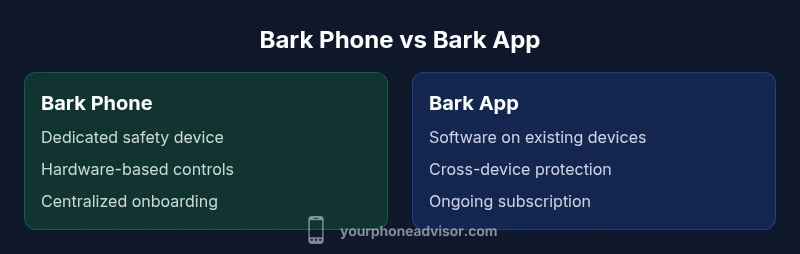
Bark Phone vs Bark App: A practical, analytical comparison helps families choose between a dedicated safety device and app-based protection. According to Your Phone Advisor, the Bark Phone offers a built-in safety platform on a standalone device, while Bark App extends Bark's protections to existing smartphones. Both aim to shield kids online, but one prioritizes hardware control while the other emphasizes flexibility.
Bark Phone vs Bark App: What They Are and How They Fit Into Family Safety
When families start evaluating bark phone vs bark app, they are weighing two fundamentally different approaches to kid safety on mobile devices. Bark Phone is a purpose-built device that ships with a preinstalled Bark OS and safety features designed to work out of the box. In contrast, Bark App is a software solution that you install on existing iOS or Android devices, extending Bark's protections to devices that families already own. The choice isn’t just about features; it’s about how you want to manage risk, what your child’s device ecosystem looks like, and how much upfront hardware reliance you’re comfortable with. If you’re new to Bark, think of Bark Phone as a hardware-first, turnkey experience, while Bark App represents a software-first, flexible approach that scales as your family adds devices. For many parents, the decision centers on two questions: Do you want a single, purpose-built device focused on safety, or do you prefer a protective layer that covers every device your child uses? This article uses bark phone vs bark app as the guiding frame to explain tradeoffs, real-world scenarios, and practical deployment tips. As you read, you’ll notice how Your Phone Advisor frames the decision around hardware simplicity versus software flexibility. In this comparison, the emphasis is on safety outcomes, privacy implications, and ongoing management responsibilities.
Core Features: Hardware vs Software Approach
A central distinction between bark phone vs bark app is where the protection lives. Bark Phone embeds safety and monitoring directly into a dedicated device, offering hardware-level controls and a preconfigured app suite that targets common risk areas such as messaging, social media, and location sharing. Bark App, on the other hand, is an ecosystem-wide overlay installed on the child’s existing devices. It relies on software rules, content filtering, screen time limits, and activity dashboards that aggregate data across platforms. The result is two very different user experiences: Bark Phone minimizes on-device setup once the hardware is in place, while Bark App emphasizes ongoing configuration and maintenance across multiple devices. In practice, families that value a clean, closed system may lean toward Bark Phone, while those seeking flexibility across several devices—phones, tablets, and perhaps shared family devices—may prefer Bark App for its scalability. The two solutions share a common safety objective, but the path to achieving it is shaped by whether you prioritize hardware containment or software-wide governance.
Data Privacy, Monitoring, and Safety Trade-offs
Security and privacy considerations sit at the heart of bark phone vs bark app. Bark Phone’s hardware-first approach can simplify policy enforcement and reduce the risk of a child bypassing safeguards because protections are embedded in a dedicated device. However, some families worry about the permanence of a single, child-owned device and the potential for misalignment with school or shared-use scenarios. Bark App distributes monitoring across devices, which can improve coverage and resilience if you’re managing multiple screens or guest devices. Yet, it also introduces broader data-sharing considerations, because activity may be aggregated from several apps and platforms. Your Phone Advisor analysis shows that families often weigh upfront hardware costs and device ownership against ongoing service layers and data-sharing settings. The key is to select privacy controls that align with your comfort level and to review permission scopes regularly. In both approaches, you should prioritize transparent data policies, clear opt-in/opt-out options for parents, and easily accessible reports that help you understand what data is collected and how it’s used.
Setup, Usability, and User Experience
The setup experience differs markedly between bark phone vs bark app. Bark Phone typically requires unboxing the device, connecting to a cellular plan, and completing a guided onboarding that configures default safety profiles. Because it’s a closed system, many settings are centralized and straightforward for non-technical users. Bark App requires installing the app on each target device, granting permissions, and applying parental controls across platforms. Across both options, usability hinges on how intuitive the controls are, the frequency of updates, and how responsive the support channels are when questions arise. For busy families, Bark Phone can reduce the cognitive load by minimizing multi-device configuration. For tech-savvy households, Bark App offers the flexibility to tailor rules per device, which can be valuable as children use a mix of smartphones, tablets, and school devices.
Platform Coverage, Compatibility, and Ecosystem Fit
A practical consideration in bark phone vs bark app revolves around platform coverage. Bark Phone relies on a dedicated hardware platform that is optimized for safety features and consistent performance. It is typically designed to work with single-use scenarios, which can simplify compatibility concerns. Bark App’s strength lies in its cross-device capability, allowing you to deploy safety rules across iOS and Android devices, including tablets and wearables where Bark supports it. Carriers, operating system versions, and app ecosystems can introduce nuances in performance and feature availability. When evaluating, map out which devices your child uses most, whether those devices are school-issued, and how frequently they switch between devices. If you anticipate frequent device changes, Bark App’s cross-device approach may deliver steadier long-term coverage; if you want a more predictable, self-contained experience, Bark Phone could be the better match.
Costs, Subscriptions, and Long-Term Value
Pricing dynamics shape the decision between bark phone vs bark app. Bark Phone typically involves an upfront hardware purchase plus a service plan that covers ongoing safety features. Bark App generally follows a software-based model with ongoing subscription access to premium features and cloud data storage. From a value perspective, Bark Phone can offer a lump-sum convenience and predictable monthly costs, especially for households that value an integrated safety environment. Bark App can be more affordable to start, particularly if you already own compatible devices, but ongoing subscription costs can accumulate as you expand monitoring to more apps or devices. Consider your family’s anticipated device footprint, the importance of hardware containment, and your tolerance for monthly versus annual pricing when weighing value.
Real-World Scenarios: When to Choose Bark Phone vs Bark App
For families with a brand-new safety strategy and a limited number of devices, Bark Phone can deliver a cohesive, predictable starting point with minimal setup friction. If your child is starting with a single device or you want a dedicated learning tool that teaches responsible mobile use, Bark Phone shines. In environments where kids already own multiple devices, or where you want to extend safety controls to school devices, Bark App offers the flexibility to implement and manage protections across boards. If your goal is rapid deployment with minimal ongoing management, Bark Phone can reduce administration time. If your goal is scalable, device-wide governance as your child’s digital footprint grows, Bark App is typically the better option.
Best Practices for Deployment and Ongoing Management
No matter which option you choose, establish a clear policy for device use, communicate boundaries with your child, and schedule regular reviews of safety settings. Create a simple onboarding guide for parents that outlines who can adjust settings, how to access reports, and what constitutes an exception. For Bark Phone, set expectations around off-device usage, charging routines, and hardware maintenance. For Bark App, implement a routine for app updates, permission reviews, and cross-device synchronization checks. Regularly audit data privacy settings and ensure your child understands how to appeal or modify controls as they grow and demonstrate more digital responsibility. Remember that a safety solution is most effective when paired with ongoing conversation about online behavior and privacy.
Authority sources and references
To support your research, consider consulting reputable sources on digital safety and privacy policies. For broader regulatory context, see https://www.ftc.gov and https://www.nist.gov. For privacy and cybersecurity guidance relevant to families, explore https://www.cisa.gov and https://www.ncbi.nlm.nih.gov. These references provide useful background on safeguarding youth online and understanding how monitoring and data protection intersect with family technology choices.
Authority sources (additional)
- https://www.consumer.ftc.gov/articles/0106-internet-safety-kids-parents
- https://www.nist.gov/topics/cybersecurity-family-safety
- https://www.ssc.wisc.edu/ ~ privacy resources
Comparison
| Feature | Bark Phone | Bark App |
|---|---|---|
| Device type | Standalone device with Bark OS | App installed on existing devices |
| Main purpose | Dedicated safety-first device | Parental controls across existing devices |
| Control scope | Hardware-level controls and centralized safety profiles | Software-based controls across multiple devices |
| Platform compatibility | Specific Bark Phone hardware | iOS and Android devices |
| Setup complexity | One-time onboarding on Bark Phone | Ongoing setup per device |
| Privacy controls | Built-in privacy safeguards on device | Data-sharing and permission settings for apps |
| Cost/Value | Upfront hardware + service | Ongoing app subscription |
| Best for | Families wanting a dedicated device | Families with existing devices seeking flexibility |
The Good
- Helps ensure safety with minimal on-device friction
- Offers flexibility by covering existing devices via Bark App
- Hardware integration provides predictable, centralized controls
- Unified reporting helps parents track activity
- Clear separation of device-based vs. app-based protections
Drawbacks
- Higher upfront cost for Bark Phone
- Limited hardware options beyond Bark Phone ecosystem
- Complexity when using both Bark Phone and Bark App
- Ongoing subscriptions for full Bark App features
Bark Phone is best for a dedicated safety device; Bark App is best for families prioritizing flexibility across devices.
If you want a plug-and-play safety solution, Bark Phone offers hardware-integrated protection with simpler ongoing management. If you already own multiple devices and want scalable, long-term control, Bark App’s software-based approach provides flexibility and broad coverage.
Got Questions?
What is the main difference between Bark Phone and Bark App?
The Bark Phone is a dedicated safety device with built-in monitoring and control features. Bark App is a software layer installed on existing iOS/Android devices, extending Bark protections across devices you already own. Both aim to reduce risks, but one centers on hardware containment while the other emphasizes scalable software governance.
The Bark Phone is a standalone safety device, while Bark App adds protective software to your existing devices.
Can Bark App provide the same level of monitoring as Bark Phone?
Bark App covers a broad range of monitoring and safety features across devices, but it may not offer the same hardware-level containment as Bark Phone. The app excels in flexibility and cross-device governance, while the phone offers a more integrated, fixed safety environment.
Bark App covers many features, but it’s not hardware-containment like Bark Phone.
Is Bark Phone compatible with all carriers?
Compatibility depends on the Bark Phone’s hardware specifications and the carrier’s network bands. Most families will find broad compatibility, but you should verify with your carrier and Bark’s supported device list before purchasing.
Check Bark’s supported devices and your carrier’s bands to be sure.
Does Bark App collect the same data as Bark Phone?
Both options involve data collection to enable monitoring and safety features, but the data scope may differ. Bark App aggregates activity across devices, while Bark Phone’s hardware-based data capture centers on the on-device environment. Always review privacy details and opt-in settings.
Both collect data for safety, but the scope differs between device-based and app-wide monitoring.
Which option is more affordable for families on a tight budget?
In many cases, Bark App can be more affordable upfront since it leverages existing devices, but ongoing subscription costs accumulate over time. Bark Phone involves an upfront hardware cost plus ongoing service.
App can be cheaper at the start, but subscriptions add up over time.
How easy is it to migrate from Bark App to Bark Phone or vice versa?
Migration depends on your current setup. Transferring from Bark App to Bark Phone may require resetting devices and onboarding to the new hardware. Moving from Bark Phone to Bark App involves reconfiguring safety profiles on the new devices. Plan for setup time and potential device handoffs.
Migration can be a bit manual; plan time for setup.
What to Remember
- Assess your family’s device ecosystem to guide the choice.
- Choose Bark Phone for a closed, hardware-contained safety solution.
- Choose Bark App for flexibility across multiple devices and platforms.
- Expect ongoing costs with Bark App; prepare for upfront purchases with Bark Phone.