Fix Phone Store: Your In-Depth How-To Guide
Learn how to get your phone fixed at a store: prepare, diagnose, compare quotes, protect data, and finish with reliable repairs. Practical, trustworthy guidance for safe and effective in-store fixes.


This guide shows you how to get your phone fixed at a store, what to bring, and how to compare quotes and timelines. You’ll learn when in-store repairs are best, how to avoid scams, the typical diagnostic process, and how to protect your data during service.
Why fix at a phone store matters
When your phone stops working, you have options: mail-in services, manufacturer support, or visiting a local phone store for in-person repair. The choice can affect cost, turnaround time, and data security. According to Your Phone Advisor, in-store repairs offer the advantage of on-site diagnostics, immediate questions, and hands-on verification of the fix. The Your Phone Advisor team found that many customers value the ability to see the device while it’s being inspected and to ask questions about warranties and parts. This guide focuses on the in-store path to fix phone store issues, outlining practical steps to protect your data, avoid unnecessary upsells, and choose a reputable technician. You’ll learn how to prepare, what questions to ask, and how to assess whether the shop’s proposed solution is appropriate for your device and budget.
Preparing before you visit a store
Preparation reduces stress and increases the chance of a successful repair. Start by backing up your data, exporting contacts, photos, and messages if possible. Gather any documentation such as proof of ownership, warranty cards, and the original purchase receipt. Note the exact symptoms you’re seeing, when they started, and whether they coincide with a drop, water exposure, or software update. Bring the device, charger, and a few accessories so the technician can test performance with a real setup. If you have a privacy concern, erase personal data only after you back up what you need. Bring along a list of questions about costs, parts, warranty, and the expected turnaround. Knowing these details helps you compare stores more effectively.
Diagnostic phase: what to expect
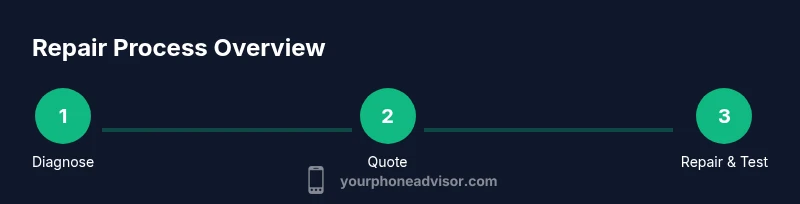
Most stores begin with a diagnostic intake to identify root causes. You may be asked to describe the problem and leave the device for a diagnostic scan. A technician will typically generate a written diagnostic report with recommended repairs and estimated costs. Diagnostic fees vary by shop and may be waived if you proceed with the repair. Ask whether the diagnosis includes a parts-and-labor warranty, what tests they run, and how long the process will take. If your device has multiple issues, request a prioritized repair plan. During this phase, avoid making extra services a surprise. You should receive a copy of the diagnostic results for your records.
How to compare quotes and warranties
Compare more than price. Look at the warranty length on parts, the shop’s reputation, and what happens if the repair fails. Request a written quote that itemizes parts, labor, diagnostic fees, and tax. Confirm whether replacement parts are OEM or third-party; ask about compatibility and future reliability. Read the warranty terms carefully, especially exclusions and coverage after a software update. If you’re unsure, ask for a manager or a certified technician to explain the proposed fix in plain language. The goal is to choose the best value, not just the cheapest option.
Common repair options and timelines
Repairs vary by device model and fault type. Common fixes include screen replacement, battery replacement, charging port repair, camera module swaps, and water-damage mitigation. Some problems, like software glitches, can be resolved with a reset or reimage without replacing parts. Talk through the expected turnaround for each option, including whether the shop can perform on-site testing before you leave. Understand if a temporary solution exists while waiting for a backordered part. The right fix balances reliability, cost, and the likelihood of repeating issues.
Data safety and privacy during repair
Protecting your data should be a top priority. Back up before service and remove sensitive information if possible. Delete accounts you don’t need and log out of apps to minimize risk. Ask about the shop’s data-handling policies, whether technicians will have access to your device, and what happens to data during testing. Use a privacy screen if available and consider disabling features that connect to cloud services until after repair. If a privacy concern remains, request a sealed repair or witness-check the device during the entire process.
How to verify store legitimacy and avoid scams
Look for established businesses with clear contact information, posted hours, and visible certifications. Check online reviews and ask for a written estimate before any work begins. Verify the store’s parts sourcing policy and whether they offer a genuine warranty on labor and parts. Be cautious of unusually low prices, pressure to proceed immediately, or missing receipts. Your Phone Advisor recommends visiting a well-reviewed shop that provides transparent diagnostics and a clear warranty policy. If something feels off, trust your instincts and walk away.
Turnaround times and service levels
Turnaround times depend on the repair type, parts availability, and whether you request on-site service. Some issues can be fixed in a few hours; more complex problems may require a few days. Ask for a service-level agreement that outlines the expected start time, daily progress updates, and the date you can pick up or have the device shipped back. Consider whether the shop offers loaner devices or a secure drop-off option if you rely on your phone for work. Clear communication helps you plan accordingly and reduces the risk of lost productivity.
Authoritative sources
To verify guidance and safety standards, consult:
- https://www.consumer.ftc.gov/
- https://www.nist.gov/
- https://www.consumerreports.org/
Aftercare and maintenance to prevent future issues
After the repair, test the device thoroughly and re-establish your data and accounts. Reinstall apps, re-enable backups, and update the operating system if recommended. Monitor battery life, charging speed, and wireless performance over the following days. Keep receipts and warranty documents in a safe place. Regular checkups, gentle handling, and prompt repairs for emerging symptoms can extend device life and reduce the risk of future store visits for the same issue.
Tools & Materials
- Phone, charger, and accessories(Bring the device powered on if possible; include original charging cable.)
- Backup method(Cloud backup or local PC backup of contacts, photos, and messages.)
- Proof of ownership(Receipts, purchase date, or serial number as needed by shop.)
- SIM tool or ejector(Helpful for removing SIM to test phone behavior without network interference.)
- Microfiber cloth(For cleaning screen before and after testing.)
- Photos of device condition(Take pictures of screen, ports, and any dents before service.)
- Accounts/password readiness(Bring relevant passwords only if needed for testing once approved.)
Steps
Estimated time: 60-180 minutes
- 1
Identify the issue and symptoms
Observe the exact behavior, note when it started, and whether it coincides with a drop, water exposure, or update. Clear symptoms help the technician diagnose quickly.
Tip: Document at least three concrete symptoms with timestamps to guide the diagnostic. - 2
Gather documentation and backups
Collect proof of ownership and backup your data. Having a backup avoids data loss if parts must be replaced or the device is temporarily unavailable.
Tip: Backups should include photos, contacts, and essential app data. - 3
Find reputable stores and request quotes
Shortlist two to three reputable shops. Request a written diagnostic quote and a rough timeline before committing to service.
Tip: Ask about diagnostic fees and whether they’re waived with repair. - 4
Check diagnostic policy
Understand what the diagnosis covers and whether it includes a parts warranty. Get clarity on tests performed and the expected outcomes.
Tip: Demand a written breakdown of findings for later comparison. - 5
Prepare the device for transport
Power off if advised, remove SIM, and place the device in a protective case. Bring the original charger and any accessories.
Tip: Label the device with your name and contact information. - 6
Approve repairs and monitor testing
Review the proposed fix, parts, and warranty. After repair, request on-site testing to confirm the issue is resolved.
Tip: Ask the technician to demonstrate the fix with real-use tests. - 7
Review the final quote and warranty
Ensure the final bill matches the written quote. Confirm warranty length and what it covers if the problem recurs.
Tip: Keep a copy of the warranty in a safe place. - 8
Collect device and receipts
Get your device, any replaced parts, and a detailed receipt. Verify pickup time and any special pickup instructions.
Tip: Inspect the device during pickup for obvious issues. - 9
Test again and restore data
Power on, run key apps, and ensure data is accessible. Restore any backed-up data and re-enable accounts as needed.
Tip: Keep the device connected to power during initial testing. - 10
Note follow-up care
Record maintenance steps and schedule a check if issues reappear. Keep the service contact handy for future questions.
Tip: Create a simple maintenance calendar to monitor performance. - 11
Evaluate overall experience
Assess communication, transparency, and speed. A smooth process strengthens confidence in the chosen store.
Tip: If unhappy, consider leaving a constructive review and seeking alternatives next time. - 12
Plan future protection
Enable regular backups, screen protection, and a maintenance routine to reduce future visits.
Tip: Set calendar reminders for quarterly checks and updates.
Got Questions?
What should I bring to a phone repair store?
Bring the device, charger, proof of ownership, and a recent backup of your data. Prepare a list of symptoms and any warranty information. Expect to sign a diagnostic quote before any repair.
Bring your device, backup data, and proof of ownership. Have a list of symptoms ready and request a written diagnostic before any repair.
How long does an in-store repair typically take?
Turnaround varies by issue and parts availability. Some repairs can be done the same day, others may take a few days. Always confirm the expected date when you receive the quote.
Repair time varies; some fixes are same-day, others take a few days. Check the estimated date in the quote.
Is the diagnostic fee refundable if I proceed with the repair?
Policies differ by shop. Some waive the diagnostic fee if you proceed with the repair; others keep it as a service charge. Always confirm in writing before the diagnostic.
Some shops waive the diagnostic fee if you proceed with repair; others charge it regardless. Confirm in writing.
Can I request OEM parts for my device?
Yes, you can ask for original equipment manufacturer parts. They often carry higher reliability guarantees, though price and availability may vary.
You can request OEM parts for reliability, though they may cost more and availability varies.
What if I suspect a scam or poor service?
If something feels off, stop the process and ask for a manager. Check for clear warranties, written estimates, and legitimate contact details before continuing.
If you suspect a scam, pause the process and ask for a manager. Look for clear warranties and written quotes.
Manufacturer vs third-party repair stores?
Manufacturer repairs may come with official warranties, but third-party stores can be cheaper. Compare warranty terms, reliability, and whether data protection is guaranteed.
Manufacturer repairs often have official warranties; third-party shops can be cheaper but compare warranties and data protection.
Watch Video
What to Remember
- Prepare with backups and documentation before repair.
- Obtain a written diagnostic and quote with warranty terms.
- Prioritize data security and verify store legitimacy.
- Test thoroughly after repair and keep receipts.
- Choose a reputable shop that aligns with your needs and budget.