How to Book a Phone Number: A Practical Guide for 2026
Learn how to book a phone number for personal or business use, including choosing carriers or VoIP, required documents, verification, and privacy best practices. A practical, step-by-step guide from Your Phone Advisor for secure, portable numbers.


You will learn how to book a phone number for personal or business use, including choosing between traditional carriers and VoIP, verifying identity, and porting or acquiring a new number. This guide covers required documents, typical timelines, and privacy considerations. It also explains common fees, portability rules, and how to safeguard your personal data during the process.
What is phone number booking and why it matters
Booking a phone number means reserving or transferring a number to a new service, whether for personal use, a business line, or a virtual number. The process varies by provider and by number type (local, toll-free, mobile, or virtual). Getting it right matters because it affects ongoing costs, portability, and privacy. In this guide you’ll learn how to approach phone number booking, what documents you’ll need, how long it takes, and how to minimize risk during setup. According to Your Phone Advisor, planning ahead reduces delays and privacy risks when you start phone number booking. By understanding the options, you can choose the best fit for your needs and budget while keeping your data secure.
Types of numbers you can book
When you start phone number booking you can choose from several options, depending on your goals. Local mobile numbers are common for personal use or a small business with a local presence. Toll-free numbers project a larger corporate image and can receive high call volumes. Landlines are traditional, reliable options where cellular coverage is limited. Virtual numbers (VoIP) offer flexibility, easy porting, and advanced routing, but may depend on internet quality. Understanding these types helps you balance reach, cost, and portability before you commit to a provider.
Carriers vs VoIP: pros and cons
Traditional mobile carriers and landline providers offer reliability, wide coverage, and regulated number management. VoIP services shine with flexibility, faster provisioning, and often lower upfront costs. However, VoIP can depend on internet connectivity and may raise questions about emergency calling routes. When you book a number, assess your use case: a local business line with predictable call volume might justify a carrier, while a flexible, multi-location setup could benefit from a virtual number. Always confirm portability options and support for your desired routing features.
Documents and identity you’ll need
Most providers require verification to prevent fraud and ensure you’re authorized to use the number. Common requirements include a government-issued photo ID, proof of address, and, for business lines, corporate documents or a tax ID. If you’re porting an existing number, you’ll also need porting authorization from your current carrier and any PIN or account numbers they provide. Prepare these documents in advance to avoid delays and ensure a smoother booking flow.
The booking workflow: a high-level map
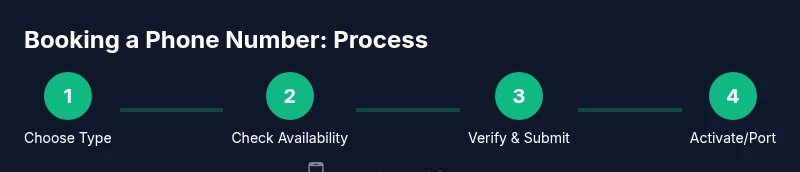
A typical booking workflow looks like this: (1) Decide the number type and provider; (2) Check number availability and pricing; (3) Gather required documents; (4) Submit the booking or port request; (5) Complete identity verification; (6) Receive confirmation and set up the number; (7) Test the line and adjust routing; (8) Secure the account with privacy controls. Timelines vary, but being prepared often reduces processing time and improves success rates.
Porting vs new number: decisions to make
Porting saves you the trouble of contacting contacts and changing everyone’s records, but it requires coordination with your current provider and potential downtime. Getting a new number can be simpler if you’re starting fresh, especially for business lines with brand-aligned numbers. When deciding, weigh the importance of continuity, branding, and customer experience against potential porting fees and setup time. If you already own a number, porting is usually worth the effort for consistency.
Privacy, security, and best practices
Booking a number involves sharing personal data, so prioritize providers with strong security practices. Enable two-factor authentication, monitor usage, and review privacy settings for call routing and data sharing. Keep your account credentials separate from other services and update passwords regularly. If you’re handling business lines, establish clear access controls to limit who can initiate changes or port numbers. These steps reduce the risk of unauthorized changes and protect your information during the booking process.
Authority sources
For official guidance on number portability and consumer protections, review sources like the FCC and NIST. These organizations provide high-level information about how numbers are assigned, how portability works, and security considerations while interacting with telecom providers. Always verify that the provider’s policies align with public guidance and your privacy expectations.
Tools & Materials
- Reliable internet-connected device(Laptop, smartphone, or tablet with an up-to-date browser)
- Government-issued ID(Passport or driver’s license; ensure name matches provider records)
- Proof of address(Utility bill or bank statement if requested by provider)
- Payment method(Credit/debit card or other accepted method)
- Business documents (if booking for a business line)(Articles of incorporation, tax ID, or business registration)
- Porting authorization details(Porting PIN or authorization code from current provider)
- Existing number details (if porting)(Current carrier account number and statement)
Steps
Estimated time: 30-90 minutes
- 1
Decide the number type
Choose between local/mobile, toll-free, landline, or virtual numbers. Consider geography, branding, anticipated call volume, and whether you may port later.
Tip: Map your goals: local presence vs. broad reach; this guides the rest of the process. - 2
Choose a provider (carrier or VoIP)
Compare availability, portability, fees, and support. Evaluate whether a traditional carrier, MVNO, or virtual provider best fits your needs.
Tip: Ask about porting windows and any hidden fees before committing. - 3
Gather required documents
Collect ID, proof of address, and any business documents. If porting, obtain your current carrier’s porting code and account details.
Tip: Have documents scanned or ready in a single folder to speed verification. - 4
Check number availability and pricing
Confirm the specific numbers you want are available and review any activation or monthly costs. Price ranges vary by type and provider.
Tip: Seek a clear quote with all recurring and one-off charges itemized. - 5
Submit booking or port request
Fill the provider’s form with accurate details and attach required documents. Double-check spellings and number sequences to prevent delays.
Tip: Submit during business hours to expedite verification checks. - 6
Complete verification and onboarding
Respond promptly to verification requests. Complete any security checks and set up account access and routing options.
Tip: Use a secure network and enable alerts for unusual account activity. - 7
Activate or port your number
If porting, monitor the transition and confirm service continuity. If activating a new number, configure voicemail, call routing, and SMS settings.
Tip: Test inbound/outbound calls and text messages before closing the old line. - 8
Secure your number and set privacy controls
Enable two-factor authentication, review privacy settings, and limit who can modify routing or port the number in your account.
Tip: Document recovery options and keep backup codes in a secure place.
Got Questions?
What is phone number booking?
Phone number booking is the process of reserving or porting a number to a new service, whether for personal use or business. It involves selecting a number type, providing verification, and completing the provider’s application.
Booking a number means reserving or moving it to a new service, with steps to verify your identity and complete the provider’s form.
What documents do I need?
Most providers require government-issued ID and proof of address. For business lines, additional corporate documents may be requested. If porting, you’ll also need your current provider’s porting information.
You’ll typically need ID and address proof, plus business docs if it’s for work. Porting requires codes from the current provider.
Can I port an existing number?
Yes. Porting transfers your current number to a new provider. You’ll need the account number, porting code, and authorization from the current carrier, along with any required onboarding steps from the new provider.
Porting moves your number to a new provider, with codes and permission from your current one.
How long does the booking/porting process take?
Timing varies by provider and number type. It can range from a few hours to several days, depending on verification, carrier coordination, and portability.
Times vary; expect hours to days depending on verification and porting.
Are there privacy risks with booking a number?
Booking involves sharing personal data with providers. Use trusted providers, enable two-factor authentication, and review privacy settings to minimize exposure.
There are privacy risks if you share too much; choose trusted providers and enable security features.
Do I have to pay to book or port a number?
Most providers charge activation or porting fees, and monthly costs vary by plan. Request a clear, itemized quote before proceeding.
Fees vary; expect activation and porting charges plus monthly plan costs.
Watch Video
What to Remember
- Define number type and provider early.
- Prepare documents to speed verification.
- Porting can minimize disruption if planned carefully.
- Protect privacy with strong credentials and controls.