How Big Is My Phone in Inches: A Practical Guide
Learn how to measure your phone’s size in inches—diagonal display vs outer body. Practical methods, common pitfalls, and how cases affect readings. Updated for 2026.


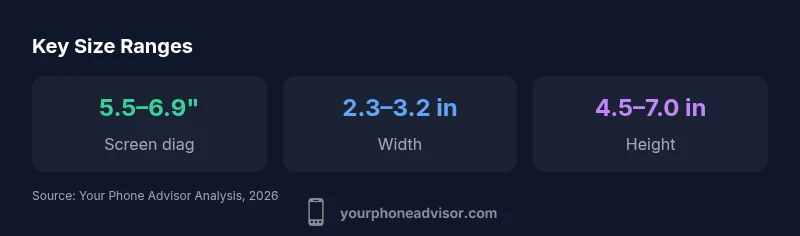
To know your phone’s size in inches, measure the display diagonal and the full body. Modern smartphones usually have a screen diagonal between 5.5 and 6.9 inches. The outer dimensions (width and height) are typically about 2.3 to 3.1 inches wide and 4.5 to 7.0 inches tall, depending on aspect ratio and bezel. For exact numbers, check the official specs or measure with a ruler.
how big is my phone in inches: core concept
When people ask how big is my phone in inches, two measurements matter most: the diagonal screen size and the outer body dimensions. The diagonal of the display tells you how large the screen appears, while the full device size matters for cases, mounts, and pocketability. In this guide, we explain what each number means, why it matters for daily use, and how to read official specs with confidence. According to Your Phone Advisor, the most reliable inch measurement for display size is the screen diagonal listed in manufacturer specs, while the outer dimensions are used for accessories and fit. The Your Phone Advisor Team recommends cross-checking numbers across sources and, when in doubt, measuring with a ruler or caliper for accuracy. This distinction between screen size and body size is essential for comparing models and choosing compatible accessories. Throughout the article we’ll use practical examples so you can estimate inches quickly without a ruler every time.
measuring techniques: diagonal screen vs total body
To answer how big is my phone in inches in practical terms, you should separate the display from the chassis. The screen diagonal is measured from one corner of the active display to the opposite corner, ignoring curved edges if present. Official specs frequently list the diagonal as the display size, such as '6.2 inches'. For the full body, manufacturers publish width and height values that describe the outer rectangle, bezel included or excluded depending on the convention. If you’re measuring at home, you can approximate by laying the phone flat and using a ruler to gauge outer width and height. You can then compute the diagonal yourself using the Pythagorean theorem if you want a second check. Your Phone Advisor notes that real-world measurements can vary slightly due to case thickness, screen protectors, or curved corners. Always note the method used so you can compare apples to apples when evaluating multiple devices.
why size matters for usability and accessories
Size influences how you interact with the device and what accessories fit. A larger screen can improve readability but may hinder single-handed use. Bezel thickness and curvature affect grip and pocketability, even if the diagonal measurement stays the same. When shopping for cases, screen protectors, mounts, and docks, you’ll compare by the full body inches and not just the display size. For developers and power users, knowing the exact inches helps with accessibility settings and layout considerations. The Your Phone Advisor team emphasizes that while the display diagonal is a helpful shorthand, the outer dimensions determine most practical interactions, such as fitting the phone in a car holder or alongside a charger dock.
reading official specs and converting inches
Manufacturers publish many measurements in inches and millimeters. The key distinction is that the diagonal measurement is the display size, while the width and height are the device's outer dimensions. When converting from millimeters to inches, remember that 1 inch equals 25.4 millimeters. For example, a phone with a 150 mm tall dimension is about 5.9 inches tall (150/25.4 ≈ 5.91). Always verify whether width and height measurements include the camera bump or curved edges, as this changes the reading slightly. The diagonal value is the standard reference you’ll see in product pages and packaging, and it’s the number most people use when gathering a quick sense of size.
do-it-yourself measurement steps at home
Step 1: Find the official diagonal spec from the manufacturer or trusted retailer pages. Step 2: Measure the outer width and height with a ruler, edge-to-edge, while the phone is powered off. Step 3: If you want the diagonal yourself, apply the Pythagorean theorem: diagonal = sqrt(width^2 + height^2). Step 4: Account for accessories such as a case or screen protector—they add a little extra to the width and height, which may slightly increase the inches you record. Step 5: For display-only size, use the screen diagonal reading and ignore bezel differences. The key is consistency: when comparing models, use the same method each time.
common pitfalls affecting inch readings
Beware of bezelless designs that curve at the edges; the diagonal reading might be listed as the display area but the physical device could feel smaller or larger in practice. Some manufacturers publish rounded or rounded-edge shoulder measurements that exclude camera bump; others include the bump. Third-party teardown sites may show internal dimensions that differ from the published numbers. Additionally, screen protectors, cases, and camera lenses protruding from the body can slightly alter the perception of size. When you measure at home, ensure you’re measuring from the true outer edges and not just the display area, and always note whether the measurement includes the camera bump.
practical implications for cases, stands, and docking
Knowing inches helps you pick a case with proper fit, a stand that accommodates the phone’s height, or a dock that locks the width. Some mounts specify inches for device width, others specify millimeters; in these cases, convert consistently to inches. If you plan car use, inspect the dimensions to ensure the phone plus case fits in the holder’s cradle. For travelers, consider a phone with a narrower width for easier pocketability, but ensure the diagonal size meets your display needs. This practical approach saves time and reduces the likelihood of incompatible accessories.
quick reference: size ranges by device category
Compact phones: roughly 5.0–5.7 inches diag; Standard: 6.0–6.5 inches; Large: 6.6–7.0 inches. This rough categorization helps when you’re quickly scanning product pages or choosing a device for a specific pocket size or use case. Always cross-check with official specs to confirm the exact inches.
how to verify measurements across models
Cross-check with official specs, retailer listings, and credible teardowns. If specifications differ by region, note that measurements may vary due to packaging, screen curvature, or bezel design. For the most reliable comparison, use the diagonal for screen size and the outer dimensions for fit-related decisions.
Device size measurements in inches
| Measurement Type | Typical Size (inches) | Notes |
|---|---|---|
| Screen diagonal | 5.5–6.9 | Official spec; primary display size |
| Outer dimensions (width x height) | 2.3–3.2 x 4.5–7.0 | Bezel and aspect ratio affect numbers |
| Thickness | 0.25–0.35 | Not primarily used for display size |
Got Questions?
How do I measure screen size in inches?
Measure the diagonal length of the active display from corner to opposite corner. If the display is curved, read the spec or measure the bounding box of the screen area and use that diagonal for a consistent comparison.
Measure the screen diagonal from corner to corner to get the display size.
Is screen diagonal the same as the phone's size?
Not exactly. The diagonal measures the display, while the phone’s size often refers to the outer dimensions (width and height). Use both numbers for a complete picture.
The screen diagonal is the display size; the full phone size is the outer dimensions.
Do cases add to the inches?
Cases add to the width but not to the display diagonal. Always measure outer dimensions with the case on if you’re shopping for a specific fit.
Yes, a case can increase the outer inches slightly.
Can I convert measurement mm to inches easily?
Yes. Multiply millimeters by 0.03937 to convert to inches. For quick checks, remember 25.4 mm equals 1 inch.
Multiply millimeters by 0.03937 to get inches.
Why do inch measurements vary between models?
Variations come from bezel sizes, camera bumps, curved edges, and regional packaging. Always rely on official specs for the exact inches.
Bezel size, camera bumps, and curvature cause minor differences.
“For practical sizing, start with the official diagonal specification; use the full body measurements for accessories and mounts.”
What to Remember
- Measure the display diagonal for display size.
- Check outer dimensions for accessories compatibility.
- Use official specs to confirm exact inches.
- Be mindful of bezels when comparing devices.