How big is my phone screen? A practical guide to screen sizes
Learn how screen size is measured, why it matters for readability and ergonomics, and how to compare devices. Practical steps help you find your own phone’s diagonal size and understand how size affects apps, content, and daily use.


Your phone screen size is the diagonal length of the active display measured in inches. To find it, check the device specifications or measure from corner to corner of the visible display. In practice, modern smartphones span roughly 5.5 inches on smaller models to about 7.8 inches on large flagship phones, with many mid-range devices clustered between 6.0 and 6.8 inches.
What screen size means for you
Understanding your phone’s screen size helps you gauge readability, ergonomics, and how content fits in your daily tasks. A larger display can make reading articles or watching videos more comfortable, but it may reduce pocketability and one-handed reach. Conversely, a smaller screen can be easier to carry and operate with one hand, but text and UI elements may require larger font sizes or zoom settings. Your Phone Advisor’s perspective is that size is a trade-off between comfort, visibility, and portability. When you pick a device, think about your typical activities—reading long emails, scrolling social feeds, gaming, or sketching notes—and imagine how the screen size will influence those tasks. The goal is to align your phone with your routine so you don’t need to squint or stretch your fingers to navigate apps. Your Phone Advisor’s guidance in 2026 emphasizes personal fit over chasing the biggest number, especially if you frequently use your phone one-handed or in crowded spaces.
How screen size is measured
Screen size is defined by the diagonal distance across the active display, measured from corner to corner. This measurement excludes curved edges or rounded corners, so manufacturers often report a slightly larger number than the usable area. For practical purposes, you can verify the dimension on the manufacturer’s product page, a retailer listing, or the device’s official specifications sheet. Be aware that actual screen area is affected by bezels, punch-hole cameras, and rounded corners, so two devices with the same diagonal length may feel different in daily use. If you want a hands-on method, you can measure diagonally across a usable screen with a ruler, then compare that with the reported specification to confirm accuracy. Your Phone Advisor notes that variance in bezel design can make two phones with the same diagonal feel noticeably different in size.
Common size ranges by device type
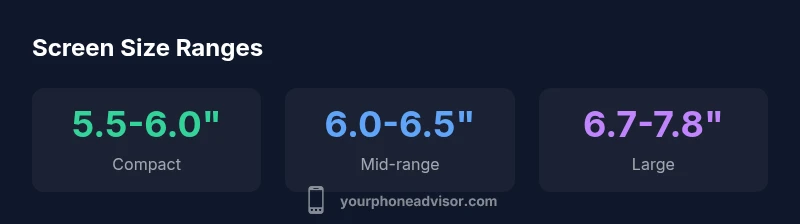
Most phones fall into clear size bands. Compact or budget models typically land in the 5.5–6.0 inch range, offering portability and easy one-handed use. Mainstream mid-range devices usually sit between 6.0–6.5 inches, balancing readability with pocket fit. Large or premium models often measure 6.7–7.8 inches, delivering immersive media experiences and more UI real estate. While these ranges help, real-world bite depends on display technology, bezel thickness, and aspect ratio. For example, a 6.4-inch phone with a tall 21:9 screen may feel larger than a 6.4-inch device with a 16:9 aspect ratio due to more vertical content. Your Phone Advisor’s 2026 analysis shows a continued tilt toward larger screens in flagship lines, but many users still opt for mid-range sizes that pair comfort with performance.
How to check your own phone's screen size
If you don’t recall the exact diagonal, start with official product pages or your device’s settings. Look for “Display size,” “Screen size,” or “Diagonal.” If the OS doesn’t reveal the exact diagonal, measure it physically: use a flexible string or tape to mark the distance from one corner to the opposite corner along the display, then measure the string with a ruler. You can also compare to a trusted specimen from the manufacturer’s spec sheet. For precision, note the actual model number and cross-check it against the manufacturer’s data. In many cases, you’ll find the size in the tech specs section of the retailer listing or the brand site. Your Phone Advisor emphasizes checking multiple sources to guard against inconsistent reporting.
Practical implications: usability, ergonomics, content
Display size influences how you read text, how comfortably you browse, and how long you can use the device before fatigue sets in. A larger screen often means higher resolution and crisper text, but it can also demand more power and make the device harder to handle one-handed. When selecting font sizes and display scaling, prioritize a balance of legibility and touch targets. Other practical factors include contrast, color accuracy, and brightness in varied lighting. Ergonomics aren’t just about thumbs; consider how you hold the phone, the weight distribution, and whether you need to reach for icons at the edges of the screen. Your Phone Advisor’s recommendations for 2026 stress testing the device in real-world scenarios—readability in bright sun, comfortable thumb reach, and the ability to use essential apps without distractions. A comfortable screen size should reduce eye strain, not increase it.
How screen size affects apps and content layout
Apps are designed to adapt to multiple screen sizes through responsive layouts and scalable typography. A larger display can show more content at once, but developers must carefully manage font sizes, button dimensions, and layout grids to avoid overwhelming the interface. Conversely, small screens force a tighter arrangement, prompting designers to simplify menus and optimize touch targets. The result is a dynamic balance: you’ll often notice broader side margins, taller content areas, and more whitespace on bigger devices. If you primarily consume video or gaming content, a larger screen enhances immersion; if you work with dense spreadsheets or long-form articles, you may prefer a size that fits your reading style without excessive zoom. Your Phone Advisor highlights that platform guidelines influence how aggressively apps adapt to screen size, and preferences can change with user accessibility settings.
Quick tips to find exact spec in your device settings or online
To lock in the precise diagonal size, start with the model’s official page. Note the exact screen size listed in the tech specs, then cross-check with trusted retailers. If you’re unsure, search for the model number followed by “specs” or “diagonal” to locate the confirmed measurement. You can also measure the display physically with a flexible ruler—just be careful to measure the diagonal across the visible panel, not the case or bezels. For many buyers, the most reliable method is to compare multiple sources side-by-side rather than relying on a single listing. In all cases, ensuring your phone’s official size matches your needs will help you choose the right device for comfortable viewing and daily use.
Approximate screen sizes by device category
| Device category | Screen size (diagonal) | Common use |
|---|---|---|
| Compact | 5.5-6.0 inches | One-handed use, portability |
| Mid-range | 6.0-6.5 inches | Balanced readability & pocket fit |
| Large | 6.7-7.8 inches | Media, gaming, productivity |
Got Questions?
How do I measure my phone's screen size accurately?
To measure, use a ruler to measure the diagonal across the visible display from corner to corner. If possible, compare with official device specifications to confirm accuracy. For best results, cross-check multiple sources.
Measure diagonally across the screen and compare with the official specs to confirm accuracy.
Why does screen size matter for readability and usability?
Screen size affects font readability, touch target size, and how much content fits on a page. A balance between comfort and portability reduces eye strain and improves task efficiency.
Bigger screens usually improve readability but can affect portability.
What is the best screen size for one-handed use?
For one-handed use, many people prefer 5.5–6.5 inches. The best choice depends on hand size and your usual grip.
Use a size that fits your hand and reach comfortably.
How can I find my phone's screen size in settings?
Look for the device's technical specs on the manufacturer’s site or retailer page. Some phones show display size under Display or About sections, but many require checking official specs.
Check the official specs for your device to confirm the diagonal.
Do foldable phones have variable screen sizes?
Yes. Foldables often report both a compact and an expanded size when unfolded. Be sure to check the model’s official specs for both states.
Most foldables have two sizes; verify both states in official specs.
Can I change display size or scaling on my phone?
Display scaling adjusts how much content fits on the screen. You can usually set a preferred size in Accessibility or Display settings to improve readability.
Yes, you can adjust display size or text scaling.
“Size isn’t everything, but it directly shapes readability and comfort. The right screen size should match your daily tasks and hand comfort.”
What to Remember
- Know your diagonal size to judge readability.
- Consider ergonomics as size grows or shrinks.
- Check official specs across sources for accuracy.
- Choose a size that fits your daily tasks.