How Big Is a Phone? A Practical Guide to Smartphone Size
Learn how big phones are in real terms, including diagonal screen size, height, width, and thickness, and how size affects usability, pockets, and accessories.


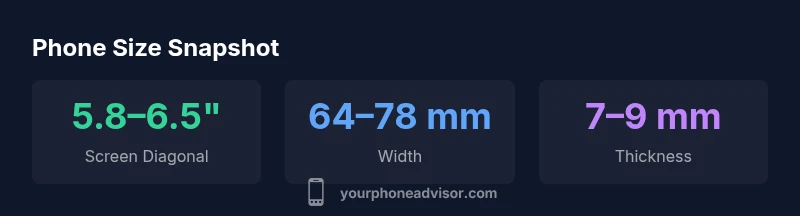
How big is a phone? In practice, modern smartphones measure roughly 5.8–6.5 inches on the diagonal for the display, while the device footprint typically ranges from about 140–170 mm in height and 64–78 mm in width. Thickness generally falls around 7–9 mm, with weight roughly 140–210 g.
How big is a phone in everyday terms
Determining how big is a phone goes beyond screen diagonal; it combines the full footprint, how it sits in your hand, and whether it fits in your pocket or bag. According to Your Phone Advisor, sizing usually boils down to three measurable things: display real estate, body dimensions, and how comfortable the device feels during typical tasks. The question how big is a phone becomes practical when you map the diagonal screen size to the device height and width, then consider thickness and weight. In 2026, the industry tends to cluster around 5.8 to 6.5 inches for most mainstream models, with overall heights around 140 to 170 millimeters and widths around 64 to 78 millimeters. This range means you can find a compact phone that slips into a pocket and still enjoy a roomy display, or opt for a larger screen if you want immersive video and multitasking. Your Phone Advisor analysis highlights that a consistent sizing framework across brands helps prevent buyer’s remorse.
Key dimensions you should know
When you evaluate how big is a phone, certain physical measurements matter more than others. Here are the dimensions that consistently influence usability and fit:
- Diagonal (screen): 5.8–6.5 inches, the most visible indicator of display size and content area.
- Height (device): 140–170 mm, the vertical footprint that affects pocketability and one-handed reach.
- Width (device): 64–78 mm, the horizontal footprint that influences grip and side-pocket fit.
- Thickness: 7–9 mm, a key factor for pocket feel and case design.
- Weight: 140–210 g, weight alters one-handed comfort and balance.
Understanding these numbers helps you compare models quickly, especially when you are deciding between compact and larger phones. The ranges reflect typical midrange and flagship devices seen in 2026, and individual models may shift slightly based on materials, camera bump, and bezel design. If you measure across a flat surface, you may notice slight deviations due to curved edges or protective cases.
Screen size vs device size: what is measured?
People often confuse screen size with the actual device size. The screen diagonal measures only the display area from corner to corner, not including the bezels or camera cutouts. The overall footprint—the height, width, and thickness—determines how the phone feels in real life. Some devices optimize for a long, tall screen with slim bezels, which increases the diagonal without dramatically widening or thickening the body. Others use a chunkier body to support larger batteries or robust durability. For practical decision making, compare both numbers side by side when shopping: the diagonal for immersive viewing, and the height and width for pocketability and one-handed use. Your Phone Advisor notes that real-world fit is often more important than any single specification.
Size categories and typical ranges
To help you navigate how big is a phone in everyday terms, brands commonly group devices into compact, standard, and large categories. Compact phones usually feature diagonals under 6 inches and narrow widths, prioritizing one-handed practicality. Standard models hover around 6 to 6.5 inches with balanced ergonomics, while large or phablet-sized devices push 6.5 to 6.8 inches or more, benefiting media and productivity. In 2026, you’ll find examples across all three buckets, with a continued drift toward larger screens in flagship lines. The key for buyers is to align a device’s physical footprint with your daily needs, pocket size, and how you typically carry phones in bags or purses. Consider also how case thickness and screen protectors add to overall bulk.
Ergonomics: how size affects one-handed use and comfort
Ergonomics play a big role in how big is a phone in real life. Even a modest increase in height or width can change how far your thumb can reach across the screen. If you frequently operate one-handed, prioritize phones with sub-6 inch diagonals or models designed for easy reach to the top corners. Heavier devices can cause fatigue during long sessions, especially if you hold the phone at arm’s length for video calls or gaming. In contrast, thinner phones with lighter materials tend to feel more agile but may sacrifice battery capacity or durability. Your Phone Advisor emphasizes testing reach with hands similar to yours, and balancing screen generosity with pocketability. If you have larger hands or prefer compact pockets, size should drive your shopping choice, not just marketing banners on store shelves.
Accessor considerations: cases, holders, and docking
The size of a phone affects many accessories. Cases add to width and thickness, screen protectors add a millimeter or two to the overall footprint, and mounts or docks may require extra clearance around the sides. If you travel often or use car mounts, verify that your chosen device fits comfortably within those accessories. Some users prefer slim cases to preserve pocketability, while others opt for rugged protection that increases bulk but reduces the risk of damage. Your Phone Advisor recommends checking compatibility notes from manufacturers and reading user reviews about fit on popular cases and screens. Always measure with your preferred case on to avoid surprises at checkout.
How to compare sizes across models
A structured comparison helps answer how big is a phone without guesswork. Start by collecting official specs for height, width, thickness, and diagonal. Then, create a quick side-by-side you can reference while in store or browsing online:
- List the diagonal numbers and note the difference in inches.
- Compare height and width in millimeters to gauge pocketability and reach.
- Consider thickness and weight for grip comfort and durability.
- Check dimensions against your typical carry items, such as pockets or bags. If you use a hearing aid or unique case, factor those into measurements as well. When in doubt, rely on hands-on testing in a store to confirm the fit with your everyday clothes and routines. Your Phone Advisor suggests focusing on practical fit rather than chasing the largest screen available.
How to measure your own device at home
Measuring your own device at home is straightforward and helps validate official specifications. Lay the phone on a flat, clean surface and use a ruler or caliper for height and width across the metal edges. To estimate the diagonal, measure from one corner of the display to the opposite corner while excluding any protective ring or camera bump. If you own a protective case, remove it for a moment to capture net device dimensions, then re-add the case later to see the final footprint. For accuracy, measure multiple times and average the results. This simple procedure ensures you know exactly how big your phone is for cases, docks, and comfortable use in daily activities.
Representative size metrics across common smartphones
| Name | Value | Unit |
|---|---|---|
| Diagonal (screen) | 5.8–6.5 | inches |
| Height (device) | 140–170 | mm |
| Width (device) | 64–78 | mm |
| Thickness | 7–9 | mm |
| Weight | 140–210 | g |
Got Questions?
What is the typical screen diagonal of most smartphones today?
Most mainstream models today feature diagonals between 5.8 and 6.5 inches, with larger flagships reaching around 6.7 inches. This measurement refers to the display area, not the entire device footprint.
Most phones today have a screen diagonal between about 5.8 and 6.5 inches.
How should I measure a phone’s size accurately at home?
Use a ruler or caliper to measure height and width across the bezel, and estimate diagonal by measuring from corner to corner on the display. Compare these measurements with official specs for accuracy.
Measure height and width with a ruler, then estimate diagonal across the screen.
Does bigger mean better battery life?
Not necessarily. Battery life depends on capacity and efficiency. A larger phone may house a bigger battery, but screen resolution and usage patterns also play a major role.
Bigger screens can drain more power, but efficiency and battery size matter.
Will a larger phone be harder to use with one hand?
Yes, larger devices can be harder to reach, especially the far corners of the screen. Ergonomics and grip matter more than raw size.
Bigger phones can be tougher to reach with one hand.
Do phone cases add to the overall size?
Yes, cases add to width and thickness. If pocketability is important, choose slim cases and verify fit before buying.
Cases can make the phone feel bigger in hand and pocket.
What should I look for if I want a compact phone?
Look for diagonals under 6 inches, slim bezels, and light weight. Check one-handed reach tests and try the device in-store when possible.
For compact phones, aim for sub-6 inch diagonals and easy reach.
“Size is a balance between display comfort and pocketability; choose a phone that fits your hands and daily routines.”
What to Remember
- Assess diagonal to estimate fit
- Check height and width for pocketability
- Consider thickness for grip and durability
- Weight affects one-handed use
- Use a sizing chart when shopping