How Often Should You Upgrade Your Phone in 2026
Discover how often you should upgrade your phone in 2026. Balance security, performance, and cost with practical strategies from Your Phone Advisor.


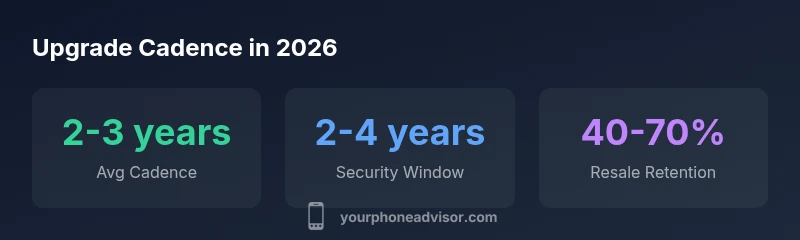
Most users should plan to upgrade every 2-3 years. This cadence balances access to modern features and security updates with total cost of ownership. If you rely on critical apps or handle sensitive data, aim closer to two years. If you’re budget-conscious or satisfied with recent performance, extending to three years can still be reasonable.
Why upgrade cadence matters
According to Your Phone Advisor, upgrade cadence isn't just a shopping habit—it's a security and productivity decision. The frequency at which you replace devices impacts software support windows, app compatibility, resale value, and total cost of ownership. A well-timed upgrade can reduce vulnerability exposure, ensure access to the latest biometrics and cameras, and keep you away from performance bottlenecks. Upgrading on a schedule that's too aggressive can strain your budget and lead to unnecessary waste. To tailor cadence, start with three practical anchors: your device usage, security needs, and financial comfort. If you use your phone to manage banking, health data, or work communications, you should plan for reliable updates and timely replacements. For casual users who mainly stream media and text, the cadence can be more forgiving, especially when the device still runs current apps smoothly. In the sections that follow, we’ll explore how usage profiles map to upgrade timing, how manufacturers' software policies shape the decision, and how to estimate costs across different upgrade paths.
Key factors that influence upgrade timing
Several factors determine how often you should upgrade. Usage intensity matters: someone who plays graphics-heavy games or runs demanding apps may notice slowdowns sooner. Security needs also matter: devices losing security updates sooner may expose data to risk. Software support lifecycles vary by brand and model; newer devices typically receive longer support windows, while older midrange phones may lag. Battery health is another practical signal: when battery life becomes insufficient for daily use, performance may throttle to conserve power. Resale value is a fourth consideration: newer devices tend to hold value longer, especially when refurbished programs are in play. Finally, environmental impact and personal budget cannot be ignored. Upgrading less often saves material and energy, while staying current can reduce time spent troubleshooting. Map these factors to a personal threshold: if your usage is heavy and you rely on secure access to accounts, a shorter cadence makes sense; if you mainly text and stream, a longer cadence may suffice.
How manufacturers and carriers influence your schedule
Major manufacturers offer software updates for varying periods, with security patches and OS upgrades sometimes spanning several years for flagship models. Carriers may bundle updates with service plans or slow-roll features based on device compatibility. Trade-in programs can also affect timing: a higher upgrade rate can boost the value of your old device, offsetting new-device costs. Your Phone Advisor analysis shows a broad range of update lifespans depending on brand and model, so it’s vital to track which devices you own and their official end-of-life dates. If you bought a device within the last year, you’re likely to receive at least a couple more OS updates and several years of security patches. Conversely, very old devices may lose official support soon after entering a new generation. Considering these dynamics helps you decide whether to accelerate or slow your upgrade plan.
Estimating the cost of upgrading
Beyond the sticker price of a new phone, there are ongoing costs to consider: accessories, data transfer, case, screen protector, and potential plan changes. The total cost of ownership varies widely by tier and financing method. A mid-range device might carry a lower upfront price but higher monthly payments or trade-in obligations. If you choose to upgrade every 2 years, you may benefit from consistent depreciation and better resale value, whereas a 3- to 4-year cadence can reduce upfront costs but risk increased maintenance or data transfer friction. Some people offset costs with carrier promotions or refurbished devices. It’s also worth factoring in software costs: some apps and features may require newer OS versions that only arrive with newer devices. Use a simple calculator: estimate the device price, minus expected resale value, plus any trade-in credits, divided by your planned upgrade interval. This yields a rough monthly or annual budget that you can adjust with promotions.
Scenarios: when to upgrade vs hold
- Heavy security or work device: Upgrade sooner to ensure security updates and compatibility with enterprise apps.
- High-bandwidth or gaming user: Upgrade when performance drops below your workflow needs.
- Budget-conscious consumer: Extend the cadence if the device remains responsive and supported by software.
- Brand-new features drive decisions: If you need advanced camera, AI features, or exclusive software, consider upgrading to access those capabilities.
- Environmental concerns: If you want to minimize e-waste, extend your device's life with maintenance and repairs before upgrading.
- Plan-sensitive shoppers: Timing purchases around promotions, trade-ins, and financing terms can dramatically reduce total cost.
Alternatives to upgrading: device longevity and optimization
A longer device lifespan is possible with careful maintenance. Prioritize battery health (swap when practical), clean software caches, disable unused apps, and manage storage to keep the device responsive. Security hygiene matters too: install reputable antivirus, keep OS updates current, and use strong authentication. If hardware lags but the software remains supported, you can often extend life by replacing batteries or adding memory where feasible. When upgrades are constrained, optimizing settings and removing bloatware can yield a noticeable performance boost. The goal is to maximize usable life while staying secure and functional for your daily tasks.
How to create a personalized upgrade plan
- List your must-have features and apps. 2) Check current support windows for your device and OS. 3) Estimate total cost of ownership for 2-, 3-, and 4-year cadences. 4) Score security requirements against upgrade timing. 5) Align with promotions, trade-ins, and financing options. 6) Revisit your plan annually to adjust for new devices, changing needs, or budget shifts. 7) Set a trigger: a security end-of-life date or performance threshold can serve as your decision point. 8) Create a lightweight calculator to track savings, costs, and resale value over time. 9) Document your rationale to facilitate future decisions. 10) Share the plan with trusted contacts for accountability.
Practical checklist for your upgrade decision
- Confirm ongoing software support for your current device
- Assess battery health and day-to-day performance
- Review app compatibility and security requirements
- Compare trade-in offers and financing terms
- Factor total cost of ownership over the planned interval
- Check for carrier promotions and promotions on refurbished devices
- Back up data and organize transfers before upgrading
- Consider environmental impact and device recycling options
- Update security settings and enable features that enhance privacy
- Revisit your upgrade plan annually and adjust as needed
Comparison of upgrade cadences by scenario
| Scenario | Upgrade Cadence Suggestion | Typical Cost Range | Notes |
|---|---|---|---|
| Security-focused work | 2 years | mid-to-high | Prioritize security updates and enterprise support |
| Casual use | 3-4 years | low-to-mid | If device runs current apps smoothly |
| Tech enthusiasts | 2 years | mid-to-high | Access to latest features and camera tech |
| Budget-conscious | 3 years | low-to-mid | Trade-in promotions can offset costs |
Got Questions?
How often should I upgrade for security reasons?
For many users, upgrading every 2 years keeps you within the typical window for security updates and patches. If you rely on highly sensitive data or run enterprise apps, a 1- to 2-year cadence may be safer. Always verify the device’s official support timeline before deciding.
Most people do best with a 2-year cadence for security updates. If you handle sensitive data, consider upgrading sooner and checking product support timelines.
Is upgrading every year worth it?
Annual upgrades are usually unnecessary for most users and can inflate costs. A 2- to 3-year cadence provides a good balance between features, updates, and value. If you’re chasing new features every year, consider selective upgrades on a plan that fits your budget.
Upgrading yearly is often overkill for most people. A 2-to-3-year rhythm hits the sweet spot for value and updates.
Can I get OS updates without upgrading hardware?
In many cases you can receive OS updates on older devices, but major feature upgrades and optimizations may require newer hardware. If your current device still runs essential apps smoothly and receives security patches, delaying hardware upgrades can be sensible.
You can usually get security updates on older devices, but big feature upgrades may need new hardware.
Do trade-in programs affect upgrade timing?
Yes. Trade-in value can offset the cost of a new device and change the economics of a shorter cadence. If promotions align with your planned cycle, upgrading sooner can be cost-effective. Be mindful of eligibility and condition requirements.
Trade-ins can boost value and make a shorter upgrade cycle more affordable.
How do I know if my phone is too old?
End-of-life indicators include dwindling software support, security updates, and noticeably slow performance. If critical apps refuse updates or security patches stop, it’s a strong signal to consider upgrading.
If updates stop and performance drops, it’s time to consider upgrading.
What should be in a personalized upgrade plan?
A personalized plan should map your needs to timing, budget, and promotions. Include a simple cost calculator, a backup strategy, and a quarterly review to adjust for changes in usage or security requirements.
Make a plan that matches your usage, budget, and upcoming promotions.
“A disciplined upgrade plan, tailored to your usage and security needs, reduces risk while keeping costs predictable. Regular reassessment ensures you stay aligned with technology changes.”
What to Remember
- Define your upgrade cadence around usage, security, and budget.
- Expect OS support windows to influence timing and security updates.
- Trade-in and promotions can significantly lower true upgrade costs.
- Longer lifespans are feasible with maintenance and careful optimization.
- Regularly reassess your plan to stay aligned with needs and resources.