Can You Use Your Phone While Charging? A Practical Guide
Learn whether you can safely use your phone while it charges, how heat and battery health are affected, and best practices to protect your device with Your Phone Advisor.


Yes. You can use your phone while it charges in most cases, but heat and charging speed matter. This guide from Your Phone Advisor explains when it’s safe, how to minimize heat, and best practices to protect battery health while multitasking on a charging device. If you wonder can you use phone while charging, the answer is yes with proper precautions.
Can you use your phone while charging? Safety basics
Yes, you can generally use your phone while it charges, but heat and charger quality are the main factors to manage. According to Your Phone Advisor, modern devices include safety protections that throttle performance or adjust charging if temperatures rise too high. The core idea is simple: use a certified charger, keep the device in a well-ventilated space, and avoid covering it with fabric or a heavy case while charging. If you’re asking can you use phone while charging, frame it around safety: monitor temperature, minimize intensive tasks, and stop if you notice excessive warmth. For many people, light tasks like messaging or streaming at a moderate volume won’t significantly harm the battery, but sustained heavy use during charging is less ideal for long-term health.
How charging tech supports multitasking
Charging technology has evolved to support safer multitasking. USB-C Power Delivery and similar fast-charging standards negotiate power to the device, so you can use the phone while it charges without overwhelming the battery. Battery-management systems throttle performance when heat climbs, and many phones offer optimized charging to reduce long-term wear. The takeaway is that you don’t have to disconnect to stay productive, but you should respect the device’s heat cues and charging profile. If you’re curious, monitor the temperature sensor and avoid heavy gaming or resource-intensive apps while the battery is already warming up.
Real-world scenarios and safety tips
In daily life, people often use their phones while charging in cars, at desks, or during commutes. Practical tips include using a stable surface, avoiding tight pockets or blanket coverage, and keeping the charging area free from flammable materials. For video calls, navigation, or email checking, prefer lighter tasks when the device is charging. If you notice the back of the phone or the charger getting uncomfortably hot, pause usage, unplug, and allow cooldown time. Your Phone Advisor recommends using either the original charger or a certified replacement that matches your device’s specifications.
Choosing charging gear and setup to reduce risk
To minimize risk while multitasking on a charging device, choose quality gear. Use the charger and cable that came with the phone or a certified equivalent, avoid ultra-cheap third-party cables, and ensure the cable isn’t frayed. Place the device on a hard, stable surface with ample airflow and keep vents clear. If you use a case, prefer a lighter, heat-dissipating design, or temporarily remove the case while charging. A small investment in proper hardware reduces heat buildup and prolongs battery life over time.
How to minimize battery wear when using phone while charging
Battery wear is gradual and influenced by heat, charging rate, and how often you reach 100%. Enable built-in protections like Optimized Battery Charging (iPhone) or Adaptive Battery/Smart Charging (Android) when available. These features slow the charging rate as the battery approaches full capacity, reducing heat exposure. During charging, try to limit heavy gaming or graphic-intensive tasks, keep brightness moderate, and avoid charging in direct sunlight. Regularly check for software updates that optimize battery management and safety.
Troubleshooting common issues
If you notice persistent heat, slow charging, or the device shuts down while charging, investigate the basics first. Check the charging brick and cable for wear, unplug and test with a different certified charger, and inspect the charging port for debris. Ensure the wall outlet is stable and doesn’t cause voltage fluctuations. If the issue persists, disable resource-heavy apps temporarily and observe whether temperature remains elevated. These steps help determine whether the problem is with the charger, the cable, or the device itself.
Practical tips for wired vs wireless charging
Wired charging typically offers faster, more consistent power and may run cooler if using a high-quality charger. Wireless charging often generates more heat due to coil inefficiencies, especially with a bulky case. If you frequently use wireless charging, consider removing the case during charging and placing the phone on a dedicated pad with good airflow. Regardless of method, avoid charging on soft surfaces like beds or couches that trap heat, and place the charger on a non-slip, ventilated surface.
Tools & Materials
- Original or certified charging brick(Use the charger that came with the phone or a certified replacement (USB-C PD or Lightning) to ensure safe power delivery.)
- Quality USB-C or Lightning cable(Inspect for nicks, frayed insulation, or bent connectors; replacement if damaged.)
- Ventilated charging surface(Place on a hard, flat surface away from bedding or cushions to promote airflow.)
- Optional heat-management accessories(Small cooling pads or stands can help in very hot environments.)
Steps
Estimated time: 15-40 minutes
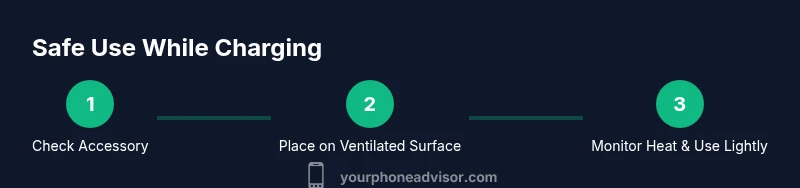
- 1
Check charger and cable
Inspect your charger and cable for damage and ensure they are certified for your device. Replace any worn parts before plugging in. This reduces the risk of overheating and ensures safe power delivery.
Tip: If the charger feels unusually warm during inspection, use a different certified charger. - 2
Place phone on a ventilated surface
Set the phone on a stable, hard surface with ample airflow. Avoid placing it on fabric, blankets, or paper that can trap heat.
Tip: Clear a few inches around the device to improve cooling. - 3
Start charging and begin light use
Plug in the device and start with light tasks like messaging or audio listening. Heavy gaming or video streaming can raise temperatures more quickly while charging.
Tip: If the temperature rises noticeably, pause demanding apps. - 4
Monitor temperature and adjust
Keep an eye on heat levels. If the back or charger feels hot to touch, momentarily stop using the phone and allow a cooldown.
Tip: Consider enabling battery saver or optimized charging features if available. - 5
Use optimized charging when available
Enable adaptive charging features that slow the final phase of charging to reduce heat and prolong battery life.
Tip: On iOS: Optimized Battery Charging; On Android: Adaptive Battery or similar setting. - 6
Unplug when the charge completes
Avoid keeping the device permanently on the charger after it reaches 100%. If you’ll be near a charger again later, it’s fine to reconnect.
Tip: Partial charging cycles can help extend overall battery health.
Got Questions?
Is it safe to use my phone while it is charging?
For most devices, light or moderate use while charging is safe. The main caveat is heat: if the phone or charger becomes uncomfortably hot, pause usage and let it cool. Always use certified accessories to minimize risk.
It's usually safe to use your phone while charging, but if it gets hot, stop using it and let it cool down.
Will using a phone while charging damage the battery?
Continuous heavy use during charging can increase heat and wear over time, potentially reducing long-term battery health. Modern phones include protections, and enabling built-in battery features helps mitigate this risk.
Heavy use while charging can contribute to wear, but built-in protections and proper charging habits help minimize the impact.
Does wireless charging affect multitasking differently than wired charging?
Wireless charging often generates more heat due to coil efficiency, which can make multitasking feel warmer. If you plan long sessions, wired charging with a certified charger may be cooler and more efficient.
Wireless charging can get warmer; wired charging is usually cooler and more efficient for long use.
What are signs my phone is overheating while charging?
Common signs are a hot back panel, rapid battery drain, slower charging, and the device feeling unusually warm during use. If you notice these, pause use, unplug, and allow cooling.
If the phone gets very hot, pause, unplug, and let it cool before continuing.
Should I avoid high-power games while charging?
Yes, high-power gaming increases heat and can stress the battery during charging. If you need to game, consider lowering graphics or pausing until the device cools.
High-power gaming while charging raises heat; reduce settings or pause to protect the battery.
What if I charge in a hot environment?
Charge in a cool, ventilated space whenever possible. If you must charge in a warmer area, monitor temperature closely and turn on battery-saving modes to reduce heat.
Charge in a cooler area when possible and use battery-saving modes if it’s warm.
Watch Video
What to Remember
- Use certified chargers to minimize risk.
- Monitor temperature and pause heavy tasks if heating rises.
- Enable device-specific battery protections to extend life.
- Prefer a ventilated surface and avoid soft bedding during charging.
- Choose wired charging for speed and stability when multitasking.