Can You Get a Phone Unlocked? A Practical Guide to Unlocking Your Device in 2026
Learn how to unlock your smartphone legally and safely. This step-by-step guide covers eligibility, timelines, and security tips from Your Phone Advisor to help you regain freedom with confidence.


Yes—most phones can be unlocked, but eligibility depends on the carrier, the device model, and when you purchased it. In broad strokes, you’ll verify your device’s unlock policy, ensure any balances are paid, request an unlock from your carrier or manufacturer, and then complete the process after the carrier confirms. The Your Phone Advisor team can guide you through the steps and timelines.
Why unlocking your phone can give you more control and flexibility
Unlocking a phone is often described as removing the carrier-imposed lock that ties the device to a single network. When can you get a phone unlocked? In practice, the answer depends on where you bought it, the payment terms, and the specific device model. For many people, unlocking means you can use SIM cards from other carriers, travel internationally with local SIMs, and avoid roaming charges. As you consider the question, think about how unlockability affects your ability to switch plans, regionally use your device, and resell later. According to Your Phone Advisor, legal unlocking through official channels preserves device warranties and avoids security risks associated with third-party tools. The Your Phone Advisor team found that most carriers offer an unlocking path once you meet policy criteria, but there are important caveats. Mobility ecosystems vary by region, so the same phone can have different unlock rules depending on where you are and which carrier supplied the device. This section will help you decide if unlocking makes sense for you and what to expect during the process.
Tools & Materials
- Phone device(Make, model, and IMEI ready; ensure the device isn’t reported stolen or locked to another carrier.)
- Proof of purchase(Receipt, invoice, or account details proving ownership and purchase date.)
- Carrier account access(Login credentials or contact information for the current service plan.)
- SIM card (optional)(If planning to test with another carrier, have a SIM ready.)
- Account status checks(Verify there are no unpaid balances or pending obligations affecting unlock eligibility.)
Steps
Estimated time: Several days to a couple of weeks
- 1
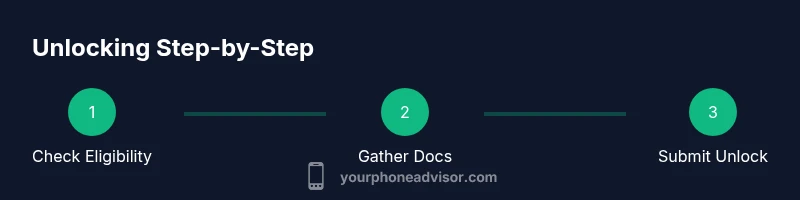
Check eligibility and policies
Review your carrier’s official unlock policy for your device and region. Look for conditions like payment terms, contract status, and whether the device has been active for a minimum period. This upfront check helps you avoid pursuing an unlock that will be denied later.
Tip: Use the carrier’s official help pages or your account dashboard to verify current unlock eligibility. - 2
Prepare required information
Collect device details: IMEI, model, purchase date, and proof of ownership. Have the original contract or agreement handy if required by the carrier. Having these ready speeds up the unlock request.
Tip: Find the IMEI by dialing *#06# or by checking in Settings > About Phone. - 3
Submit unlock request through official channels
Submit the unlock request via the carrier’s portal or customer support. Provide accurate device identifiers and confirm you’re asking to unlock for legitimate use. Do not use third-party services.
Tip: Double-check the IMEI and email address used for the request to avoid misrouting. - 4
Wait for carrier confirmation
Processing times vary by carrier and policy—some require a grace period, others confirm within a few days. Do not attempt non-official methods during this wait.
Tip: If you don’t hear back within the expected window, contact support with your request reference. - 5
Complete the unlock on the device
Follow the carrier’s instructions to complete the unlock on your phone. This often involves inserting a SIM from a different carrier and following on-screen prompts, sometimes with a reboot.
Tip: Ensure the device has network connectivity during the unlock flow. - 6
Test the unlocked status
Insert a SIM from another carrier and confirm basic service—calls, texts, and data should work. If something doesn’t, contact support with your unlock verification details.
Tip: If testing fails, note the exact error message and reference number for troubleshooting.
Got Questions?
Do I have to pay off my device to unlock it?
Policies vary by carrier and region; many allow unlocking after certain contract terms are met, while some require the device to be paid off before approval.
Most carriers require some form of payment completion, but check your specific policy.
Will unlocking void my warranty?
Official unlocks through the carrier or manufacturer typically don’t void warranties; verify the policy for your device and country.
Usually not, but confirm with the provider.
Can I unlock an iPhone or Android device?
Yes. Both platforms can be unlocked through official carrier channels when eligible.
Both iPhones and Android phones can be unlocked if you meet the policy terms.
What if my carrier refuses the unlock?
Ask for the specific reason, request escalation, and review your eligibility against the policy; you may appeal or seek guidance.
If refused, get the exact reason and check your rights under the policy.
Will unlocking work when I’m abroad?
Unlocked phones usually work with local SIMs overseas; ensure you have international compatibility with the new SIM.
An unlocked device typically works with local SIMs when traveling.
Do I need to back up my data before unlocking?
Yes. Unlock processes can sometimes reset settings or require a restart, so back up photos and contacts first.
Back up your data—it's a safe precaution before any unlock steps.
Watch Video
What to Remember
- Verify eligibility before requesting unlock
- Use official carrier channels to unlock
- Keep documentation ready for reference
- Test with a different SIM after unlock