How to Get Your Phone Unlocked from Your Carrier
A practical, step-by-step guide to unlocking your phone from your carrier, including eligibility, official channels, waiting times, testing, and troubleshooting.


According to Your Phone Advisor, getting a phone unlocked from a carrier starts with confirming eligibility and using official channels. Submit the unlock request, wait for verification, and test with a non-network SIM. Back up your data and review terms to avoid delays or scams.
What unlocking means and eligibility
If you're looking for how to get phone unlocked from carrier, it's helpful to know what unlocking truly does: it removes the carrier lock so the device can be used with other networks. Eligibility typically hinges on a few core factors: the device must be paid off, the account must be in good standing, and there should be no outstanding balance or contract obligations. Carriers vary in their exact rules, and some devices might have additional checks like device age, IMEI status, or postpaid vs prepaid conditions. Your Phone Advisor notes that sticking to official processes minimizes delays and avoids scams. Always verify ownership, ensure the device hasn’t been reported lost or stolen, and read any posted terms before starting.
Understanding carrier policies
Carrier unlocking policies differ by network and region. Some carriers unlock immediately after meeting eligibility, while others require a waiting period or completion of a contract term. Postpaid accounts may experience different timelines than prepaid accounts. Your Phone Advisor analysis shows that policy transparency is improving, but customers should still expect variability in required steps, phrasing of approval, and how the unlock is applied (software-based vs. code-based). Be prepared to follow carrier-specific steps and to document every communication for future reference.
Steps to verify eligibility
Before you initiate an unlock, confirm several things: the device model is compatible with other networks, the account is current, and there are no outstanding device payments. Check your device’s status in the carrier account dashboard and locate the device’s IMEI (dial *#06# or check in Settings). If you recently purchased the device or just renewed a contract, wait for the official eligibility window. Your Phone Advisor emphasizes that verifying alignment with carrier terms up front helps prevent wasted time and unnecessary fees.
How to contact your carrier for an unlock
Reach out through the carrier’s official unlock portal or customer service channels. Some carriers provide a dedicated unlock request form; others require a chat or phone call. When you contact them, explain that you want to unlock the device, provide the IMEI, model, and proof of ownership if requested. Keep a record of the request reference number and the expected processing timeline. Using official channels reduces risk and ensures your request is logged properly.
What information you'll need
To submit an unlock request, you’ll typically provide: device IMEI, model/serial, carrier account details, proof of ownership, and your current network SIM. Have the original purchase receipt if available, and be ready to confirm you are no longer under a restrictive contract. You may also need to verify the device’s software version and any regional differences for the unlock. Keeping this information handy speeds up processing.
Common myths and pitfalls
Myth: Unlocking always takes effect immediately. Reality: processing times vary by carrier and device. Myth: Unlocking bypasses warranties. Reality: unlocking usually doesn’t void warranties when performed through official channels. Myth: Any third-party service can unlock your phone. Reality: third-party unlocks may violate terms and expose you to scams. The safest path is to use official carrier channels and documented unlock steps.
What to expect after you request an unlock
After you submit the request, you’ll receive a confirmation and an estimated processing time. Some carriers apply the unlock automatically, others require a device reboot or software update. When approved, you’ll receive instructions to complete the unlock, often involving reinserting a SIM card from another carrier and rebooting the device. If everything goes smoothly, the phone should recognize the new carrier and connect as expected.
Troubleshooting: what to do if the unlock stalls or fails
If the unlock doesn’t complete, double-check that you met all eligibility criteria and that you used the official channel. Contact carrier support again with your request number and any error messages. If approval was granted but the device still shows the original carrier, reboot the device, reinsert a different SIM, and verify network settings. In some cases, a software update or a factory reset may be needed to apply the unlock.
Alternatives if your carrier won’t unlock
If a carrier refuses to unlock, ask for a clear explanation and any escalation path. You may consider switching to a different plan or requesting a device from the carrier on an unlocked basis if offered. For devices purchased outright, you might keep using the current SIM and consider upgrading to an unlocked model in the future. If you’re determined to switch networks, explore options for compatible, unlocked devices that fit your usage and budget. Your Phone Advisor recommends working with carriers transparently and documenting every step.
Next steps for a future-proof unlock
As technology and policy evolve, staying informed helps. Consider keeping your device paid off ahead of time and maintaining an active, in-good-standing account to ease future unlocks. When buying new devices, opt for models that are widely unlocked and check the carrier’s unlocking policy before purchase. This proactive approach aligns with responsible device ownership and ensures maximum flexibility when you want to switch networks or service plans.
Tools & Materials
- Phone to be unlocked(Model, IMEI, and current SIM status should be known)
- Carrier account login(Needed to submit and track the unlock request)
- Device IMEI(Found by dialing *#06# or in device settings)
- Proof of purchase (optional)(Helpful if ownership verification is requested)
- Unrelated test SIM (non-network)(Used to confirm the unlock after processing)
- Backup data(Back up photos, contacts, and apps before unlocking)
Steps
Estimated time: A few hours to several days, depending on the carrier and device
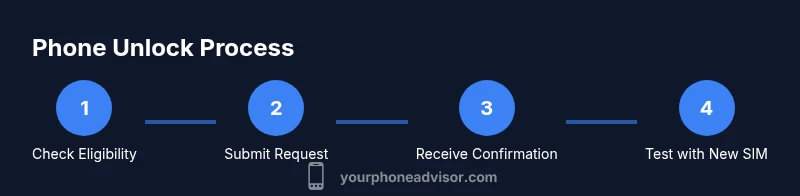
- 1
Check eligibility
Verify device status, account standing, and any contract obligations. Ensure the device is paid off and not reported lost or stolen. Confirm the device model and IMEI align with the unlock policy.
Tip: Document your status and keep receipts handy in case the carrier asks for proof. - 2
Gather required information
Collect the device’s IMEI, model, proof of ownership, and carrier account details. Have a backup of all data before you proceed.
Tip: Having the IMEI ready speeds up the unlock review. - 3
Submit the unlock request
Use the carrier’s official unlock portal or contact customer support to initiate the unlock. Include IMEI, device model, and ownership proof if requested.
Tip: Always use official channels to avoid scams. - 4
Wait for processing
Processing times vary by carrier and device; you may receive status updates via email or your account portal. Do not attempt to unlock with non-official methods during this period.
Tip: Keep your reference number safe and monitor your account for updates. - 5
Apply the unlock
If approved, follow the carrier’s instructions which may include rebooting the device or inserting a new SIM. Ensure the device recognizes a different network.
Tip: Test with a non-network SIM to confirm the unlock works. - 6
Test and verify
Power cycle the phone, insert a SIM from another carrier, and confirm voice and data services work as expected.
Tip: If issues occur, contact support with your unlock reference.
Got Questions?
Is unlocking my phone legal in my region?
In many regions, unlocking a phone through official carrier channels is legal and supported. Always follow the carrier’s terms and applicable local laws to avoid violations.
Unlocking through official channels is generally legal where allowed by local rules. Check your carrier’s terms for specifics.
Will unlocking affect my warranty?
Unlocking a device via official carrier methods typically does not void the warranty. If you unlock through unofficial methods, check the terms with the manufacturer and carrier.
Official unlocks usually don’t void the warranty. Unofficial methods can complicate warranties.
What information do I need to unlock my phone?
You’ll generally need the device IMEI, model, proof of ownership, and account details. Have receipts ready if requested by the carrier.
Have the IMEI, device model, and proof of ownership on hand before you start.
How long does the unlock process take?
Processing times vary by carrier and device; expect a period that could range from a few hours to several days. Always check the status in the carrier portal.
Processing times vary; check the carrier status page for updates.
What if my carrier refuses to unlock?
Ask for a clear explanation and escalation path. If unresolved, you can review consumer rights resources or consider alternative devices that fit your needs.
If denied, ask for the reason and escalation steps. Look into official consumer resources for guidance.
Should I back up my data before unlocking?
Yes. Back up photos, contacts, and apps before starting the unlock to prevent any potential data loss during the process.
Back up your data before unlocking to avoid loss.
Will unlocking allow me to switch carriers immediately?
Unlocking enables compatibility with other networks, but you may still need to satisfy any plan or device terms before switching.
Unlocking makes switching networks possible, but you may need to meet plan terms.
What should I do after unlocking is complete?
Insert a non-network SIM, reboot if required, and verify that voice and data work on the new carrier. Keep documentation for future use.
Test the new SIM and verify services after unlocking.
Watch Video
What to Remember
- Verify eligibility before submitting unlock requests.
- Use official channels and document every step.
- Back up data prior to unlocking to prevent loss.
- Test unlock with a test SIM to confirm success.
- Expect variable processing times by carrier and device.