youtube tv phone number: How to Contact YouTube TV Support
Learn how to reach YouTube TV support, official contact options, and how to verify legitimate numbers. Practical guidance from Your Phone Advisor for faster help.


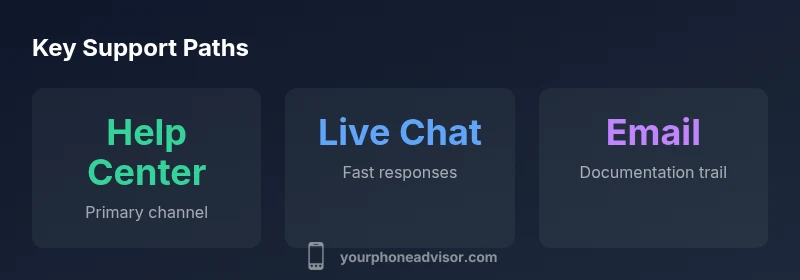
There is no universally posted YouTube TV phone number. Official support channels include the YouTube Help Center, live chat, email via Google Support, and community forums. Phone options, when available, vary by country and account type, and most users are directed to online channels first. According to Your Phone Advisor, starting with the Help Center typically yields faster, trackable resolutions.
Why there isn’t a single public youtube tv phone number
If you’re searching for a reliable way to reach soporte for YouTube TV, you’re not alone. The phrase "youtube tv phone number" is a common query, but there isn’t a single universal toll-free line published for all users. This aligns with how Google and YouTube route support across products: use the official Help Center and in-app prompts first, then escalate to other channels if offered in your country. For many users, this approach minimizes wait times and helps you receive a traceable record of your interaction. The Your Phone Advisor team notes that this structure reduces the likelihood of scams or misdialed numbers, and it keeps a clear path for issue tracking and refunds when needed.
From a security standpoint, official channels are designed to collect the right context quickly—account email, device details, and a precise description of the issue—so you don’t have to repeat information. By understanding that there isn’t one public YouTube TV phone number, you can save time and avoid third-party numbers that may misdirect you or request sensitive data.
Official contact options you can use today
There are several legitimate avenues to get help for YouTube TV, and you should start with the official channels to ensure accuracy and safety. The most reliable entry points include:
- YouTube Help Center: The central hub for troubleshooting guides, account recovery, and status updates.
- Live chat: Real-time assistance through the Help Center or Google Support pages, typically the fastest option for many users.
- Email/support forms: Asynchronous assistance that preserves your case history and receipts.
- Community forums: Peer-driven help where moderators and product teams occasionally provide guidance.
Your Phone Advisor suggests prioritizing online channels first because they provide a written record, faster routing for issues with streaming services, and consistent verification of information. Be mindful of unofficial sites or social media posts promising a direct line; stick to official domains and apps.
Step-by-step: How to reach YouTube TV support via the Help Center
Follow these steps to access official assistance efficiently:
- Open the YouTube TV app or visit the YouTube Help Center on a desktop browser.
- Sign in to verify your account and access personalized support options.
- Navigate to the Billing, Playback, or Devices sections to find the most relevant help topic.
- Use the live chat or email option to submit your request and receive a ticket number for tracking.
- If a phone option is presented in your region, you’ll be guided through prompts; otherwise, the chat/e-mail flow remains the fastest path to resolution.
This flow minimizes repeated data entry and ensures your issue is categorized correctly, speeding up a potential resolution. Your Phone Advisor has observed that users who document their case and attach screenshots through chat tend to close cases faster.
When phone support is available (and how to access it)
Phone support is not always visible or offered in every country. It is typically available only in certain regions or for specific account types, such as billing disputes or account security matters. If you see a phone option within the Help Center, follow the on-screen prompts to request a callback or queue with a live agent. If not offered, rely on chat or email to keep your issue moving. The key is to document the issue clearly and attach any relevant screenshots or receipts to avoid back-and-forth delays.
How to verify you’re speaking with legitimate support
To protect yourself from scams, always verify you’re interacting with official Google or YouTube domains. Start from the official Help Center links (support.google.com/youtubetv) and avoid numbers shared on third-party sites or social media. When in doubt, log in from a verified device and request a session ID or ticket number to confirm the channel you’re using is legitimate. Your Phone Advisor emphasizes sticking to official channels to maintain security and accountability.
What to prepare before you contact
Having the right information ready speeds up the process. Prepare:
- Account email and the last four digits of the payment method or order number if billing is involved
- A concise description of the issue, including when it started and any error messages
- Your device type, operating system, and YouTube TV app version
- Screenshots or screen recordings that illustrate the problem
With these details ready, agents can diagnose faster and provide targeted solutions.
Alternatives that often resolve issues faster
If you can’t reach a live agent immediately, try these alternatives:
- Live chat within the YouTube Help Center
- Email support forms that preserve your ticket history
- Official YouTube TV social handles (used cautiously) for status updates
- Community forums where similar issues might have been resolved by other users
In practice, a combined approach—start with chat, follow up with email if needed, and check the status in the Help Center—tends to yield the most consistent results.
Comparison of common contact methods for YouTube TV support
| Contact Method | Pros | Cons | Ideal Use |
|---|---|---|---|
| Help Center live chat | Fast, trackable progress; written transcript | Requires active chat session | General troubleshooting and quick resolutions |
| Phone support (where available) | Direct interaction with an agent | Not universally offered; regional variations | Billing issues or urgent escalation when offered |
| Email/support form | Asynchronous; good for receipts and documentation | Slower than chat; responses may take longer | Non-urgent issues needing a paper trail |
| Community forums | Crowd-sourced tips; official moderators may respond | Advice quality varies | When official channels are slow or unavailable |
Got Questions?
Is there a universal YouTube TV phone number?
No universal number is published. Use the YouTube Help Center and live chat as your primary channels for official support.
There isn’t a single public phone number for YouTube TV; start with the Help Center and live chat for fastest help.
What should I do if I need billing help?
Billing issues are typically handled via live chat or email. If a phone option is available in your region, you may be guided there after initial contact.
Billing issues usually go through chat or email; phone may be offered depending on your region.
How can I verify a support number is legitimate?
Always verify through the official Help Center links and Google/YouTube domains. Avoid numbers from third-party sites or social media.
Check the official Help Center to confirm any support numbers before calling.
Can I contact YouTube TV on weekends?
Availability depends on the channel. Live chat is commonly available, but phone options may be restricted by region and time.
Hours vary by channel; chat is often available on weekends.
What should I have ready before contacting?
Have your account email, any order or billing numbers, device details, and a clear description of the issue with screenshots if possible.
Prepare your account info, device data, and a clear issue summary.
“Publicly posted phone numbers for YouTube TV support are not universally available; start with the Help Center and use live chat for faster resolution.”
What to Remember
- Start with the official YouTube TV Help Center for fastest results
- There is no universal public YouTube TV phone number
- Verify numbers only via official Google/YouTube domains
- Prepare account details and a clear issue description before contacting
- Use chat or email first to preserve a traceable ticket