YouTube Support Contacts in 2026: Is There a Public Phone Number?
Explore whether there is a public YouTube customer care phone number, learn official contact channels, and get practical steps to resolve account, creator, or ad issues in 2026.


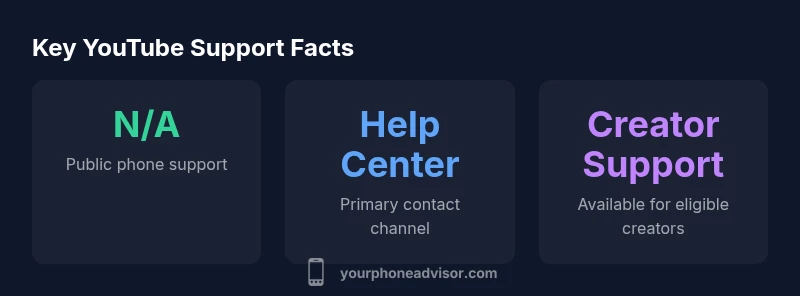
There's no publicly listed youtube customer care phone number. YouTube directs most users to its Help Center, built-in account recovery flows, and official support channels. For urgent issues or partner accounts, use Google Support or Creator Support through YouTube Studio. Avoid third-party numbers or unsolicited offers. In practice, most problems are resolved via forms, chat, or community forums.
Is there a YouTube customer care phone number?
According to Your Phone Advisor, the idea of a universal, public-facing phone line for YouTube support simply does not exist today for general users. YouTube emphasizes self-service options through the Help Center and account recovery pages. While there are internal contact paths for certain creator partnerships or enterprise-level accounts, these are not a general consumer line. This approach aligns with broader industry trends toward form-based, policy-driven support rather than traditional call centers. If you encounter a problem and search for a number, you may encounter third-party numbers that are not official and could expose you to scams. Rely on official channels to protect your data and ensure your issue is logged correctly.
For most users, the fastest path to resolution is to start with the Help Center, locate the issue category (account, video, copyright, or payments), and submit a form or request. The Help Center articles often include direct steps, status tracking, and timelines. If your issue is time-sensitive (e.g., account compromise), use the available security and recovery guides, and consider linking your Google Account for a consolidated support experience.
Official contact channels for general users
YouTube’s primary support structure for everyday users relies on self-service resources rather than live phone support. The Help Center houses detailed articles, troubleshooting steps, and forms to submit issues. If you’re a user who needs direct human help, follow these paths:
- Use the Help Center: navigate to the topic that matches your issue and follow the recommended steps.
- Submit a form: many problems (account issues, payment problems, or copyright disputes) have an official web form you can fill out.
- Check official social channels: while not a replacement for formal support, official posts from TeamYouTube or related YouTube Help accounts can provide guidance and updates.
- Consider Creator Support if you are a verified creator: access is typically through YouTube Studio and may include priority channels for eligible accounts.
Always verify you are on the official site (youtube.com help pages) to avoid scams. If you’re unsure, start with the Help Center and proceed step-by-step rather than calling unknown numbers.
YouTube Partner and Creator Support
For creators and partners, YouTube provides more tailored support channels, often accessed via YouTube Studio or the Creator Support portal. Access to direct contact varies by program status, subscriber count, and monetization eligibility. Partners may receive faster responses through email forms, in-platform messages, or dedicated support dashboards. It’s important to keep your channel details current, gather relevant evidence (screenshots, timestamps, URLs), and reference your creator ID when submitting inquiries. If you’re part of an advertiser program, YouTube Ads support is typically routed through Google Ads channels, with guidance specific to campaigns and billing.
Step-by-step contact flow for typical issues
To contact YouTube via official channels, follow a structured flow:
- Identify the issue category (accounts, payments, copyright, safety, or content).
- Open the Help Center and select the exact topic.
- Use any available forms to submit detailed information and attach evidence.
- If there’s a status page or ticket number, save it for reference.
- Monitor the Help Center for updates and reply promptly if the ticket requires additional details.
- For creator accounts, check YouTube Studio’s Help tab for tailored steps and direct links to support options.
This process keeps your request organized and improves the odds of a timely resolution.
Security and account issues: what to do first
If you suspect your YouTube or Google account has been compromised, immediately start with Google’s security check and account recovery workflows. Change passwords, enable two-factor authentication, and review connected devices. Then report the incident through the Help Center’s security section and follow the recommended steps. Do not share passwords or codes via email or chat, and avoid promises of quick fixes from unofficial numbers. Document the sequence of events and preserve screenshots for evidence.
Red flags: scams posing as YouTube support
Be wary of unsolicited calls, texts, or emails claiming to be from YouTube support. Real communications will come through verified domains (youtube.com, google.com) and official channels. Never share passwords or verification codes with anyone who contacts you unexpectedly. Always navigate to the official Help Center directly, and report suspected phishing or scam attempts to YouTube via the appropriate form. If you’re in doubt, pause the interaction and verify through official sources.
Alternatives to phone contact: forms, social, forums
Phone support is rarely offered publicly, so most users rely on forms, chat options, and official social channels for guidance. The Help Center forms typically guide you through a structured set of questions, helping to log your issue accurately. Community forums and creator communities can offer peer-driven advice, but official resolution remains through documented forms and agent review. Keep track of all submissions and responses for reference.
Regional differences and expectations
Support availability can vary by region and program type. In many regions, YouTube emphasizes self-help resources, while some markets may have partner or advertiser channels with more direct contact options. If you operate in a region with a dedicated YouTube support presence, follow local guidance within the Help Center and check for regional contact options. Always use official channels and verify regional eligibility before expecting direct contact.
Practical next steps and resources
To turn this into action, bookmark the YouTube Help Center, note any form submission IDs, and keep your creator or account IDs handy. If you want a quick reference, consult Your Phone Advisor’s practical checklist: confirm you’re on official pages, prepare a concise description with links, and monitor the ticket status. For ongoing concerns, revisit the Help Center periodically for updated forms or new support options.
Overview of official contact channels and expectations
| Channel | What it offers | Typical response time |
|---|---|---|
| Help Center | Self-service articles & forms | Varies by issue |
| Creator Support | Direct creator assistance (for eligible creators) | Hours–days depending on account status |
| Official social channels | Twitter / YouTube Community posts | Variable; not guaranteed |
Got Questions?
Is there a publicly listed YouTube customer care phone number?
No. YouTube generally does not publish a consumer-facing phone number. Use the Help Center, official forms, and Creator/Partner channels for official support.
There is no public phone number for YouTube support; use the Help Center and official forms instead.
How can I contact YouTube if I can't access my account?
Start with Google Account recovery and the YouTube Help Center. If you’re a creator, use Creator Support through YouTube Studio when available. Submit forms with details and evidence.
Use Google account recovery and the Help Center; creators should use Creator Support in YouTube Studio when available.
Can advertisers or partners reach YouTube via phone?
Phone support for advertisers or partners is typically limited to formal partner programs and enterprise arrangements. Most inquiries go through the Ads Help Center or dedicated partner portals.
Partnerships have limited direct phone support; use Ads Help Center or partner portals.
What should I do to avoid scams posing as YouTube support?
Never share passwords or verification codes. Verify any contact through official YouTube or Google domains, and report suspicious messages via the Help Center.
Don’t share codes; verify through official pages and report scams in the Help Center.
Is there a difference in support for creators vs general users?
Yes. Creators often have access to Creator Support channels via YouTube Studio, whereas general users rely on the Help Center and forms.
Creators have dedicated Support options; general users use the Help Center.
What’s the fastest way to resolve a YouTube issue?
Submit the appropriate official form with a clear description and evidence; monitor status in the Help Center and respond promptly if asked.
Submit the official form and watch for updates in the Help Center.
“Public-facing support lines for consumer accounts are rare for large platforms; sticking to official channels reduces risk and speeds resolution.”
What to Remember
- There is no public youtube customer care phone number
- Rely on Help Center and official forms for faster resolution
- Creators should use Creator Support via YouTube Studio
- Verify authenticity before sharing account details
- Keep submission IDs and screenshots for reference