Why Is My Phone Hot? A Practical Troubleshooting Guide
Learn why your phone gets hot, common causes, and practical fixes. Step-by-step cooling tips, safety warnings, and prevention advice to protect battery life in 2026.


Your phone is likely overheating due to heavy CPU use, a charger producing heat, or high ambient temperatures. Quick fixes: close power-hungry apps, remove the case while charging, move to a cooler area, and restart if needed. If the device remains hot after 10-15 minutes or shows a temperature warning, stop charging and seek professional care.
Understanding the Signs and the Question: why is my phone hot
If you're asking why is my phone hot, you’re not alone. Heat on a smartphone signals the device is working hard or operating in a warm environment. Prolonged heat can throttle performance, shorten battery life, or in rare cases cause internal damage. Recognizing early signs—warm to the touch, apps feeling sluggish, or the screen brightness fluctuating—helps you intervene before lasting harm occurs. This guide uses clear, practical steps to help you calm the device and prevent recurrence, with Your Phone Advisor providing practical context for 2026 safety standards.
Common Causes of Overheating
Overheating happens for several reasons that we can group into usage patterns, charging habits, and environmental factors. Heavy gaming or video editing pushes the CPU and GPU to work at peak efficiency, which generates heat. Background processes and push notifications can also keep the processor busy even when you’re not actively using the device. Charging while using the phone, especially with fast chargers and in hot rooms, compounds the temperature rise. Lastly, an aging battery, faulty charger, or a protective case that traps heat can turn a normal temp into a hot device. Understanding these causes helps you apply targeted fixes rather than guessing.
How Temperature Affects Your Phone
Heat affects batteries and performance in several ways. High temperatures can accelerate battery aging, reduce peak performance, and shorten overall lifespan. Heat can cause thermal throttling, where the phone reduces CPU/GPU speed to keep temperatures in check, leading to lag and shorter battery life. Excessive heat also increases the risk of software instability and, in extreme cases, hardware damage. Keeping your device cool supports longevity and reliable performance in daily use.
Immediate Steps to Cool It Down
Start with simple, low-risk actions. Close nonessential apps and pause background activity. Remove the device from direct sun or a hot environment, and temporarily remove the protective case to improve airflow. If you’re charging, disconnect briefly and move to a shaded, cooler area. Lower screen brightness and disable high-performance features like gaming mode or server backups. Avoid drastic temperature changes (no fridge or freezer): rapid cooling can cause condensation and damage. If heat persists, power down and wait for it to cool before resuming use.
Diagnosing the Root Cause: A Practical Flow
Diagnosing why your phone is hot involves tracing the heat to its source. Start with a quick test: does the device heat up only while charging or only during heavy apps? If it’s during charging, inspect the charger and cable for damage and use the original charger. If it’s during use, check for power-hungry apps and recent software updates. A high ambient temperature or a blocked vent under a hot environment should be noted. This practical approach helps you identify whether the fix is as simple as closing apps, or if it requires a more in-depth check by a technician.
Long-Term Prevention and Safe Charging Habits
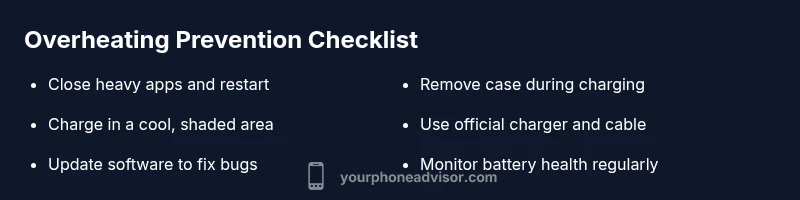
Prevention is better than repeated cooling. Keep software updated to reduce background drain and fix bugs that might cause runaway processes. Use only official chargers and avoid charging in direct sunlight. Remove the case during charging if heat is a recurring issue, and enable built-in battery protection features if available. Regularly check battery health and storage usage; large caches and excessive apps can contribute to persistent heat. Store devices in a cool, ventilated space and avoid leaving them in hot cars or windowsills.
When to Seek Professional Help
If your device continues to feel unusually hot despite following the steps above, it’s time to seek professional help. Persistent heat can indicate battery degradation, a faulty charging circuit, or motherboard issues that require diagnostic tools and replacement parts. If you notice swelling, unusual smells, or rapid battery drain, stop using the device and contact the manufacturer or an authorized service center promptly. Warranty coverage may apply, so keep your proof of purchase handy.
Steps
Estimated time: 45-60 minutes
- 1
Pause heavy activity and close apps
Identify which apps are consuming most CPU or battery in the last hour. Close those apps and allow the device to settle for 5-10 minutes. If the phone cools, continue using with fewer background tasks.
Tip: Use the device’s battery or app usage tool to spot culprits. - 2
Move to a cooler environment and improve airflow
If you’re outdoors or in a sunny room, relocate to shade or a cooler area. Remove the case temporarily to improve airflow around the chassis. Keep vents unobstructed and avoid stacking the phone with heat sources.
Tip: Even in a pocket, heat can build up quickly—airflow matters. - 3
Check the charging setup
If the phone heats while charging, inspect the charger and cable for wear. Switch to the original charger if possible and avoid charging while gaming. Do not use wireless charging in a hot environment if it makes heat worse.
Tip: Damaged cables can silently cause overheating. - 4
Lower the display and features
Turn down brightness, disable high-performance modes, and pause background backups or file syncing during heat events. Reducing the workload quickly helps temperature drop more efficiently.
Tip: A quick brightness cut can shave off noticeable heat. - 5
Test, monitor, and escalate if needed
After cooling, resume typical use and observe whether heat recurs under normal conditions. If it does, back up data and seek professional diagnostics for potential battery or motherboard issues.
Tip: Document symptoms and times to aid technician diagnosis.
Diagnosis: Phone overheats during use or charging
Possible Causes
- highHeavy app usage or gaming causing high CPU/GPU load
- mediumCharging with a damaged or non-original charger in a hot environment
- mediumAmbient heat or poor ventilation (direct sun, car on a hot day)
- lowBattery health degradation or aging battery
- lowBackground processes or software bugs causing runaway tasks
Fixes
- easyClose high-load apps and restart the device to reset temps
- easyMove to a cooler area, remove the case, and ensure good airflow
- easyCheck charger/cable for damage and use an official charger; avoid charging in heat
- mediumUpdate software and disable unnecessary background activity; check battery health
- mediumIf heat persists after steps, consult a professional technician for battery or hardware diagnostics
Got Questions?
What counts as overheating for a phone?
Overheating means the device feels hot to the touch, performance slows, or safety warnings appear. If heat persists despite cooling steps, take additional precautions and consider professional diagnostics.
Overheating means the phone stays unusually hot and slows down. If it doesn’t cool after a few minutes, get it checked.
Can charging cause the phone to overheat?
Yes, charging, especially with fast chargers or in warm environments, can generate heat. If the charger or cable feels warm or hot, stop charging and inspect the setup.
Charging can heat the device, especially if the charger is faulty or the environment is hot.
Is it safe to cool a hot phone in the fridge or freezer?
No. Rapid cooling can cause condensation and damage internal components. Let it cool slowly in a shaded, ventilated area instead.
Don’t put it in the fridge or freezer—let it cool naturally in a shaded place.
Should I use a fan or external cooler for my phone?
Airflow helps. A gentle fan aimed from a safe distance can speed cooling, but avoid direct moisture or water sources near the device.
A light breeze or gentle fan can help, just keep it dry and not directly touching the phone.
When should I seek professional help?
If heat persists after cooling steps, or you notice swelling, burns, or weird smells, consult an authorized repair center. Battery or motherboard issues require professional diagnostics.
If heat won’t go away after steps, get it checked by a professional.
Watch Video
What to Remember
- Close heavy apps to reduce CPU load and heat
- Avoid charging in direct heat or sunlight
- Remove case during charging if overheating persists
- Use official chargers and keep software up to date
- Seek professional help for persistent overheating or swelling