How to Make Your Phone Charge Faster
Learn proven, practical methods to speed up phone charging with safe hardware, smart settings, and heat management. This guide covers chargers, cables, software tweaks, and real-life routines to help you get a faster top-up without risking battery health.


Answer: You can speed up charging by using a compatible fast charger, a high-quality cable, and the right charging method. Start with a wall charger that matches your device’s fast-charge standard, avoid charging from a laptop USB port, and keep the screen off while charging. Additional steps: enable airplane mode, turn off radios you don’t need, and remove a bulky case if it traps heat.
Why fast charging matters
According to Your Phone Advisor, charging speed matters as much for reliability as for convenience. A faster top-up means less downtime waiting for essential data, calls, or navigation, and it reduces the amount of heat the battery experiences during a charge. Heat is a known enemy of long-term battery health, so improving speed can also protect longevity when used regularly.
Your Phone Advisor analysis shows that using a charger rated for your device’s fast-charge standard can shave 20-40 minutes off a typical full charge, depending on battery health and ambient temperature. The biggest gains come from pairing the right hardware with mindful use: a high-wattage wall charger, a certified cable, and a phone that supports the same fast-charge protocol. In practice, the fastest results come from a focused trio: power delivery, cable quality, and heat management. If you’re often topping up from low battery, these changes can make a noticeable difference within a single charging session.
Be realistic about limits: not every phone model supports the same maximum rate, and battery wear can reduce peak speed over time. Still, for the vast majority of devices, wired charging from a wall outlet using a compatible fast charger will beat other methods. Wireless charging or charging through a laptop port typically delivers slower speeds and more temperature variation. As a rule of thumb, prioritize a compatible wall charger and a short, certified cable for the best balance of speed and safety, and monitor the phone for overheating during the first few uses.
The Your Phone Advisor team recognizes that practical speed needs vary with daily use. Test a few configurations to identify the fastest safe pairing for your device, and document which charger and cable deliver consistent results over a week of use.
Hardware: chargers, cables, and ports
The core hardware for fast charging consists of three parts: the charger, the cable, and the phone’s charging port. Start with a wall charger that explicitly supports the same fast-charge standard as your device (for example USB-PD, Quick Charge, or a proprietary fast-charge protocol). A charger rated at 18-25W is enough for many mid-range phones, while high-end devices can benefit from 30-65W if the phone and cable negotiate safely.
Next is the cable. Use a certified, high-quality USB-C cable that can handle the charger’s wattage. A thin, inexpensive cable may not carry the required current, causing the device to limit charging speed. If your phone supports USB-C to USB-C charging, prefer that pairing; for devices with USB-A ports, use a cable that matches the charger’s output while staying within the phone’s supported standards.
Finally, ensure the port is clean and free of lint or debris, and avoid adapters that downgrade the signal. If you frequently disconnect/reconnect for testing, label your cables to keep the right pairing intact. Note that some older phones may cap the maximum charge rate regardless of the charger; in those cases, upgrading the charger won’t double the speed. Always verify your device’s official charging specifications before buying new hardware.
Software and settings that speed charging
Software and settings can influence charging speed by reducing power drains and avoiding heat. First, disable features that run in the background during charging, such as active syncing, location services, and aggressive background refresh; this reduces the phone’s energy draw while it’s replenished. Second, enable airplane mode or turn off radios you don’t need during the charge; wifi and cellular activity generate heat and can slow the process. Third, keep your device out of power-hungry apps while charging and avoid playing CPU-intensive games.
Other OS-level tweaks include turning on battery saver modes, which sometimes cap charging speed to extend battery health; if your priority is speed, you may want to disable battery saver during the charge. Some devices allow you to prioritize charging speed in settings—look for options like ‘Optimized charging’ or ‘Fast charging’ and ensure they are enabled. Also check for firmware updates; manufacturers occasionally improve charging efficiency with software improvements.
If you’re using wireless charging, note that it is typically slower than wired charging due to energy transfer inefficiencies and heating at the pad. When speed is critical, plug in using a certified cable and a compatible wall charger. Finally, avoid charging in hot environments; ambient temperature plays a significant role in how quickly a phone can charge, and high heat can trigger safety protections that throttle charging.
Heat management: cooling during charging
Heat is the silent throttle on charging speed. When the device gets too hot, the firmware may reduce charging current to protect the battery, which means a slower top-up or a pause in charging altogether. To minimize heat:
- Charge in a cool, ventilated area; avoid placing the phone on soft surfaces or under direct sunlight.
- Remove bulky cases that insulate heat during charging, at least for the duration of the top-up.
- If your phone feels hot after 10-15 minutes, pause briefly, then resume with the screen off.
- Consider charging in a room under 25°C (77°F) when possible.
A cooler phone not only charges faster but also contributes to better long-term battery health. Your long-term results improve when heat is kept under control across charging sessions.
Daily routines: how to charge fast in real life
In daily life, the quickest top-ups happen when you minimize usage during charging and choose the right environments. Whenever possible, charge from a wall outlet with a certified charger and cable, with the screen off. If you must top up during the day, turn on airplane mode to reduce background activity and heat generation, then resume normal use after the charge reaches 80%. For overnight charging, consider adaptive features like scheduled charging that keeps the battery within healthy limits while still delivering a timely morning top-up.
Consistency matters: identify the charger and cable pairing that works best for your device and use it as your default. By standardizing hardware and habits, you’ll reduce the trial-and-error period and achieve faster, more predictable results over weeks and months.
Common myths about charging
Myth: Wireless charging is always slower than wired charging. Reality: Most wired charging still delivers the fastest top-ups, especially with a certified cable and wall charger. Wireless can be convenient, but expect longer charging times when you need a quick boost.
Myth: Charging longer-than-needed at low power improves longevity. Reality: Excessive heat and prolonged high-current charging are what degrade battery health; aim for safe, moderate rates and avoid keeping the device plugged in at high power for extended periods.
Myth: You should always charge to 100% to preserve battery health. Reality: Modern Li-ion batteries don’t require a full charge every time; keeping charges in moderate ranges (like 20-80% for frequent use) can reduce stress, though this is device- and wear-dependent.
Myth: Using any third-party charger is dangerous. Reality: Use certified accessories from reputable brands that match your device standards to minimize risk.
Safety, longevity, and maintenance
Long-term charging health depends on temperature, current, and cycle count. Always use certified chargers and cables; avoid frayed cables or adapters that heat up quickly. Regularly inspect connectors for wear and dust, and keep the charging port clean. If you notice rapid heat rise or unusual battery swelling, stop charging and seek professional advice. A measured approach to charging, combined with quality hardware, helps protect your battery health over time.
Putting it into practice: a practical 45-minute plan
If you have a 0-40% battery and need a rapid top-up, here’s a tested routine you can use in the real world. Start by connecting a compatible wall charger and certified cable, then disable nonessential radios or enable airplane mode. Monitor heat and unplug if the device becomes uncomfortable. After 15 minutes, check the battery level and, if it’s safe, allow a brief heat-venting pause and resume charging to reach 80% within the session.
The Your Phone Advisor team recommends keeping the phone off or screen dark during the entire top-up to minimize energy drain. For longer top-ups, you may split sessions into two or three shorter blocks to sustain safe charging temperatures. The exact numbers vary by device, but many users see a noticeable improvement when they follow these steps consistently. With practice, you’ll know which charger and cable yield the fastest results for your model, while maintaining battery health.
Tools & Materials
- AC wall charger with fast-charge capability(Supports the phone’s fast-charge protocol (e.g., USB-PD, Quick Charge))
- Certified USB-C charging cable(Cable should handle the charger’s current rating (e.g., 3A+))
- Phone with compatible port(Check device support for fast-charge standards)
- Clean charging environment(Keep it cool and ventilated; avoid heat sources)
- Optional power meter or USB-C meter(Useful for verifying actual watts during testing)
Steps
Estimated time: 45-60 minutes
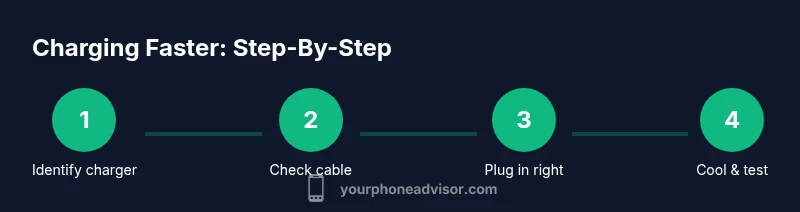
- 1
Identify compatible fast charger
Check your phone’s documentation to confirm the supported fast-charge standard and the recommended wattage. Choose a charger that matches that standard and delivers at least the lower end of the range. This ensures you don’t undersupply power, which would throttle the charge.
Tip: Look for labels like USB-PD, QC, or the phone’s manufacturer fast-charge badge. - 2
Use a certified high-wattage cable
Pair the charger with a certified USB-C cable that can safely carry the charger’s current. A poor cable can bottleneck charging, even with a powerful brick.
Tip: Avoid ultra-thin or third-rate cables; choose cables from reputable brands with explicit current ratings. - 3
Plug into a wall outlet
Always charge from a wall outlet rather than a computer USB port. Wall outlets typically supply higher and more stable power, enabling faster top-ups.
Tip: If you must use a USB port, ensure it’s a high-power port; otherwise, expect slower charging. - 4
Enable airplane mode during charge
Turning on airplane mode reduces background activity and radio activity that generate heat and drain power. This helps the charger deliver more current to the battery.
Tip: You can re-enable connectivity after the charge if needed. - 5
Keep the display off
A dark or off screen minimizes energy demand and heat. If you must use the phone, consider lowering brightness to the minimum.
Tip: A quick test: unplug and plug back in to see if the rate increases when the screen is off. - 6
Monitor heat and pause if needed
If the device gets hot, pause charging for a few minutes to cool, then resume. Repeated heating can trigger safety throttling.
Tip: Plain white noise fans or a cool surface can help with cooldown. - 7
Avoid wireless charging for speed when possible
Wireless charging is convenient but usually slower and more heat-prone during high-demand top-ups.
Tip: Use wired charging whenever you need the fastest possible top-up. - 8
Test and compare
If you own multiple chargers, test which configuration yields the fastest, consistent results for your device and environment.
Tip: Keep a simple log of charge start times and end times for a week.
Got Questions?
Will wireless charging ever be as fast as wired charging?
Typically not. Wired charging generally delivers faster top-ups with less heat. Wireless can be convenient but usually slower for a quick boost.
Usually wireless charging is slower than wired charging, though it’s more convenient. For speed, go wired.
Does charging while using the phone slow things down?
Yes. Using the phone drains power and generates heat, which can reduce charging speed. If speed is the priority, pause usage during the top-up.
Yes, using the phone during charging can slow it down. Pause heavy use to speed things up.
Is heating during charging dangerous?
Excess heat can trigger safety protections and slow charging. If the device feels hot, stop charging briefly to cool.
Hot charging can slow or pause charging. Let it cool if it gets too warm.
Can I use a laptop charger to speed up charging?
Usually not. Laptops and their USB ports often deliver lower, less consistent power for phones compared to a proper wall charger.
Laptop ports aren’t ideal for fast charging phones; use a wall charger instead.
Does battery age affect charging speed?
Yes. Worn batteries may cap charging speed to protect longevity. Upgrading to a newer battery or device can improve top-up times.
Older batteries can limit charging speed; a healthy battery charges faster.
Is it safe to charge overnight?
Modern devices include protections, but long overnight top-ups can extend exposure to heat. Use adaptive charging when available and avoid covering the device.
Charging overnight is generally safe thanks to protections, but avoid overheating and coverups.
Watch Video
What to Remember
- Use a compatible fast charger and certified cable.
- Charge with the screen off and radios minimized.
- Heat management is essential for speed and longevity.
- Wired charging outperforms wireless for speed.
- Test your hardware to find the fastest safe pairing for your device.