How Long to Leave a Phone in Rice: A Practical Drying Guide
Learn why rice isn’t a reliable fix for wet phones and follow a science-backed drying protocol. This guide covers do’s, don’ts, timelines, and when to seek professional help after water exposure.


There is no guaranteed time to leave a phone in rice. Rice is not a reliable desiccant, and results vary by moisture and device. If your phone gets wet, power off immediately, remove the SIM and battery (if removable), and dry the exterior. Then place the device in a moisture-absorbing environment (silica gel) for 24-48 hours before testing.
How long to leave a phone in rice: Why it's not a magic fix
Rice is a persistent household suggestion for drying a wet phone, but it is not a reliable desiccant and cannot guarantee recovery. The question of how long to leave a phone in rice has no universal answer because moisture access to the internal circuitry varies by model, port design, and the extent of exposure. According to Your Phone Advisor, many devices fail due to corrosion, short circuits, or adhesive degradation even after extended rice exposure. In practice, some phones may seem fine after a day, while others fail days later. This article explains the science behind moisture, the limits of rice, and a safer, evidence-based approach to drying a water-damaged phone. The goal is to keep the device from further damage and maximize the chance of recovery without risking harm to you or the device.
Immediate actions after water exposure
When a phone gets wet, time matters more than the old rice trick. The first steps you take can influence whether the device survives. Power off the phone immediately to minimize short circuits and battery damage. If you can, remove the SIM card and, for devices with removable batteries, take the battery out to reduce moisture movement. Do not attempt to turn the device on to test it. Wipe away visible water with a soft microfiber cloth, but avoid vigorous rubbing that could push moisture deeper. The aim is to reduce surface moisture quickly while preventing additional ingress. Place the phone in a dry, ventilated area to accelerate evaporation and avoid heat sources that could warp plastics or damage circuits.
Rice vs desiccants: what's actually effective
Desiccants are more effective than kitchen rice because they trap moisture without leaving behind particulates. Silica gel packets, found in many packaging, are a common, safer option. Use multiple packets around the device in a sealed bag or container to create a low-humidity microclimate. Avoid letting rice particles come into contact with ports, speakers, or the charging port, as tiny grains can lodge inside and cause mechanical problems. If you don’t have silica gel, a dedicated electronics moisture absorber or a breathable desiccant kit can help. Always prioritize devices with external moisture indicators to gauge internal conditions.
The physics of moisture in electronics and why rice fails
Electronics are sensitive to moisture for several reasons. Water can travel along seams, seep into connectors, and reach the PCB and battery. Rice is an ineffective desiccant for micro-scale moisture because it does not pull water vapor efficiently from tight spaces and can shed dust into ports. Even if rice seems to draw moisture from the surface, liquid inside components may remain trapped. Additionally, rapid drying with heat can cause condensation and static discharge risk. In short, the “how long to leave a phone in rice” question misses the key point: controlled drying with proven desiccants and patience yields safer outcomes.
A safe, science-based drying protocol
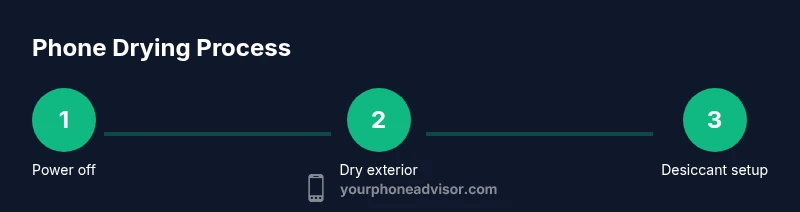
A structured drying protocol minimizes risk and increases the chances of salvaging a water-exposed phone. Step 1: Power off immediately and remove SIM, and battery if possible. Step 2: Pat-dry the exterior with a microfiber cloth; do not use heat. Step 3: Place the device in a sealed container with silica gel desiccants; ensure the ports are covered to prevent newer moisture ingress. Step 4: Leave undisturbed for 24-48 hours in a cool, dry place. Step 5: After the wait, inspect for any signs of moisture or corrosion; if none, reinsert the battery and SIM and test gently. Step 6: If the phone does not power on or shows erratic behavior, seek professional repair services rather than attempting further DIY fixes.
When to stop waiting and seek professional help
If the device remains unresponsive after the drying window, or if you notice swelling, unusual odors, corrosion around ports, or battery bulging, stop attempting DIY fixes. Moisture inside the motherboard or battery can be dangerous and may require professional evaluation. Your Phone Advisor recommends consulting an authorized service center or manufacturer support for guidance, especially for premium or water-sensitive models. Early professional intervention can prevent further damage and preserve data where possible.
Common mistakes and myths debunked
Many people wrongly assume that rice dust-free environment guarantees moisture removal. Common mistakes include using a microwave or hair dryer, which can cause heat damage or drive moisture deeper, and leaving the phone submerged in rice for days without ventilating. It’s also a myth that a phone always survives if kept in rice long enough. The reality is that moisture can cause hidden corrosion and short circuits over time, and patient, controlled drying with desiccants is a safer approach.
Maintenance tips to prevent moisture damage
Prevention is better than cure. Use a waterproof case where appropriate and keep devices away from humid environments. After exposure to water, always dry surrounding gear and consider using a protective screen and port covers. If you frequently encounter damp environments, consider a silica gel pack nearby and a quick-drying routine as part of your safety plan. Regular data backups and using cloud storage provide extra protection when the device’s functionality is compromised.
Final checklist before powering back on
Before you power the phone back on, ensure all visible signs of moisture are gone, the device has been in a desiccant environment for the full recommended window, and there are no signs of physical damage. If the phone shows any warning indicators, discontinue use and seek professional help. Data recovery options should be considered if the device remains non-functional, as attempting to power on can lead to further harm.
Tools & Materials
- Silica gel desiccant packets(Use multiple packets; tailor quantity to device size and container volume)
- Zip-top plastic bag or sealable container(Large enough to fit the phone with desiccants and allow air exchange)
- Soft microfiber cloth(For gentle exterior drying without scratching)
- Optional: electronics moisture-absorbent kit(A purpose-built desiccant kit can outperform rice in moisture removal)
- Ventilated drying space(Place in a cool, dry area with air circulation; avoid heaters)
Steps
Estimated time: 24-48 hours
- 1
Power off immediately
Turn the phone off at once to prevent short circuits. If possible, remove the SIM card and disable any removable battery to limit moisture pathways.
Tip: Do not press any buttons to reboot; this can push moisture deeper. - 2
Gently dry the exterior
Pat the surface with a microfiber cloth to remove surface moisture. Avoid rubbing, which can drive moisture into ports and seams.
Tip: Leave the device in a cool, dry area between steps to prevent condensation. - 3
Prepare a desiccant drying setup
Place the phone in a sealable bag or container with silica gel packets surrounding it. Make sure ports are not blocked by desiccants.
Tip: Ensure you have adequate desiccant quantity; too few packets slows moisture removal. - 4
Add time and patience
Seal the setup and let it sit for 24-48 hours. Do not rush this window—moisture can remain hidden inside components.
Tip: Keep the environment cool and dry to avoid heat-induced damage. - 5
Check before powering back on
After the drying window, inspect for any dampness or corrosion signs. If none, reassemble and cautiously test power and basic functions.
Tip: If you see swelling, corrosion, or unusual smells, stop and seek professional help. - 6
Test core functions
Power on and check the display, speakers, camera, charging port, and sensors. Monitor for abnormal heat or performance issues during a slow, short test.
Tip: If the charging port shows corrosion or the device won’t hold a charge, discontinue use. - 7
Decide on next steps
If the phone powers on but malfunctions persist, back up data if possible and consult a professional repair service. Do not attempt risky DIY repairs.
Tip: Data backup is a priority; you may lose data if you pursue aggressive DIY fixes.
Got Questions?
Does rice really dry out a wet phone?
Rice is not an effective desiccant for electronics. It may absorb surface moisture but often leaves internal moisture behind and can introduce dust into ports. Use silica gel or electronics-specific desiccants for better results.
Rice isn’t a reliable fix; silica gel works better for drying electronics.
How long should I wait after using silica gel?
A general guideline is 24 to 48 hours in a sealed desiccant setup. This window gives moisture time to migrate away from sensitive components. Check for visible moisture and start testing afterward.
Usually 24 to 48 hours is enough with proper desiccants.
Can I use a hair dryer to dry my phone?
No. A hair dryer can push moisture deeper and cause heat damage. Avoid any direct heat source and instead use desiccants in a sealed environment.
Avoid heat—let desiccants do the work.
What are signs of water damage after drying?
Persistent error messages, charging issues, screen flickering, or unusual odors indicate potential hidden moisture or corrosion. If these occur, seek professional assessment.
Watch for errors, charging problems, and odd smells.
Should I charge the phone after it dries?
Only attempt charging once you are sure the device is completely dry and shows no signs of moisture or corrosion. Charging a wet device can cause short circuits.
Wait until you’re sure it’s dry before charging.
Is it safe to open the phone yourself for drying?
Opening a phone can void warranties and introduce additional risk. If you’re not experienced, rely on a professional repair service for internal inspection.
Don’t DIY internal repairs unless you’re trained.
Watch Video
What to Remember
- Dry with proven desiccants, not rice
- Prioritize immediate power-off and safe handling
- Allow 24-48 hours for moisture to dissipate
- Test carefully and seek professional help if needed
- Back up data early to preserve information