What If Your Phone Gets Wet? A Practical Recovery Guide
Learn practical steps to recover a wet smartphone, including immediate actions, drying methods, and when to seek professional help. Your Phone Advisor guides you with safe, actionable, step-by-step guidance for minimal damage and faster recovery.


If your phone gets wet, act fast to limit damage. This quick guide outlines essential steps: power off immediately, remove the SIM and case, wipe away visible moisture, and avoid heat or attempts to recharge too soon. What you do in the first hours matters. According to Your Phone Advisor, rapid, safe actions dramatically improve your chances of recovery.
What happens when water meets electronics
What if phone gets wet? Water that reaches internal circuits can create conductive bridges, causing short circuits, corrosion, and rapid degradation of components. Even a short splash can invite mineral residue into ports and microphones. The risk is highest as soon as moisture is present—lateral conduction can occur through metal traces, while damaged coatings may peel away over time. The model behavior of the phone varies by design; some devices have water-resistance ratings, but those seals degrade over time and during impact. This makes immediate action essential. In this block, we’ll unpack why water damage happens, what kinds of exposure pose the greatest threat, and how to plan a safe response that minimizes lasting harm.
Quick triage: immediate actions within the first minutes
The moment you detect moisture, your priority is to halt any power flow and remove potential sources of ongoing damage. Powering the device off prevents further short circuits. Remove the case to expose vents, ports, and the SIM tray so you can inspect and begin drying. Do not press buttons repeatedly in a frenzy; aggressive button pressing can drive moisture deeper. If you can safely access the SIM card, eject it to help airflow and reduce moisture trapped near the SIM contacts. Keep the device oriented to allow any liquid to drain away from sensitive circuits. This triage phase reduces the risk of lasting harm and sets the stage for effective drying.
Splash exposure vs submersion: what’s worse and why
Not all water exposure is equal. A light splash on a phone that’s powered off is different from a full submersion. Splash exposure may be mitigated by protective coatings and shells, while submersion allows more moisture to seep into ports and seams. If water enters the charging port, speakers, or microphones, the odds of corrosion increase and components may fail over time even after drying. Understanding the distinction helps you decide how long to wait and whether professional evaluation is warranted. Regardless of exposure type, the safest course is to treat any moisture as potentially harmful until proven otherwise.
Drying myths debunked: rice is not a magic fix
Rice has long been suggested as a quick fix, but it’s largely ineffective for real drying, and it can introduce dust or starch into ports. Desiccants such as silica gel packets are much more reliable for drawing moisture away when used in a sealed bag. For best results, place the device in a breathable, moisture-absorbing environment, protected from dust. Do not apply heat sources or use a hair dryer, which can push moisture further into the device and warp components. These real-world practices minimize additional damage during the drying phase.
Creating a safe drying environment and using the right tools
A safe drying environment is quiet, dust-free, and well-ventilated. Use a soft microfiber cloth to wipe exterior moisture and keep the device in an upright position to facilitate drainage from ports. If available, silica gel desiccants placed around the phone in a sealed container help draw out moisture more effectively than rice. A gentle, non-conductive brush can remove debris from ports once you’ve had time to dry. Avoid attempting to blow air into the ports with a vacuum or compressed air, which can push moisture deeper.
After the device dries: testing and cautious powering on
Once you’ve waited for a substantial drying period (often a minimum of 24 hours, with longer for heavy exposure), reassemble any removed components. Turn the device on and carefully test basic functions: screen, speaker, microphone, camera, and cellular connectivity. If you notice abnormal behavior—unusual warmth, screen flicker, distorted audio, or unable to connect to networks—power it down and seek professional inspection. Be prepared to back up data if the device becomes reliable, but do not induce more risk by forcing a reboot during a compromised state.
When to seek professional help and data safety priorities
If the phone remains unresponsive after an extended drying period, or if corrosion signs appear around ports or connectors, contact a professional technician. Water damage can silently continue to harm internal traces long after visible moisture has dried. If you can, back up data from a functioning device or via cloud services before attempting repairs. A pro can assess battery health, port integrity, and board-level damage without risking further harm. Your Phone Advisor emphasizes that professional evaluation is prudent when moisture exposure occurs.
Prevention: best practices to minimize future water risk
Preventing future incidents is easier than repairing them. Invest in a reputable case with reliable seals, use a waterproof pouch for high-risk environments, and avoid charging while near water. If your device has an official water-resistance rating, understand its limitations and avoid relying on it in submersion scenarios. Regularly inspect seals and ensure ports are clean and dry before plugging in power. Training family and coworkers about quick-response steps also reduces risk from accidental exposures.
Common myths vs. reality: quick checks for peace of mind
Myth: rice-drying will magically restore a wet phone. Reality: rice is not a reliable method and can worsen debris exposure. Myth: water-resistant devices are impervious to water. Reality: seals wear and performance diminishes over time, especially after drops. Myth: turning the phone on immediately after drying is safe. Reality: power restoration should occur only after thorough drying and, ideally, distributor guidance.
What this means in practice: a practical checklist you can follow
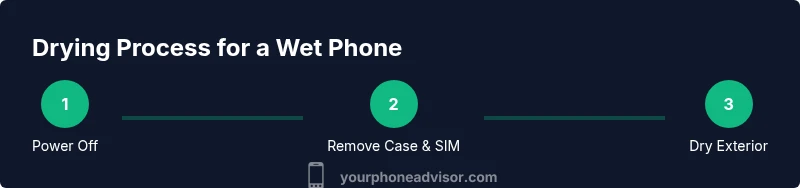
- Power off immediately when moisture is detected.
- Remove SIM and case to facilitate airflow.
- Dry exterior surfaces with a microfiber cloth; avoid heat.
- Use silica gel desiccants if available; avoid rice.
- Wait a minimum of a day, longer for heavy exposure.
- Test basic functionality only after thorough drying; seek help if issues arise.
Tools & Materials
- Soft microfiber cloth(For gentle drying and cleaning ports and surfaces)
- SIM ejector tool(To remove the SIM tray for clearing moisture near contacts)
- Silica gel desiccant packets(Place phone in a sealed bag with desiccant to absorb moisture)
- Small brush or cotton swabs(Gently clear debris from ports after drying)
- Non-conductive container(For a short-term drying setup with desiccants)
Steps
Estimated time: 24-72 hours
- 1
Power off immediately
Hold the power button until the device shuts down. Do not press any buttons repeatedly in an attempt to reset; this can push moisture further into circuits. Powering down stops short-circuit risks.
Tip: If the screen is unresponsive, hold power with volume until it powers off. - 2
Remove SIM and case
Use the SIM ejector tool to remove the SIM tray and take off any protective case. Clearing these access points improves airflow and reduces trapped moisture near ports and antennas.
Tip: Place the SIM on a dry, clean surface so it won’t get dust on it. - 3
Dry exterior surfaces
Wipe visible moisture from the phone with a microfiber cloth. Tilt the device to encourage any liquid to drain away from openings. Do not use heat sources that could warp components or encourage moisture movement.
Tip: Avoid rubbing aggressively; gentle patting helps prevent pushing liquid into gaps. - 4
Use desiccants, not rice
If available, place the phone in a sealed bag with silica gel or another desiccant. Rice is not recommended because it is slow and can introduce dust. Desiccants are designed to attract moisture efficiently.
Tip: Check the bag after several hours; moisture visible near ports indicates more drying time is needed. - 5
Wait for thorough drying
Leave the phone in the drying setup for a full day or longer if exposure was significant. Moisture can migrate during the initial hours, so longer drying reduces hidden moisture pockets.
Tip: During this period, avoid charging or booting the device. - 6
Reconnect and test cautiously
After a thorough drying period, reinsert the SIM, replace the case, and power on. Test essential functions: display, sound, camera, and connectivity. If anything seems off, shut down and seek professional help.
Tip: Test one function at a time to identify issues early. - 7
Evaluate battery and ports
If the device feels unusually warm, shows corrosion signs, or won’t hold a charge, discontinue use and arrange service. Battery health is critical for safe operation and long-term performance.
Tip: Keep backup data accessible in cloud or another device in case replacement is needed. - 8
Plan for future protection
Invest in a watertight case or pouch for risky environments and check manufacturer guidance for water resistance limits. Adoption of protective habits reduces recurrence.
Tip: Create a routine of quick checks before expected water exposure (pool days, beach trips, etc.). - 9
Know when to seek professional help
If moisture persists or devices shows unexpected symptoms after drying, seek a qualified professional. Early diagnosis can prevent further damage and preserve data.
Tip: Ask for a moisture diagnostics report if you visit a service center.
Got Questions?
What should I do first if my phone gets wet?
Power off immediately and remove any case or accessories. Gently wipe away moisture from the exterior and eject the SIM card if possible. Avoid turning it on until you’re sure it’s dry.
First, power off, remove the case and SIM, wipe the exterior, and wait until you’re sure it’s dry before turning it back on.
Can I dry a wet phone with rice?
Rice is not recommended. It’s slow and can leave dust in ports. Desiccants like silica gel are a better option for absorbing moisture in a sealed environment.
No, rice isn’t reliable. Use a desiccant like silica gel in a sealed bag instead.
How long should I wait before turning it back on?
Wait at least 24 hours after drying or longer for heavy exposure. Booting up too soon can trap moisture and cause short circuits.
Wait a full day or more to be safe before powering it back on.
Is it safe to charge a phone after drying?
Only charge after you are confident the device is completely dry. Charging a damp phone can cause corrosion and short circuits.
Only charge if you’re sure the phone is completely dry.
What signs indicate permanent damage?
If the device won’t power on, shows erratic behavior, unexpected warmth, or corrosion around ports, professional evaluation is warranted.
Look for non-responsive behavior or signs of corrosion, and seek help if you see any.
Will water damage affect the warranty?
Water exposure can void certain warranties or require paid service; refer to your manufacturer’s policy for details.
Warranty terms vary; check your policy to understand coverage after water exposure.
Watch Video
What to Remember
- Act quickly to power off and remove moisture sources
- Avoid heat and rice; use desiccants if available
- Dry thoroughly before powering on to prevent short circuits
- Seek professional help for persistent moisture or abnormal symptoms
- Prevent future incidents with protective gear and cautious habits