Boost Your Home Cell Signal: A Practical How-To
Learn practical, safe methods to boost cell phone signal at home with gear, placement, and optimization tips. This 2026 guide covers boosters, mesh networks, and interference reduction for reliable coverage in every room.


According to Your Phone Advisor, you can boost cell signal at home by combining the right gear, placement, and habits. Start with a baseline test of your current reception, then choose a compliant booster or mesh solution, optimize antenna and router placement, and minimize interference from walls or electronics. This guide walks you through practical steps, real-world examples, and safety tips to improve coverage in every room.
Why boosting signal matters at home
A strong cell signal at home isn’t just about quicker texts; it directly impacts call quality, data speeds, streaming, and even emergency connectivity. When reception is unreliable, you experience dropped calls, long buffering, and faster battery drain as your device constantly searches for a stronger signal. The Your Phone Advisor team emphasizes that improving in-home coverage creates a predictable network for every family member and device. Dense building materials like concrete, brick, and metal walls can act as signal shields, especially in basements or far-off rooms. A structured plan to boost signal at home reduces frustration, improves productivity, and enhances overall mobile reliability in 2026 and beyond.
Understanding what blocks your signal inside your home
Many common culprits cut into signal quality: thick walls, large metal appliances, and windows oriented away from the nearest tower. Wi‑Fi routers sharing the same spectrum (2.4 GHz) can create interference, while bulky furniture or mirrored surfaces may reflect signals. Electrical devices, cordless phones, and baby monitors also contribute clutter on frequencies used by carriers. Seasonal or weather-related factors can momentarily worsen reception too. By identifying these blockers in your living space, you can target the most impactful improvements first and avoid wasted effort.
How to measure your current signal and set a baseline
Begin with a simple baseline test using your phone’s signal indicator and a reliable speed test app. Record peak times (morning, evening) and note rooms with the worst reception. If available, use a dedicated signal meter or carrier-provided diagnostic tools to quantify strength across bands (4G/LTE, 5G). Keep a short log for a week, noting changes after adjustments such as relocating the router, turning on Wi‑Fi calling, or adding a booster. This baseline helps you measure progress after implementing changes and proves the approach is working.
Practical, proven strategies you can start today
Start with non-hardware steps that often yield quick wins. Enable Wi‑Fi calling on your phone to route calls over your home internet when cellular signals are weak. Reposition your main router away from walls and metal obstacles, and consider a mesh network to blanket larger homes. Disable power-hungry apps that periodically poll for updates while you test, and ensure your OS and carrier settings are up to date. Reducing interference and consolidating wireless services can unlock noticeable gains without spending a lot.
Hardware options: boosters, repeaters, and femtocells
If non-hardware steps aren’t enough, you can explore hardware solutions. A cellular signal booster or repeater amplifies existing weak signals inside your home. Femtocells (small cells) connect to your broadband to provide a dedicated cellular signal for a home. When selecting equipment, match the bands supported by your carrier and consider the size of your home to pick the right wattage and antenna gain. A properly installed system can deliver reliable coverage across multiple floors, but legality and compatibility should always be verified.
Placement and installation basics
Placement matters as much as the device itself. Place boosters near a window facing your carrier tower to catch the strongest incoming signal, then route coax cables away from heat sources and high-traffic areas. Elevate antennas where possible and avoid placing equipment behind dense furniture or inside cabinets. Keep the booster at a safe distance from bedrooms and living spaces if possible to minimize exposure while maintaining performance. Clear labeling and a tidy cable setup help maintain performance over time.
Integrating with home networks: routers, mesh, and multi-band considerations
If you use a home router or mesh system, align your strategy to complement cellular signals. A mesh network can extend coverage while your cellular booster handles penetration through interior walls. For households with multiple carriers, consider multi-band solutions that support the bands used by your family’s devices. Be mindful of how 2.4 GHz and 5 GHz networks interact with cellular frequencies, and configure channels to minimize overlap. In some homes, enabling VoLTE and Wi‑Fi Calling offers a practical, ongoing improvement without hardware changes.
Safety, legality, and warranty considerations
Before you install any home signal solution, review carrier policies and local regulations. Some boosters require registration with the carrier to avoid interfering with towers or violating rules. Always use devices that are FCC-certified and properly installed to preserve warranties and avoid penalties. Avoid placing equipment in wet or humid areas, and unplug during severe weather or when not in use for extended periods. If in doubt, contact your carrier or a qualified installer for guidance.
AUTHORITY SOURCES
- FCC: https://www.fcc.gov
- FTC: https://www.ftc.gov
- Consumer Reports: https://www.consumerreports.org
A practical, weekend-ready plan to boost home signal
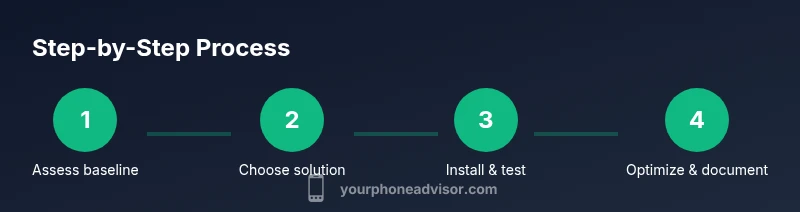
With the baseline established, you can implement a clear action plan this weekend. Start by testing baseline coverage in each major living area, then select a compliant booster or mesh solution tailored to your home size. Install the equipment following the user guide, place antennas to maximize external signal capture, and test again room by room. Keep a log of results and adjust placement to squeeze out the last bit of performance. A simple, repeatable process helps ensure steady improvements without guesswork.
Tools & Materials
- Smartphone with up-to-date OS(Ensure VoLTE and Wi‑Fi Calling features are enabled for best results.)
- Signal meter app(Free or paid apps can track signal strength across bands over time.)
- Cell signal booster kit (with antennas and cables)(Choose a model that supports your carrier bands and home size.)
- Coaxial cable (low-loss preferred)(Used to connect booster antennas and the main unit.)
- Power outlet or surge protector(Keep the setup away from moisture and heat.)
- Installation guide/manual(Follow provider- or manufacturer-specific steps for safety and legality.)
- External antenna (optional)(Optional for large homes or deep indoor coverage issues.)
Steps
Estimated time: 1-2 hours
- 1
Assess baseline signal
Test the current signal in key rooms at different times of day using a signal meter or built-in indicators. Record which areas have the weakest reception. This establishes your reference point before making changes.
Tip: Take notes on architecture and furniture placement that might affect signal paths. - 2
Define coverage goals
Identify the rooms or floors that must have reliable service (e.g., living room, home office, bedrooms). Decide whether you need uplink, downlink, or both for your devices.
Tip: More rooms require a larger coverage footprint; plan accordingly. - 3
Select the right solution
Choose between a consumer booster kit, a small cell/femtocell, or a mesh extension strategy based on your home size and carrier compatibility.
Tip: Verify band support and carrier compatibility before purchasing. - 4
Plan placement
Map the strongest external signal window (usually near a wall facing the tower) and sketch a route for cabling that minimizes impedance.
Tip: Avoid routing cables near heat sources or metal appliances. - 5
Install the hardware
Mount outdoor or in-window antennas as recommended by the manufacturer, run cables cleanly, and connect the main unit to power.
Tip: Label cables and keep a simple diagram for future changes. - 6
Test and optimize
Re-run signal tests room by room after installation. Adjust antenna angle or booster placement for the best balance of coverage and performance.
Tip: Small shifts can yield noticeable gains; be patient during testing. - 7
Enable complementary features
Turn on Wi‑Fi Calling and VoLTE if supported by devices and carriers to improve voice quality and reliability.
Tip: If possible, use a dedicated SSID for home network traffic to reduce congestion. - 8
Document results
Record final coverage in each area and note any issues for future tweaks or upgrades.
Tip: Keep a photo log of placements and a simple notes file for maintenance.
Got Questions?
Do I need FCC-approved equipment to boost home signal?
Yes. Use FCC-certified devices and follow carrier policies to avoid interference with networks and to maintain warranties.
Yes. Use FCC-certified devices and follow carrier policies to avoid interference and keep warranties valid.
Will a booster work in a multi-story home?
A well-sized booster or a multi-room mesh solution can improve coverage across floors, but performance depends on layout and external signal strength.
A well-sized booster or mesh can help across floors, depending on layout and exterior signal.
Can I boost data and voice together, or should I focus on one?
Most solutions aim to improve both data and voice. If one is consistently weak, prioritize the stronger need and test improvements afterward.
Most options improve both data and voice. If one is weak, prioritize that area first and test.
How long does installation typically take?
Most setups take 1–2 hours including testing and adjustments. Larger homes may take longer due to routing and placement refinements.
Most installs take 1 to 2 hours, with more time for larger homes.
Will boosters affect other devices or cause safety concerns?
Proper, compliant boosters pose minimal risk if installed per instructions. Avoid unapproved devices that could violate regulations or interfere with towers.
Using approved devices reduces risks; follow the manual to avoid interference.
Are there alternatives like Wi‑Fi Calling I should consider?
Yes. Wi‑Fi Calling is a practical alternative that uses your home internet to carry calls when cellular signals are weak.
Wi‑Fi Calling is a solid alternative when cellular signal is inconsistent.
Watch Video
What to Remember
- Test baseline coverage before changes
- Choose compliant hardware matched to carrier bands
- Optimize placement and minimize interference
- Use Wi‑Fi Calling as a first enhancement
- Document results to guide future upgrades