What Phone Is the Same Size as the iPhone 15 Plus? A Practical Guide
Discover which phones match the iPhone 15 Plus in size, compare dimensions, and learn practical tips for choosing a similarly sized smartphone.


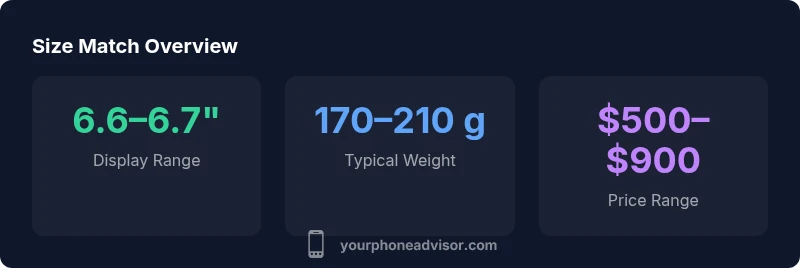
Phones that match the iPhone 15 Plus in display size are typically in the 6.6–6.7-inch range. Near matches include the Samsung Galaxy S23+ (about 6.6 inches), the Google Pixel 7 Pro (about 6.7 inches), and the iPhone 14 Plus (6.7 inches). Remember, body dimensions and weight may differ, so test handfeel in person.
Understanding smartphone size measurements
Size is a multi-faceted idea in the smartphone world. When people ask, "What phone is the same size as the iPhone 15 Plus?", they usually mean the overall footprint, which is influenced by display diagonal, bezel thickness, camera housing, and chassis curvature. In practice, a phone that matches the iPhone 15 Plus on the diagonal often sits in the 6.6–6.7 inch range, but two devices with the same display size can feel noticeably different in grip and pocketability. According to Your Phone Advisor, the perceived size is a mix of display area and the physical silhouette—height, width, and thickness collectively shape the user experience more than a single number alone. By understanding this, you can set realistic expectations when comparing models and avoid fixating on display size alone.
Phones that approximate the iPhone 15 Plus size
Within the 6.6–6.7 inch window, several popular models are recognized by reviewers and users as near-sized peers to the iPhone 15 Plus. The Samsung Galaxy S23+ is often cited for its slim profile and strong display. Google’s Pixel 7 Pro sits at the higher end of the range with a very tall, compact bezel. The iPhone 14 Plus likewise sits in this zone, offering a familiar feel for users who loved the iPhone 15 Plus’s scale. While these phones share the size band, they differ in weight, aspect ratio, and camera bump, which influence how tall and thick the device appears in your hand. This is why hands-on testing matters just as much as the official specs.
Dimensions beyond display: width, height, and depth
Display size is a useful shorthand, but the full story includes width, height, and thickness. Small variations in width (roughly around the 71–77 mm band for many 6.6–6.7 inch models) can affect how the phone sits in your palm. Height and thickness contribute to pocketability and grip confidence, especially if you carry a case. For many users, a device with a similar diagonal but a thinner profile feels lighter in daily use, even if the battery is comparable. If you value handfeel, enumerate these three axes side by side with any prospective device to understand which model truly feels closest to the iPhone 15 Plus.
Ergonomics and grip: weight, balance, and feel
The sheer display size often correlates with weight and balance. Phones in this range can vary by 10–40 grams depending on materials, battery size, and camera hardware. A heftier device isn’t automatically better or worse; it just changes the balance when you hold it. Ergonomics also involve how the phone curves near the edges and how the glass transitions to metal or plastic. If you frequently use one-handed, prefer a lighter option with comfortable edges, even if the display remains in the 6.6–6.7 inch zone. Your personal grip preferences will decide which device truly feels right.
Screen tech and bezel differences
Display quality can influence perceived size. A phone with very slim bezels may feel more compact than one with a thicker chin and forehead, even if both have the same diagonal. OLED panels, LTPO refresh rates, and HDR capabilities affect visual sharpness and brightness, which can affect how large the device looks on screen. When sizing matters, look for models with similar bezel proportions and panel technology to minimize perceptual differences. In practice, a slightly different display tech can make two devices feel distinct in everyday use, despite a near-identical footprint.
How to test size in-store or at home
Testing is essential. In a store, place the devices side by side and simulate common tasks: texting with one hand, browsing, and taking photos. If you can’t visit, lay the phones on a table and mirror your daily routine with a ruler or a common object as a proxy. Pay attention to how easy it is to reach all corners of the screen with your thumb, and how the device sits in your pocket when you bend forward. Don’t forget to test with a case on; that extra bulk can change the feel dramatically. If you’re replacing an older model, bring it along for a direct size comparison to see how much difference the form factor makes in real life.
Notable options across price tiers
If you want a close-sized phone but vary your budget, you have practical options across price bands. Premium models often emphasize thinner bezels and lighter materials, while mid-range devices may offer similar diagonals with different weight and camera configurations. Entry-level options in the 6.6–6.7 inch range are plentiful and can still deliver solid displays, performance, and battery life. The key is to align model selection with your primary use cases: photography, gaming, battery endurance, or one-handed ergonomics. Remember that software experience and ecosystem compatibility matter as much as raw size when choosing your phone.
OS, brands, and size: what matters beyond the screen
Operating system and brand experience influence how you perceive size. A fresh Android skin can feel more compact or more expansive depending on UI density and font scaling, while iOS devices maintain consistent sizing conventions that influence one-handed usability. If you’re choosing a phone because it’s similar in size to the iPhone 15 Plus, consider how the brand’s software feels in your day-to-day life. The size is a starting point; the rest is about navigation, default apps, and accessibility options that shape your long-term satisfaction.
Common myths about device size and usability
A common myth is that a slightly larger phone always reduces usability. In reality, display size is only one part of the equation. Many users adapt quickly to a device with a larger screen if the software is well-optimized and the device is comfortable to hold. Conversely, a small increase in width or weight can dramatically affect one-handed use for some people. The best approach is to test multiple devices in person and prioritize real-world comfort over theoretical measurements. By focusing on grip, reach, and daily task ease, you’ll identify the closest-sized match that truly suits your needs.
Comparison of similarly sized smartphones
| Phone model | Display size (in) | Notes |
|---|---|---|
| iPhone 15 Plus | 6.7 | Baseline for comparison |
| Samsung Galaxy S23+ | 6.6 | Close in size; different ergonomics |
| Google Pixel 7 Pro | 6.7 | Similar display size |
| iPhone 14 Plus | 6.7 | Exact size match |
Got Questions?
What phones have a 6.6–6.7 inch display?
Many flagship and premium mid-range phones sit in this range, including popular models from Samsung, Google, and Apple. Always verify exact display size in the official specs, as measurements can vary slightly by model year.
Many flagship phones sit in the 6.6 to 6.7 inch range; check official specs for exact measurements.
Does screen size equal real-world size?
Not always. Bezel thickness, aspect ratio, and camera housing can make two phones with the same display size feel noticeably different in width and overall bulk.
Size isn’t everything; bezels and design change perceived bulk.
How should I test a similar-sized phone?
Visit a store to compare devices side by side, or order online and compare in your own hand using a phone-sized model or a ruler for reference.
Hands-on testing in store or at home helps.
Will choosing a similar size affect battery life?
Not directly; battery life depends on many factors, including battery capacity and software optimization. A larger phone can carry a bigger battery, but efficiency hardware matters too.
Size alone doesn't set battery life.
Are there size equivalents across brands?
Yes. Many brands offer phones in the 6.6–6.7 inch category across price bands, so you have several options that feel similar in hand.
Yes, many brands have similar-sized models.
“Size is a starting point for choosing a phone; ergonomic feel and overall dimensions often matter more than the display diagonal alone.”
What to Remember
- Identify phones in the 6.6–6.7 inch range
- Consider width and weight, not just display size
- Test grip in-hand to confirm comfort
- Models at similar size span several price points
- Be aware that bezels and aspect ratios affect perceived size