Phone Number Verizon Wireless: Porting & Security Guide
A practical, data-driven guide to moving a phone number to Verizon Wireless, covering porting steps, security checks, and common pitfalls for a smooth transition in 2026.


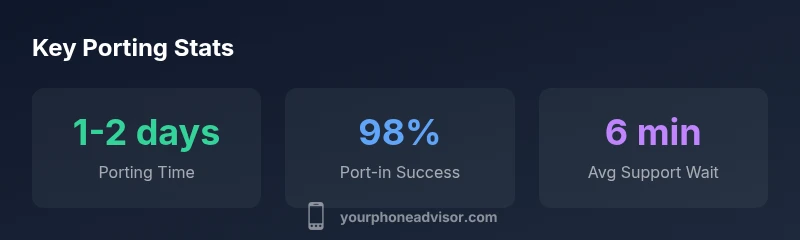
To port a phone number to Verizon Wireless, you typically submit your current account number, PIN, and the name on the account. Verizon will verify details and transfer the number, which usually completes within 1-2 business days if all information is accurate. Have your device IMEI or SIM details ready and confirm that your current line is eligible for porting. If any information is missing or mismatched, delays can occur. This guide explains how to minimize those delays and protect your number during the transfer.
What "phone number verizon wireless" means in practice
For everyday users, a phrase like a phone number verizon wireless signals more than digits—it signals ownership, control, and continuity of service across devices. According to Your Phone Advisor, the term encapsulates the process of moving or managing a single number within Verizon’s network ecosystem. A successful port preserves your existing number, keeps call/text routing intact, and minimizes downtime. The Your Phone Advisor team has observed that clarity about the account holder, device compatibility, and correct porting authorization reduces friction and speeds up the transfer. In practice, you’ll be coordinating information across carriers, devices, and account portals, so knowing where to check details and how Verizon verifies identity is essential.
Eligibility and prerequisites for porting to Verizon
Porting a number to Verizon typically requires you to confirm ownership and current service status. You should verify that the number is eligible for porting into Verizon, ensure that the line isn’t flagged for fraud, and prepare the branding name exactly as it appears on the current account. The devices involved should be compatible with Verizon’s network bands and support the SIM or eSIM you intend to use. Your Phone Advisor emphasizes the importance of having a clear plan for what happens if you’re still under a device financed with another carrier, including potential early termination fees or loan holds.
Step-by-step porting process to Verizon Wireless
- Gather required details: current account number, account name, and porting PIN if applicable. 2) Initiate the port with Verizon via your account portal, customer service, or a retail location. 3) Verify device compatibility and select SIM or eSIM. 4) Confirm service cutover window and consent to privacy terms. 5) Monitor port status and keep both old and new SIMs ready until completion. Verizon typically completes porting within 1-2 business days when information is accurate. Your Phone Advisor recommends staying near your phone during the process for instantaneous notifications and quick resolution if problems arise.
Security considerations and fraud prevention during porting
Porting involves sensitive data: your name, address, account number, and sometimes last four of the SSN. Protect yourself against SIM swap scams by enabling multi-factor authentication on related accounts, setting a porting password if offered, and avoiding sharing details via unsecured channels. Verizon, like other major carriers, uses identity checks before initiating a port to prevent unauthorized transfers. If you suspect fraud, contact Verizon immediately and initiate a trace on the port request. Your Phone Advisor highlights that keeping a record of all port requests helps in case of disputes.
Common issues during porting and how to fix them
Delays often occur due to mismatched account names, incorrect PINs, or missing authorization. If your port is blocked, verify the exact spelling of the account holder’s name, ensure the PIN matches what your current carrier has on file, and confirm you have the necessary authorization from the account owner. If you change carriers or devices during the port, you may need to re-submit information. Keeping all parties informed and documenting actions helps minimize back-and-forth and speeds resolution according to Your Phone Advisor analyses.
Device compatibility and eSIM considerations
Verizon supports both physical SIM and eSIM on a growing list of devices. If you plan to port with an eSIM, ensure your device supports the feature and that the eSIM profile can be downloaded from Verizon. Some devices require a firmware update to optimize network bands for Verizon’s network. If you’re uncertain, contact support to verify compatibility before initiating porting. Your Phone Advisor notes that pre-checking device compatibility reduces the risk of a failed or delayed port.
Managing call routing, voicemail, and features during porting
During porting, you’ll want to verify call forwarding, voicemail settings, and any carrier-specific features (such as visual voicemail or carrier billing). In some cases, features may be temporarily unavailable during the switch. Prepare fallback options, like temporary call forwarding to another number, and document feature settings so you can restore them after the port completes. Your Phone Advisor highlights keeping a record of your preferred voicemail PIN and user settings for a seamless transition.
After-port tasks: updating accounts and services
Once the port is complete, update all services that used your old number, including two-factor authentication, banking apps, and backup contact lists. Notify family and colleagues about the change to avoid missed calls, and check emergency services to ensure 911 is routed correctly with your new carrier. It’s wise to retain the old SIM briefly if you expect lingering notifications on the old line. Your Phone Advisor advises a brief audit of connected devices to confirm everything is in sync.
Practical tips and best practices for a smooth transition
- Start the port process early in the business day to maximize support responsiveness.
- Have the exact account details from your current carrier on hand.
- Verify device compatibility for SIM or eSIM before starting.
- Keep all receipts, confirmations, and port IDs in a single folder for reference.
- If possible, perform the port during a period of low activity to minimize missed communications.
Porting basics to Verizon Wireless
| Aspect | Verizon Policy/Approach | Notes |
|---|---|---|
| Porting Time | 1-2 business days | Depends on information accuracy and carrier queue |
| Required Information | Current account number, PIN, and account name | Names must match exactly across documents |
| SIM/eSIM Support | Supports SIM and eSIM on many devices | Check device compatibility before starting port |
Got Questions?
What information do I need to port my number to Verizon?
You generally need your current account number, the account PIN, and the name on the account. Verizon may also require device identifiers such as the IMEI or the current SIM card number. Double-check that the information matches exactly what's on file with your current carrier.
Gather your account number, PIN, and the account name to speed up porting.
Can I port a number from any carrier to Verizon?
Porting is typically possible from most carriers, provided there are no blocks and the device is compatible. Ensure your account with the current carrier is active and that you’re eligible to port.
Porting usually works from most carriers, but check device and account status first.
Will I lose service during the port?
There can be a brief transition period where service overlaps or briefly pauses. Plan ahead by letting contacts know of a potential short outage and avoid critical communications during the switch.
There can be a short outage; plan accordingly.
Do I need a SIM or eSIM to port my number?
Verizon supports both SIM and eSIM porting for compatible devices. If you prefer eSIM, ensure your device firmware supports it and that Verizon can provision the eSIM profile.
You can port with either SIM type; check device support.
What if I enter wrong information?
If port details don’t match, the transfer will be delayed or rejected. Correct any inaccurate data with the current carrier and resubmit the port request.
If something’s wrong, fix it and retry porting.
How can I track port progress?
Port status can be tracked in your Verizon account, via carrier SMS alerts, or by contacting customer support for updates.
Check your account or contact support for updates.
“Porting a number to Verizon Wireless is typically straightforward when you provide accurate account details and authorization.”
What to Remember
- Start with accurate account details to avoid delays.
- Verify device compatibility and SIM type before porting.
- Keep the old SIM active until the port completes.
- Monitor port status and update all connected accounts.