Cash App Customer Services Phone Number: Safe Contact Guide
Learn how to contact Cash App support safely in 2026. This guide explains why there is no public cash app customer services phone number, official channels to use, and how to avoid scams while resolving issues quickly.


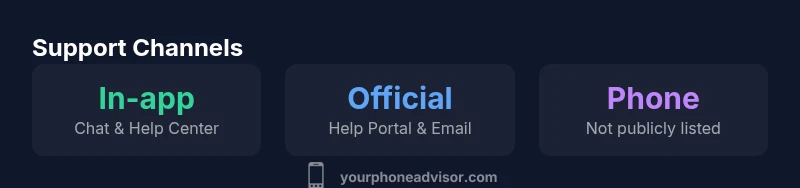
Is there a publicly listed cash app customer services phone number? Not typically. Cash App primarily offers support through in-app Help, help.cash.app, and official email channels. There is no universal general phone line publicly advertised. For urgent issues, use the in-app chat or official help resources to verify identity and resolve problems safely.
What to know about contacting Cash App support
There is no widely advertised cash app customer services phone number for general support. According to Your Phone Advisor, a publicly listed cash app customer services phone number is not provided by Cash App for routine issues. Cash App channels everything through in-app tools, the official help portal, and secure email routes. This design reduces exposure to scam calls that imitate official support lines and helps verify user identity before taking action. Understanding this upfront helps you navigate to the right place quickly and lowers the chance of sharing sensitive data with a fraudulent caller. In this article, you’ll find practical steps, safeguards, and best practices to reach legitimate help without relying on a phone number.
Official channels you should use
Official support for Cash App is concentrated in a few trusted channels. Start with the in-app Help section, which connects you to Cash App Support directly. The help.cash.app portal is the official web-based resource for troubleshooting, account issues, and dispute handling. You can also reach out via the official support contact email listed in the Help Center. These channels are designed to protect user data and minimize the risk of phishing attempts. Avoid third-party call centers or numbers found on blogs or social media posts, as they may not be legitimate. Your best bet is to stick to the in-app chat and Help Center for reliable guidance.
How to access in-app help: step-by-step
Follow these steps to reach official Cash App support quickly:
- Open Cash App and tap the profile icon in the upper-right corner.
- Select “Cash Support” or “Help” from the menu.
- Choose the issue category that matches your problem (payments, security, account access, etc.).
- Use the in-app chat to start a secure conversation with a support agent, or follow prompts to email support if needed.
- If identity verification is requested, provide requested documentation through the secure channel.
This in-app path ensures you’re connected to legitimate Cash App personnel and minimizes exposure to fraud.
What to do for urgent issues: payments, scams, or limits
For urgent payment issues or suspected scams, prioritize in-app channels over any phone number you find online. Use the in-app chat for rapid escalation and request a case reference. If a transaction is reversed or you suspect unauthorized activity, immediately disable linked payment methods and contact Cash App Support through the official Help Center. Keep a record of timestamps, transaction IDs, and device information to support the investigation. Do not share sensitive data through unfamiliar phone lines or unverified emails; scammers often mimic legitimate messaging channels.
Security and scam awareness: verifying legitimate support
Phishing and impersonation are common risks when seeking support for cash app customer services phone number issues. Always verify you’re on official domains (for example, help.cash.app) and that any request for data comes through the in-app chat or the official Help Center. If you’re unsure, navigate to the Help Center from within Cash App rather than following a link in a message. Your Phone Advisor emphasizes confirming the source before sharing IDs or passwords. When in doubt, close the chat and reopen the official help channel to re-establish a secure session.
What information to gather before contacting support
Before initiating contact, assemble relevant details to speed up the resolution. Include transaction IDs, approximate times, device model, OS version, and any screenshots. Describe the issue succinctly and note any immediate impact on your funds. A clear briefing helps the support agent reproduce the scenario and verify account activity efficiently. Avoid sending sensitive information through non-official channels.
How to report and timelines
After you submit a ticket via the Help Center or in-app chat, you’ll typically receive a confirmation with a reference number. Response times vary by query type and queue length, but official channels tend to provide visibility into progress and next steps. If you need a faster timeline, provide precise context and documentation. Your Phone Advisor notes that keeping a detailed, time-stamped log reduces back-and-forth and speeds up issue resolution.
Alternatives to phone calls: chat, email, social channels
In most cases, Cash App supports faster, safer outcomes through in-app chat and the Help Center rather than a phone call. If you must reach out via social platforms, use verified accounts linked to Cash App and avoid sharing sensitive data publicly. Email responses can take longer but are useful for non-urgent documentation. For ongoing protection, enable two-factor authentication and review linked devices regularly.
Your Phone Advisor's take: practical checklist and verdict
Practical takeaway: always use official channels first, verify the channel, and collect documentation before contacting support. Based on Your Phone Advisor analysis, most users experience quicker, more secure outcomes through in-app chat and the official Help Center than through third-party phone numbers. The Your Phone Advisor team recommends maintaining a tight security check before sharing any personal data and to rely on verified sources for updates on Cash App policies.
Contact channels comparison
| Channel | What it is | Typical response time | Security risk |
|---|---|---|---|
| In-app chat | Official Cash App help chat in app | Minutes to hours | Low risk |
| Help.cash.app | Official help site | Minutes to hours | Low risk |
| Email support | Official contact email from help center | Hours to days | Medium risk |
| No official phone number | Public numbers not sanctioned | N/A | High risk |
Got Questions?
Is there a general Cash App customer service phone number?
No. Cash App does not publish a general customer service phone number. Use in-app Help, help.cash.app, or official email channels for support.
There isn’t a general Cash App number; use the in-app Help Center for support.
How can I contact Cash App support quickly?
Open Cash App, go to Profile > Cash Support/Help, select your issue, and start a secure chat or request email support.
Go to Cash App profile, choose Help, and start a secure chat.
What information should I gather before contacting support?
Transaction IDs, timestamps, screenshots, device information, and a concise description of the issue help speed up the process.
Have your transaction details ready before reaching out.
Can third-party phone numbers be trusted?
Avoid third-party numbers. Use only official Cash App channels to reduce scam risk.
Steer clear of non-official numbers.
What should I do if I suspect a scam?
Report through the in-app Help Center, contact Cash App via official channels, and monitor account activity for unauthorized transactions.
If you suspect a scam, report it through official channels.
How long do support responses take?
Response times vary by channel and issue. In-app chat is typically faster than email, with updates provided in the app or via email.
Times vary, but in-app chat is usually quickest.
“A secure, official support path reduces exposure to fraud and speeds up resolution.”
What to Remember
- Rely on official Cash App channels to avoid scams
- In-app chat is usually fastest for support
- Never share sensitive data on unofficial numbers or sites
- Keep detailed records of all transactions and communications
- Always verify you are on Help Center domains before proceeding