Can You Phone Tap with Cash App? A Practical Privacy Guide
Explore whether you can phone tap through Cash App, how tapping happens in real life, and proven steps to protect your device, data, and payments. Your Phone Advisor breaks down risks, detection methods, and best practices for secure mobile payments.


The short answer is no: Cash App cannot enable phone tapping. The app handles payments and transfers, not surveillance. Real risks come from a compromised device, malware, or social engineering, so focus on device and account security to prevent any form of data leakage.
Can you phone tap with Cash App? A reality check
The phrase "phone tap" often conjures a dramatic image: someone secretly listening to your calls or intercepting your microphone to capture private data. In practical terms, can you phone tap with Cash App? No—Cash App does not enable covert tapping of your device or your calls. The app is a financial service that processes payments and bank transfers; it does not include features to monitor or intercept phone audio. However, the real danger lies in how attackers abuse your device rather than the Cash App protocol itself. If your device is compromised by malware, a rogue profile, or social engineering, criminals can access sensitive data, including payment details, messages, or transaction history. This nuance matters because the best defense focuses on your device hygiene and account security rather than searching for a non-existent backdoor in the app.
Your Phone Advisor emphasizes that the risk model for tapping is dominated by how safely you manage your device and credentials. Even if an attacker cannot literally tap Cash App, they can piggyback on weak defenses to read messages, exfiltrate data, or alter transactions. This section will unpack those risks and set up a robust protection plan.
How phone tapping works on mobile devices
"Phone tapping" is not a single, easy-to-detect feature. In the consumer security landscape, the term usually refers to when someone secretly accesses microphone, camera, or data streams on your device. The most common pathways are malware installed through phishing or malicious apps, SIM swapping that redirects authentication, and compromised networks that expose data in transit. In many cases, tapping is the result of a broader compromise rather than a feature added to Cash App. Attackers may exploit weak passwords, unpatched software, or insecure Wi‑Fi to gain access. Understanding these channels helps you prioritize defenses rather than chasing a mythical device-level tap within a payment app.
From a practical standpoint, you should assume potential exposure if your device is rooted/jailbroken, if you routinely sideload apps, or if you ignore software updates. Your defenses must center on secure configurations, regular monitoring, and cautious behavior online. The critical takeaway is that tapping risk is an attacker’s pathway into your device, not a built-in Cash App capability, which informs where your protections should focus.
Cash App and device risk: what to know
Cash App, like other mobile financial services, relies on standard platform security and app-specific protections. The real-world risk isn’t a hidden feature in Cash App but exposure via your device’s security posture. Social engineering, phishing links, and fake support attempts are common methods used to gain access to accounts or persuade users to reveal credentials. If a device is already compromised, attackers may read notifications, intercept one-time codes, or observe screen activity during authentication. Your best protection is layered security: device encryption, a strong lock screen, updated OS, trusted networks, and minimizing sensitive data exposure through notifications. By focusing on these pillars, you reduce the chance that any tapping-like technique succeeds on your device while using Cash App.
In practice, you should treat Cash App as a high-value target—not because it can be tapped, but because it contains financial information. Keeping the app updated, enabling built-in Cash App security features, and separating financial traffic from untrusted apps dramatically lowers risk.
Secure setup: enabling protections on iOS and Android
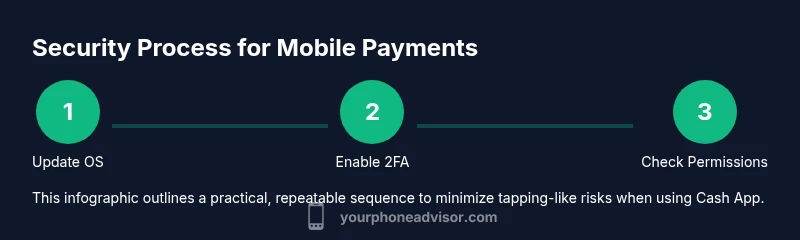
Security starts with a strong foundation. On both iOS and Android, enable a robust lock screen (PIN, password, or biometrics) and keep it unique to your device. Install the latest OS updates and Cash App updates promptly to close known vulnerabilities. Enable two-factor authentication (2FA) for your Cash App account and pair it with an authenticator app if possible. Review app permissions regularly; disable mic/camera access for apps that don’t need them. Use reputable security software if your device supports it, and avoid jailbreaking or rooting your phone, which removes important security barriers. When possible, conduct financial activity over trusted networks, not public Wi-Fi, and consider a mobile VPN for additional protection on public networks.
In short, a secure device environment dramatically lowers tapping risk and protects your Cash App activity. The Your Phone Advisor team recommends a proactive approach: update, lock, verify, and monitor.
Your network and login hygiene
Public networks are a common weak link. Always prefer trusted Wi-Fi or cellular data for Cash App activity. Turn on automatic app updates and enable device encryption where available. Use unique, strong passwords for your accounts and a password manager to store them securely. When logging in, avoid copying or reusing credentials across sites, and beware of phishing attempts that mimic payment platforms. If you receive a suspicious prompt to verify your identity, pause and verify through official channels rather than tapping links in a message. This layer of vigilance reduces the likelihood of attackers intercepting authentication codes or session tokens.
Credential hygiene is just as important as device hygiene. A secure login is your first line of defense against any tapping attempt, malicious login, or credential stuffing.
Monitoring and reacting to suspicious activity
Regular monitoring is essential to catch unusual activity early. Enable push alerts for Cash App transactions and review recent activity in the app frequently. If you notice unfamiliar transactions, contact Cash App support immediately and follow their process to secure the account. Check for unexpected changes in device behavior, such as rapid battery drain, new apps you didn’t install, or unusual notification bursts. Run a malware scan if your device offers one, and consider resetting passwords and re-authenticating devices you’ve approved in the past. In case of suspected compromise, isolate the device from other accounts and inform relevant financial institutions.
Proactive monitoring is a practical habit that reduces risk. The sooner you detect anomalies, the better your chances of limiting damage and regaining control.
Step-by-step security checklist for Cash App users
This section translates the defenses above into a practical checklist you can follow during a single security tune-up.
- Review and strengthen the device lock and biometric settings, then enable auto-lock after a short inactivity period.
- Update OS and Cash App to the latest versions, and confirm there are no pending app permissions you don’t understand.
- Enable Cash App PIN or biometric authentication, and set it to require re-authentication for critical actions.
- Activate two-factor authentication (2FA) and consider an authenticator app for added protection.
- Review app permissions and revoke any unnecessary access, especially mic, camera, and SMS permissions for non-essential apps.
- Use a trusted network and avoid public Wi-Fi for financial transactions; use a VPN if needed.
- Regularly review transaction history and enable alerts for new activity; report anything unfamiliar immediately.
- Keep recovery options up to date and store essential codes securely offline.
- If device rooting/jailbreaking is discovered, revert it immediately and perform a factory reset if appropriate.
- Establish a quarterly security check-in to review settings, permissions, and recent activity.
Estimated total time for this checklist: about 25-40 minutes depending on device familiarity.
Beyond Cash App: general privacy best practices
Protecting Cash App is part of broader privacy hygiene. Keep your device's software current, avoid installing apps from unknown sources, and regularly review app permissions across all installed software. Be skeptical of unsolicited password reset requests or verification prompts, especially those delivered via text or email. Enable device-wide encryption, back up data securely, and minimize the footprint of sensitive information on the device. Consider dedicating a secondary device for sensitive financial tasks if practical.
A holistic privacy posture reduces the chance that tapping-like techniques succeed, not only for Cash App but for all digital services you use. Your best defense is a routine that blends technical controls with prudent behavior.
Putting it all together: practical plan for peace of mind
To translate theory into action, set up a 30‑minute quarterly security sprint focused on device hygiene, app security, and account monitoring. Start by updating software, re-checking protections, and enabling alerts for transactions. Then walk through your cash apps’ security settings and confirm 2FA is active. Finally, review recent activity for anomalies and adjust permissions as needed. This routine keeps tapping risk low while preserving a smooth user experience with Cash App.
The practical plan is to treat security as an ongoing project, not a one-off task. By combining device hygiene, app-level safeguards, and vigilant monitoring, you create a resilient environment for mobile payments.
Note: This article is for educational purposes and does not guarantee that tapping cannot occur. It focuses on minimizing risks and maximizing user control over device security and payment privacy.
Tools & Materials
- Smartphone with latest OS updates(Ensure automatic updates are enabled if possible)
- Strong lock screen (PIN/password/biometrics)(Use a unique method not shared with others)
- Authenticator app for 2FA(Use when available for Cash App and related accounts)
- Cash App security features enabled (PIN/biometrics)(Enable for every login and transaction)
- Secure network (trusted Wi‑Fi or cellular data)(Avoid public networks for financial activity)
- Malware protection (where supported)(Install from reputable sources only)
- Device encryption(Turn on full-device encryption if available)
Steps
Estimated time: 30-45 minutes
- 1
Inspect device security settings
Open your device settings and verify that a strong lock screen is enabled, with biometric options configured if available. Confirm that screen lock requires authentication for purchases and sensitive actions. Reason: A strong lock and biometric checks reduce the chance an attacker can access apps like Cash App after you walk away from the phone.
Tip: Set auto-lock to 30 seconds or less for better protection. - 2
Update OS and Cash App
Check for and install the latest OS updates and Cash App version. Security patches address newly discovered vulnerabilities that could be exploited by malicious software or attackers. Reason: Known exploits are often fixed in updates, preventing a range of tap-like intrusion techniques.
Tip: Enable automatic updates for both the OS and critical apps if possible. - 3
Enable 2FA and authenticator
Turn on two-factor authentication for your Cash App account and set up an authenticator app where supported. This adds a second barrier beyond your password. Reason: Without 2FA, an attacker who gets your password can gain access more easily.
Tip: Store backup 2FA recovery codes in a safe offline location. - 4
Review app permissions
Go through installed apps and revoke unnecessary permissions (especially microphone, camera, SMS). Limit data-sharing to the minimum required by each app. Reason: Excess permissions create leakage paths that attackers can exploit if your device is compromised.
Tip: Use a permission-by-permission audit monthly. - 5
Use trusted networks only
Avoid financial activity on public or shared networks. If you must use a public network, enable a reputable VPN and disable automatic sign-ins for sensitive apps. Reason: Untrusted networks can be used for man-in-the-middle attacks and credential theft.
Tip: Turn off auto-connect to open Wi‑Fi networks. - 6
Monitor account activity
Enable transaction alerts in Cash App and review recent payments and linked bank accounts. Immediately flag unfamiliar activity with your financial institutions and Cash App support. Reason: Early detection improves your chances to stop fraud before it grows.
Tip: Set up daily quick checks for new transfers. - 7
Secure recovery options
Update recovery emails and phone numbers, and keep backup codes offline. Ensure you can reclaim access if credentials are compromised. Reason: Recovery channels are a common target; securing them protects you from lockout thieves.
Tip: Use a dedicated backup method for sensitive accounts. - 8
Avoid jailbreaking/rooting
Do not jailbreak iOS devices or root Android devices, as this removes several built-in security protections and can enable attackers to access apps like Cash App. Reason: Rooted devices expose higher risk of malicious software gaining control over payments.
Tip: If you’ve already rooted, consider a factory reset and restore from a clean backup. - 9
Educate yourself on phishing
Learn to spot phishing attempts that imitate cash apps or payment services. Do not click on unsolicited links; navigate using your browser or app directly. Reason: Social engineering remains a leading cause of account compromise.
Tip: Always verify the source before entering credentials or 2FA codes. - 10
Set a personal security plan
Document a simple plan for quarterly reviews of device security, app permissions, and account alerts. Share the plan with a trusted contact if you want accountability. Reason: A written plan improves consistency and reduces the chance of missed steps.
Tip: Block out calendar reminders for quarterly reviews. - 11
Know when to escalate
If you believe you are under active attack, contact Cash App support immediately, suspend activity on the affected device, and consider involving your bank or financial institution for protection and guidance. Reason: Early escalation minimizes potential losses.
Tip: Have your transaction history handy when you call support.
Got Questions?
Can Cash App tap my phone or access my microphone?
No. Cash App cannot secretly tap your phone or access your microphone as a feature. Tapping, in real-world terms, is typically the result of a device compromise, not an app function. If there is risk, it stems from malware or credential exposure rather than Cash App itself.
No. Cash App isn’t designed to tap your phone. If you’re worried, focus on securing your device and accounts instead.
What signs suggest my device might be compromised?
Common signs include unexpected battery drain, unfamiliar apps, frequent crashes, strange notifications, or unusual data usage. If you see these, run a security check, review permissions, and consider a factory reset after backing up essential data.
Watch for sudden battery drain, new apps you didn’t install, or strange notifications.
How can I protect Cash App from tapping-like risks?
Protect Cash App by enabling strong device security, using 2FA, updating software, reviewing permissions, avoiding suspicious links, and monitoring transaction alerts. These steps reduce the chances of data leakage even if the device is targeted.
Strengthen device security, enable 2FA, and monitor alerts to stay safe.
If I suspect an issue, what’s the first step?
Pause activity, secure the device, run a malware check, and contact Cash App support to report suspected compromise. Changing passwords and re-authenticating devices is also advised.
Pause activity, scan the device, and contact support right away.
Does enabling public Wi‑Fi protection help with tapping risks?
Using public Wi‑Fi increases exposure to risk. If you must use it, enable a VPN and avoid transmitting sensitive data. For regular use, prefer trusted networks or cellular data for financial apps.
Avoid public Wi‑Fi for money apps; use a VPN if needed.
Are there legal protections if I’m a victim of fraud via tapping-like methods?
Yes. Consumers generally have protections against unauthorized transactions and data breaches. Report incidents promptly to your financial institutions and the service provider. Specific remedies depend on jurisdiction and the nature of the breach.
Report promptly; protections depend on local law and the service.
Watch Video
What to Remember
- Understand tapping as a device-compromise risk, not a Cash App feature.
- Prioritize device security and account protections to minimize exposure.
- Use updates, 2FA, and strict permission controls as core defenses.
- Monitor activity regularly and escalate promptly if you detect issues.