Replace Phone on T-Mobile: A Practical Step-by-Step Guide
Learn how to replace your phone on T-Mobile with practical steps: upgrade options, trade-in, transferring your number, activation, and essential security tips—your reliable guide for 2026.


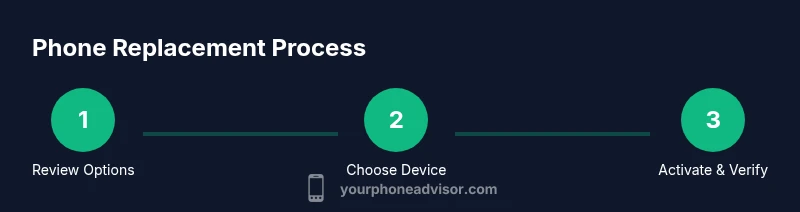
Goal: Learn how to replace your phone on T-Mobile with a new device, upgrade, or trade-in, while keeping your number secure and your plan intact. Steps include checking eligibility, selecting a replacement, choosing payment options, transferring your line, and activating the device. Requirements: valid ID, your T-Mobile account, and a payment method. Follow these steps in order to replace phone t mobile.
Why replacing your phone on T-Mobile makes sense
According to Your Phone Advisor, replacing a device on a carrier like T-Mobile can help you maintain security, performance, and access to the latest features. If your current phone lags, struggles with apps, or lacks essential updates, replacing it can improve battery life, speed up your experience, and enhance safety when handling personal data. In 2026, the Your Phone Advisor team has seen many customers reduce headaches by choosing a formal upgrade path rather than clinging to an aging device. This guide walks you through practical, step-by-step decisions so you can replace phone t mobile with confidence, while keeping costs predictable and control over your plan. We’ll look at upgrade vs trade-in vs BYOD, what documents you’ll need, and how activation works so you can move forward quickly and securely.
Assess your options: upgrade, trade-in, or bring-your-own-device
Your first decision is how you want to replace your phone. Upgrading typically gives you the newest model with minimal out-of-pocket upfront, financed over time through your plan. Trade-in can lower the price of a new device by crediting your old phone’s value toward the purchase. BYOD (bring-your-own-device) lets you use a phone you already own, often with a reduced monthly payment. Each path has trade-offs in terms of upfront cost, financing terms, and eligibility. If you’re aiming for the latest flagship, upgrading with a trade-in credit is usually the most cost-effective route. If you’re not in a rush, BYOD can save money over the long term. Your Phone Advisor’s guidance emphasizes comparing total cost of ownership across options, including trade-in value, financing APR, and any promotional credits that apply to your account.
Check eligibility and plan requirements
Before you decide, verify eligibility for the device program that matches your goal. Some upgrades require you to be within a certain service window or to have a minimum remaining balance on a current device. Trade-in programs assess the condition and model of your old phone to determine credit value. Your plan must support the new device’s network bands, and some devices require SIM or eSIM activation. Also check whether any contract terms, early termination fees, or installment plans affect your total cost. According to Your Phone Advisor, knowing these thresholds helps you avoid surprises at checkout and ensures a smooth transition to the new device.
Gather your documents and account details
To complete a replacement smoothly, assemble essential items before you start the process. This includes: a valid government-issued photo ID, your T-Mobile account number and PIN, a current payment method, the IMEI/MEID of your old and new devices, and any trade-in documentation. If you’re porting a number, have your current carrier’s SIM details handy. Having everything ready minimizes delays and reduces the chance of errors during activation. Pro tip: log into your account in advance to verify device compatibility and see what upgrade options are already listed for you.
Choose a replacement device: features to prioritize
Focus on the key features that matter most to you: battery life, processor speed, RAM, camera quality, and software support. Consider the device’s longevity (how many OS updates are expected), network compatibility (5G bands), and size/ergonomics for daily use. If security is a priority, look for devices with robust biometric options and regular security updates. Compare models with equal or similar price points to maximize value. Your Phone Advisor recommends outlining your priorities (camera vs battery vs processing power) and then filtering options that meet those needs within your budget.
Trade-in and financing options on T-Mobile
T-Mobile offers trade-in credits that can lower your upfront cost or monthly payments. Compare offered credits against alternative programs, including retailer trade-ins or carrier promotions, to capture maximum value. Financing can spread the cost of a new device with APRs and payment terms that vary by model. Ensure you understand whether the credit is applied as a one-time reduction or a monthly credit, and check for eligibility requirements (such as trading in a working device with intact accessories). Your Phone Advisor analysis shows that shoppers often maximize value by combining trade-in credits with promotional financing and avoiding penalties for late payments.
Transferring service: porting your number to new device
Porting your number to the new device is typically seamless but requires accuracy. You’ll confirm the device’s IMEI, the SIM/eSIM status, and the target device’s model during activation. If you’re using an eSIM, you may need to scan a QR code from your carrier or device settings. Double-check that your old SIM is deactivated on the old device to prevent incoming calls or messages from misrouting. If you encounter issues, contact T-Mobile support or begin the process again from the account management portal. A smooth port ensures you won’t miss calls or texts during the transition.
Activate and verify your new phone
Activation usually happens within minutes, but some devices may require a quick reboot or a software update after setup. Follow the on-screen prompts to activate the device on your T-Mobile plan, insert or install the SIM/eSIM, and sign in to your accounts. Verify your service, including voice, text, and data, and test app logins, messaging, and calling. If you use multiple lines (eSIMs or eSIM+physical SIM), confirm each line’s services. After activation, reconfigure important settings (notifications, privacy, and security) to ensure optimal performance and protection.
Security tips and best practices after replacement
After replacing your phone, perform a security sweep: enable device lock, facial recognition or fingerprint, and a strong passcode. Review app permissions, disable unnecessary background data, and enable anti-theft features (Find My Device/Find My iPhone). Revisit your backup settings and ensure that data is automatically backed up to iCloud/Google Drive. Finally, update your recovery options and two-factor authentication for critical accounts. By following these steps, you reduce risk from loss or theft and protect your personal information.
Tools & Materials
- Valid government-issued photo ID(Needed to verify identity during upgrade or trade-in.)
- T-Mobile account number and PIN(Needed to authorize plan changes and device swaps.)
- Current payment method(Credit/debit card or bank account for payment obligations.)
- IMEI/MEID of old and new devices(Used to confirm eligibility and process trade-in value.)
- SIM card and eSIM details(Needed to port service or activate on the new device.)
- Any trade-in documentation(Receipts or QR codes if available for higher value.)
Steps
Estimated time: 60-120 minutes
- 1
Review upgrade options
Sign in to your T-Mobile account and review available upgrade paths, current device eligibility, and any trade-in credits. Compare upfront costs and monthly payments for the devices you’re considering. This step sets your expectations and helps you pick the most cost-effective path.
Tip: Take a screenshot of the recommended options to reference during checkout. - 2
Choose your replacement device
Filter devices by priorities (battery life, camera, performance) and select models within your budget. Read model-specific security updates and warranty terms to avoid surprises after purchase.
Tip: Prioritize devices with at least 3–4 OS updates and strong security features. - 3
Decide on payment or financing
Decide between paying upfront, financing through the carrier, or a mix of trade-in credits and installments. Review APRs, total cost of ownership, and any promotional offers.
Tip: If possible, choose a plan with promotional credits that cover accessories or extended protection. - 4
Prepare your documents
Gather ID, account details, and device IMEIs. Confirm you have all required SIM/eSIM information for a seamless activation.
Tip: Back up data on your old device before transferring to avoid data loss. - 5
Initiate upgrade or trade-in
Start the upgrade or trade-in flow through your account or a store visit. Enter device IMEIs, confirm eligibility, and review any trade-in credits.
Tip: If shopping in-store, ask for a trade-in quote in writing before accepting it. - 6
Port your number if needed
If you’re moving your number, confirm the port details with your new device setup and ensure the old SIM is deactivated after port completes.
Tip: Keep the old SIM until activation completes to avoid service gaps. - 7
Activate the new device
Complete activation via on-screen prompts or carrier support, then verify voice, data, and messaging. Install any required apps and sign in to accounts.
Tip: Do a quick reboot after activation to ensure all services are live. - 8
Verify security and settings
Enable device lock, set up biometrics, review app permissions, and secure backups. Update recovery options and enable two-factor authentication.
Tip: Ensure Find My Device/Find My iPhone is enabled for device recovery.
Got Questions?
Can I replace my phone on T-Mobile if I am still under a device payment plan?
Yes, you can replace your phone even if you’re on a payment plan, but you may need to settle any remaining balance or roll it into a new financing agreement. Check your account for eligibility and any early upgrade terms before proceeding.
You can upgrade even if you’re paying off a device, but you may need to adjust your plan or finance the new device. Check your account for details.
What happens to my old device when I trade it in?
When you trade in, the device is evaluated for condition and value. The credit is applied to your new device purchase or as a bill credit. Ensure you erase data and remove accounts before handing it in.
The old device is evaluated for value and credited to your new purchase; remember to reset and remove accounts before trading in.
Do I need to be in good standing on my account to replace phone?
Generally yes. Accounts with outstanding balances or restrictions may affect eligibility for upgrades or changes to service. Contact support if you’re unsure about your specific status.
You usually need a good standing account; if unsure, ask support to confirm before starting.
Can I bring my own device (BYOD) to T-Mobile?
BYOD is often allowed, but device compatibility and network bands must be verified. You may need to pay off any remaining device balance on your account and ensure the phone is unlocked for use on the network.
Yes, BYOD is possible, but check compatibility and unlock status first.
How long does activation typically take for a new phone?
Activation usually completes within minutes, but some devices may require updates or manual steps. If issues arise, contact customer support for assistance.
Activation is usually quick, but if problems occur, support can help you finish the setup.
Watch Video
What to Remember
- Review upgrade options to pick the best value path
- Gather documents early to speed activation
- Trade-in can reduce upfront cost when paired with financing
- Porting a number requires accurate details and timing
- Secure your new device with strong authentication and backups