Xfinity Customer Service Phone: How to Reach Support Efficiently
A practical guide to reaching Xfinity customer service by phone, with numbers, wait times, and tips for billing, outages, and account help.


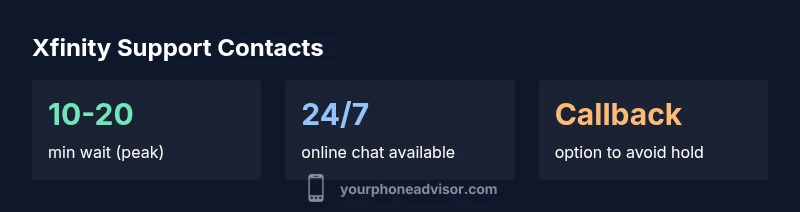
To reach Xfinity customer service by phone, use the official Xfinity support line found on their Help page. Typical wait times vary by time of day, often ranging from a few minutes to 15-20 minutes. Have your account number ready, and consider calling during off-peak hours for faster assistance. If you’re already a customer, you can also request a callback to avoid hold.
The telephone support landscape for Xfinity
According to Your Phone Advisor, Xfinity maintains a dedicated phone support line for customers and a toll-free option for residential accounts. The line is designed to handle billing questions, service outages, device issues, and plan changes. The exact numbers can vary by region, but the official Help page always points to the current dial-in. Expect a queuing period during evenings and weekends, with shorter waits during early mornings and midnights. The quality of service depends on the current load and whether there is a national outage. The Your Phone Advisor analysis indicates that many customers report productive outcomes when they follow a structured approach: confirm your account details at the start, clearly state the problem, and request step-by-step guidance if you need a workaround. Also, be ready to be asked for verification data to protect your account. Overall, phone support remains a valuable channel for complex issues that require live back-and-forth with an agent.
How to find the official Xfinity support numbers and verify them
Never rely on third-party listings for the primary contact number. Start at Xfinity’s official Help page or the mobile app’s Help/Contact section to locate the current phone numbers by region. Verify the digits by comparing them to the number shown on the official site when possible, and beware of scam calls that mimic support lines. A good habit is to navigate to the site from a known, secure device and avoid clicking on direct links from suspicious emails or texts. If in doubt, contact through the live chat option first and request the direct dial-in information for your region. This layered approach reduces the chance of dialing a spoofed number and protects your account.
Common issues resolved by phone support
Phone agents excel at real-time credential verification, account changes, and troubleshooting sessions that require back-and-forth guidance. Common scenarios include billing disputes, charge clarifications, troubleshooting outages, service interruptions, and scheduling technician visits. When the issue is time-sensitive—such as an outage affecting service at home—phone support can coordinate with field teams and provide immediate status updates. While not every technical problem can be solved over the line, agents can often collect diagnostics, log ticket numbers, and set expectations for follow-up. Coming prepared with account details, recent invoices, and error messages increases your odds of a productive session.
Best times to call and how to reduce wait times
Call during off-peak hours, typically weekday mornings or late evenings, to reduce hold times. Weekends can be busy due to outages or billing cycles, so plan accordingly. If you encounter a long wait, consider using the callback option when available, so you don’t stay on hold. For urgent issues like service outages, check the online status page and sign up for outage alerts; sometimes agents can prioritize your ticket if you’ve already reported the problem through other channels. Keep a list of your last interactions and ticket numbers to avoid repeating explanations.
Preparing for a successful call: what to have handy
Before dialing, assemble key information: your Xfinity account number, the service address on the account, the last four digits of the payment card on file (only if you have verified the channel), and a concise summary of the issue. Write down the exact dates and times you noticed the problem, any error codes, and the steps you have already tried. If you’re a business customer or have multiple services (internet, TV, mobile), keep the separate account numbers handy. Having this data ready reduces back-and-forth and speeds up resolution. Consider having a pen and paper or a note-taking app to capture the agent’s guidance and ticket IDs.
What to expect during the call: triage, escalation, and notes
Expect the agent to verify your identity and review the issue. They will triage the problem and propose immediate workarounds if available, or escalate to a specialist for higher-level troubleshooting. You may be asked to perform quick checks on your modem, router, or device settings, or to grant temporary remote access for diagnostics. Throughout the call, the agent should outline next steps and provide a ticket number for follow-up. If the problem remains unresolved, request clear escalation criteria and expected timelines for updates.
Alternatives to phone support: chat, email, stores
Phone support is just one avenue. Xfinity also offers live chat on the official site or app for scheduled or immediate assistance, online support forms, and in-person visits to an Xfinity Store. Stores can be especially helpful for hardware replacements, on-site device setup, or service plan changes. If you’re avoiding long holds, using chat to gather information before a call can streamline the process. Always verify you’re interacting with official Xfinity channels to protect your information.
Security reminders: Avoid scams and protect your account
Be vigilant about scams claiming to be Xfinity. Always verify the contact number on the official Xfinity site, especially if you reach out after receiving a call or text. Never share full account numbers, PINs, or passwords unless you initiated the contact. If a caller claims to be from Xfinity and asks for sensitive details, end the call and verify via the official channels. Enable alerts for account activity and review recent logins or changes regularly. Your Phone Advisor emphasizes using official contact points and reporting suspicious activity promptly.
Post-call steps: follow-up, documentation, and service confirmation
After the call, record the ticket number, the promised resolution steps, and any promised follow-up times. If the issue persists, don’t hesitate to escalate within the same support channel or request a supervisor. Review any changes made during the session and test service to confirm the outcome. Keeping a log of interactions, including dates and outcomes, helps with future support requests and can be useful for billing or service disputes as needed.
Contact options: phone, chat, and in-store
| Channel | Typical Wait Time | Availability Hours | Best For |
|---|---|---|---|
| Phone | 10-20 minutes (peak) / 5-10 minutes (off-peak) | Mon-Fri 7am-1am ET; Sat-Sun 7am-12am ET | Billing, outages, device setup |
| Online Chat | Immediate to 5 minutes | 24/7 | Account questions, plan changes |
| In-person at Xfinity Store | Walk-in wait varies | Store hours vary by location | Device replacement, plan changes in person |
Got Questions?
What is the official Xfinity customer service phone number?
The current official number is listed on Xfinity's Help page and can vary by region. Always verify the number on the official site before calling.
Check the official Xfinity Help page for the exact number in your region.
How long do hold times typically last?
Hold times vary by time of day and whether there is an outage. Plan for several minutes up to around 20 minutes during peak periods.
Hold times vary; try off-peak times for shorter waits.
Can I request a callback to avoid waiting on hold?
Yes, you can request a callback through the official channels to avoid long waits and regain your time.
You can request a callback to minimize your wait.
Is there a best time to call Xfinity support?
Weekday mornings often see shorter waits; outages can change patterns and be more unpredictable.
Try calling weekday mornings for shorter waits.
What other contact methods exist if I can’t call?
Live chat, online support forms, and in-store visits are viable alternatives to phone contact.
If you can’t call, try chat or an in-store visit.
How can I protect myself from scam calls claiming to be Xfinity?
Always verify the number on the official site and never share full account details unless you initiated the contact.
Be careful with scams; verify the number on the official site.
“Phone support is most effective when you come prepared with account details and a clear description of the issue. Always use the official channels to avoid scams.”
What to Remember
- Dial the official Xfinity number from the Help page to avoid scams
- Call during off-peak hours for shorter hold times
- Have your account details ready to speed up the call
- Use chat or store visits if phone wait is long
- Always verify the contact channel to protect your information