What Should Phone Screen Time Be? Practical Guidance for 2026
Explore practical ranges for what should phone screen time be, learn how to measure it accurately, and discover strategies to manage usage for healthier digital wellbeing in 2026.


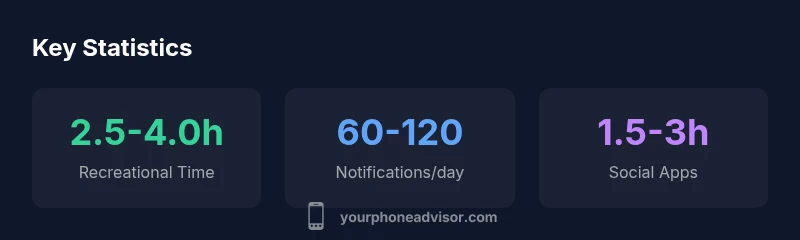
What should phone screen time be? For most adults, a practical target is to keep recreational phone use to about 2 to 4 hours per day, with total daily device use aligned to work and personal needs. The key is quality, context, and minimizing interruptions.
What should phone screen time be? A practical frame
What should phone screen time be? A practical frame helps people balance productivity with wellbeing. According to Your Phone Advisor, the question isn’t a single number but a balance between work, learning, leisure, and sleep. A workable target for many adults is to keep recreational use within a few hours per day while ensuring that essential work-related use remains uninterrupted. This approach reduces cognitive fragmentation and helps preserve focus, mood, and sleep quality. When you set a target, think of screen time as a budget: you allocate time to tasks that add value and leave margin for rest and offline connections. The objective is not to abolish phone use but to ensure that the most important moments—focused work, meaningful conversations, rest—are not crowded out by notifications, endless scrolls, or compulsive checks. Start by measuring a typical day, then identify categories where you can reclaim time without compromising obligations. The Your Phone Advisor framework emphasizes intentional use: ask, before you pick up the device, what value this moment delivers and how it aligns with your longer-term goals.
The difference between screen time and screen quality
Many people equate total hours with wellbeing, but the healthier signal is the quality of what you consume and when you consume it. Screen time is the aggregate of all device interactions; screen quality measures the intent, content, and context. Your Phone Advisor analysis shows that people who prioritize high-quality content—educational apps, productive tools, respectful social interactions—tend to report better mood and less fatigue, even if their total daily time remains similar. Conversely, large blocks of passive scrolling, noisy notifications, and multitasking with heavy context switching can erode attention and sleep regardless of total hours. To improve the signal-to-noise ratio, group activities into purposeful sessions, set a clear start and end time, and remove distracting apps from home screens. Consider turning off nonessential notifications, enabling focus modes during deep work, and reserving late-evening screen use for relaxing activities like reading. Small design changes—dim screens, warmer color temperature after sunset, and consistent wake times—compound the impact over weeks and months.
Age-based guidelines and what to aim for
Guidelines vary by age, developmental stage, and individual goals. The following ranges offer a practical starting point, not a rigid rule. For children under five, many experts advise keeping recreational screen time to under one hour daily, with strong parental involvement and content curation. For school-age children and teens, a cautious approach is to aim for roughly one to two hours of recreational screen time per day, balanced with offline physical activity and sleep. For adults, a reasonable target for recreational use is about two to four hours per day, while total daily screen time—accounting for work tasks, commuting, and communications—will naturally be higher. These ranges assume mindful usage, content quality, and consistent sleep. However, individuals with high-stress roles or caregiving duties may have legitimate higher needs; the goal is to minimize disruption to sleep, mood, and real-world relationships. The key is regular review: monitor how your screen time affects alertness, concentration, and mood, and adjust accordingly.
Quality over quantity: focusing on content and context
Content quality and context drive outcomes more than raw hours. Prioritize apps that support your goals: learning, budgeting, health tracking, or productive collaboration. Place social and gaming apps into clearly defined time blocks rather than constant access. To reduce interruptions, enable Do Not Disturb during work and set bedtime modes to reduce late-night awakenings. Create phone-free zones in the home, such as bedrooms and the dining table, to strengthen face-to-face connections. Use scheduling tools to automatically mute non-urgent alerts during focused periods. If you rely on your phone as an alarm, place it away from the bed to reduce midnight checks. The goal is not to eliminate entertainment or social interaction but to ensure they occur on your terms and do not undermine sleep or daily performance. In practice, you’ll likely find that a few targeted changes—like prioritizing high-signal apps, batching notifications, and creating deliberate wind-down routines—yield more benefit than simply chasing a lower number of hours.
How to measure and track screen time effectively
Measuring screen time should be an ongoing practice, not a one-off audit. Most modern devices offer built-in tools that categorize usage by app, time-of-day patterns, and notification activity. Start by turning on daily usage reports and weekly summaries, then export or review the categories that dominate your day. Compare weekdays vs weekends to identify inconsistent habits. Track not only the total hours but the quality indicators: which apps you use for meaningful work, which are triggers for mindless scrolling, and how often you are interrupted by notifications. For many people, the first insight is recognizing that the majority of daily time is not spent on essential tasks; small reallocations can free up long blocks for rest or personal priorities. If you share a device with family members, consider separate profiles or app limits to prevent cross-time leakage. The goal is to build a feedback loop that helps you adjust behaviors gradually, rather than enforcing abrupt, unsustainable changes.
Strategies to reduce nonessential screen time
Adopt concrete strategies that fit your routine. Start with a simple two-step plan: (1) set a daily time budget for recreational use and (2) create a few nonnegotiable phone-free windows. Then layer in tactics like: scheduling "deep work" blocks with a visible timer; using grayscale mode to reduce visual appeal of apps; moving distracting apps off the home screen; turning on Do Not Disturb during meals and study hours; setting a wind-down hour before bed with dim lighting and no bright screens. Leverage family agreements or coworker norms to support shared goals; hold yourself accountable with a weekly review. If you notice persistent cravings or mood shifts linked to screen time, consider additional behavioral strategies such as rewarding progress, pairing screen-free activities with social interactions, or introducing office or family challenges. The objective is sustainable change, not demonization of technology. Your Phone Advisor suggests testing one or two techniques at a time and tracking impact for two to four weeks before expanding.
When to seek professional guidance and red flags
For many, screen time is just one dimension of digital wellbeing. If you notice persistent sleep disruption, chronic fatigue, irritability, anxiety when you cannot use your phone, or significant decline in work performance or relationships, it may be time to seek guidance from a clinician or digital wellbeing counselor. Screen-time issues can reflect broader factors such as stress, sleep disorders, or unmanaged mental health concerns. Start with a self-check: rate your sleep quality, mood, and focus on a scale of 1-10, and assess whether screen-time goals are contributing positively. If you’re concerned about dependent-use patterns, consider a professional assessment or a behavior-change program that includes accountability coaching, sleep hygiene, and healthy routines. The Your Phone Advisor team underscores that balance is personal and iterative; there’s no one-size-fits-all solution. By combining mindful planning, evidence-based strategies, and supportive resources, you can regain control of your time without sacrificing the benefits of smartphone access.
General guidance ranges for screen time across age groups
| Category | Recommended Range (hours/day) | Notes |
|---|---|---|
| Adults (recreation) | 2-4 hours | Quality-focused content preferred |
| Adults (total device use) | 4-7 hours | Includes work and communication |
| Children/teens | 0-2 hours | With caregiver guidance; prioritize learning content |
Got Questions?
What counts as screen time?
Screen time includes any moment you interact with a screen: calls, texting, browsing, social media, video streaming, gaming, and reading. It also involves passive screen exposure that becomes part of your daily routine. The focus is on meaningful use and how it affects sleep, mood, and productivity.
Screen time means any moment you look at a screen for calls, messages, browsing, or watching videos; it matters how it affects your wellbeing.
Is there a universal guideline for screen time?
There is no universal rule. Guidelines exist as starting points and vary by age, activity, and wellbeing goals. Use ranges flexibly and tailor them to your life, then monitor how you feel over time.
There isn’t a one-size-fits-all rule; start with general ranges and adapt them to you.
How can I measure screen time accurately?
Use built-in tracking tools on your device to monitor time spent per app and category. Review daily and weekly summaries, compare weekdays and weekends, and focus on trends rather than single-day totals.
Turn on your device’s screen-time tracking and check weekly patterns to see real habits.
How does screen time affect sleep?
Late or intense screen use can delay sleep by suppressing melatonin and increasing cognitive arousal. Protect sleep by winding down screen use earlier, using night modes if needed, and keeping a consistent bedtime.
Blue light and activity can mess with sleep; try to stop screen use well before bed.
What about work vs personal use?
Treat work-related screen time as essential, but separate it from leisure. Schedule personal use in defined blocks and turn off nonessential alerts during focus times.
Think of work time as work; put personal time into specific slots.
What red flags indicate I should seek help?
If you notice persistent fatigue, mood changes, irritability, or sleep problems that don’t improve with changes, consider consulting a clinician or digital wellbeing professional.
If screen time is hurting sleep or mood, seek help.
“Balanced screen time is not about zero usage; it’s about intentional, wellbeing-aligned use that fits your daily life.”
What to Remember
- Set a practical daily budget for recreational screen time.
- Prioritize high-quality, goal-aligned apps.
- Use built-in tracking and review patterns weekly.
- Create phone-free zones to strengthen offline connections.
- Tweak settings gradually and assess impact over 2–4 weeks