Phone Fast Charge: Safe Steps to Speed Up Your Phone's Power
Discover how to charge your phone faster without sacrificing battery health. This practical guide covers standards, cables, settings, and best practices for safe phone fast charge.


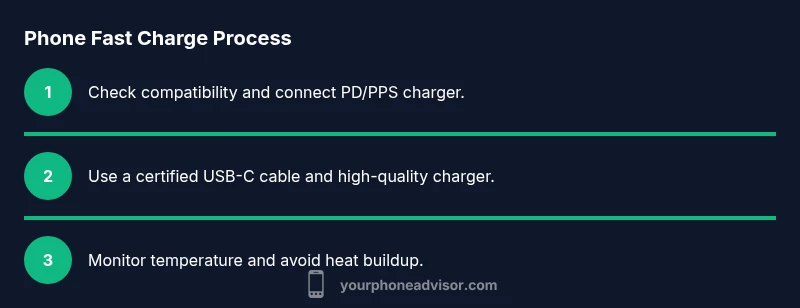
Goal: learn how to achieve phone fast charge safely by using a compatible fast charger, high-quality cable, and the device's built-in power management. Requirements: a USB-C PD/PPS charger, a capable USB-C cable, and your phone's fast-charge setting enabled. This guide walks you through the what, why, and how of charging at higher speeds. We’ll cover charger compatibility, optimal wall outlets, and how to avoid heat buildup that can shorten battery life.
What is phone fast charge and why it matters
Phone fast charge is the practice of delivering power to a mobile device at higher-than-basic levels using compatible chargers and cables. When done correctly, you can reach a practical 50–80% charge quickly, without overheating or stressing the battery. The goal is to balance speed with long-term health, so you get more usable life out of the battery between full recharges. In this section, we outline the core concepts, how charging speed is measured, and why compatibility matters for everyday use.
Standards and compatibility you should know
The most common fast-charging standard today is USB-C with Power Delivery (PD). PD negotiates the maximum safe wattage between charger and device. Some devices also use PPS (programmable power supply) on top of PD to fine-tune voltage and current for even faster charging with less heat. While many phones support these standards, not all chargers offer the same performance. Always verify that your charger and cable together support the device's charging profile.
How to assess charger quality and cable reliability
Cheap, uncertified accessories are a major reason for slower speeds or safety issues. Look for chargers that explicitly advertise PD or PPS compatibility, and cables rated for high current (look for 3A or higher). Check for official certifications from recognized standards bodies, and avoid knock-offs that omit safety features like over-voltage protection. A quality charger combined with a high-grade cable makes a meaningful difference in speed and safety.
Preparing your device: software settings and health checks
Before you rely on fast charging, make sure your device is in good condition and configured for speed. Enable any adaptive charging or battery optimisation features your OS offers. These features throttle charging based on temperature, time of day, and usage patterns to protect battery health. If your device has a battery health statistic, review it to gauge whether fast charging remains beneficial over time.
Hardware you need: chargers, cables, and accessories
The core trio for phone fast charge is a PD/PPS charger, a USB-C cable, and a compatible device. Use a charger that can deliver at least the device's maximum supported wattage, and pair it with a cable that can handle high current. For travel, carry a compact PD charger that supports both wall outlets and car adapters. Keep extra cables for different devices or emergencies.
Best practices to minimize heat and battery wear
Heat is the enemy of lithium-ion cells. Avoid charging on soft surfaces, in direct sunlight, or in a hot car. If possible, remove bulky cases during charging to improve heat dissipation. Don’t let your phone charge to 100% all the time; consider stopping at around 80–90% for daily use, especially on hot days or when you know you’ll be plugged in for long stretches. Proper cooling and mindful charge levels extend battery life.
Diagnostics: how to tell you are fast charging correctly
You can observe the charging speed by noting how long it takes to move from a low to mid-range level. If you see the percentage jump quickly and the device feels warmer but not hot, you are likely charging at a healthy rate. Use built-in battery stats or third-party apps to verify that the charger and cable are delivering the expected wattage, and watch for warning signs like rapid temperature increases or abnormal battery drain after charging sessions.
Travel, car charging, and on-the-go tips
When you are traveling, a PD-enabled car charger can keep you powered on the road. Plug into a port with sufficient wattage and use a well-reviewed cable to avoid throttling. If your car only provides limited power, consider charging in shorter bursts or using a portable power bank for times when you cannot access a charging outlet. Always pack a spare cable to avoid compatibility issues in unfamiliar outlets.
Myths, tips, and a practical daily routine
There is a lot of folklore about fast charging. The truth is that modern systems are safe when used with proper accessories and temperature control. A simple daily routine is to start charging when you are near a plug, keep the device out of direct heat, and stop charging at 80–90% for most days. This approach minimizes stress and helps preserve battery life over months and years.
Tools & Materials
- USB-C PD/PPS charger(Output 18W+ recommended; PD/PPS compatible.)
- USB-C to USB-C cable(Certification; 3A+ current rating.)
- Wall outlet or power strip(Stable power source; avoid daisy chains.)
- Car charger with PD support(For travel; ensure PD support.)
Steps
Estimated time: Estimated total time: 15-25 minutes
- 1
Check device compatibility
Verify your phone supports fast charging and locate the device's max supported wattage. If your device lists a PD or PPS support in settings, note it. Also confirm you have a PD/PPS charger and a USB-C cable that can handle higher current. If unsure, consult the device's official spec sheet or support page.
Tip: If you can't confirm wattage, start with a modest 18W USB-C charger to test performance. - 2
Choose the right charger
Select a charger that supports USB-C PD or PPS and can deliver at least the device's max supported wattage. Avoid inexpensive adapters lacking safety protections. Prefer chargers from reputable brands with clear safety certifications.
Tip: Check that the charger explicitly lists PD or PPS in its specifications. - 3
Pick a quality cable
Use a USB-C to USB-C cable rated for high current (2-3A or more). A poor cable can bottleneck charging or fail safety checks, even with a good charger.
Tip: Choose cables that are USB-IF certified or have visible current ratings. - 4
Enable fast charging on the device
Ensure the device’s fast-charge feature is enabled in battery settings. Some devices auto-enable when a compatible charger is detected; others require a toggle.
Tip: If in doubt, perform a 20% to 80% test in a cooler environment to confirm speed. - 5
Charge in a cool environment
Keep charging away from direct heat sources; a warm room helps maintain safe charging rates. If the device becomes very hot, pause charging and inspect the charger and cable for faults.
Tip: Remove bulky cases if they trap heat during charging. - 6
Monitor and end at 80–90%
For routine fast charging, stopping at 80–90% reduces stress on the battery and can improve long-term health, especially in hot conditions or long charging sessions.
Tip: If you need a full 100%, do so when temperature is stable and ventilation is good.
Got Questions?
Does fast charging harm battery health in the long term?
Modern fast charging uses safe charging curves and smart temperature monitoring. When used with certified chargers and within device limits, it does not inherently harm the battery. However, sustained heat and over-discharging cycles should be avoided.
Yes, modern fast charging is designed to be safe when you use the right charger and keep the device cool.
Is USB PD the only standard I should look for?
USB Power Delivery (PD) is the most common standard for fast charging on Android and iPhone devices, often with PPS variants. Some devices also support Quick Charge, but PD compatibility is the most universal.
PD is the norm for most devices, but some models may support additional standards.
Can I fast charge in a car?
Yes, as long as your car charger supports USB-C PD or PPS and your cable is appropriate. Car charging can be slower if the car’s power supply is limited.
Yes, car charging can be fast if you have a PD-enabled charger.
Why does my phone get hot while charging and still charge slowly?
If charging is slow or the phone heats excessively, the device may reduce power draw to protect the battery. Check for faulty cables, charger compatibility, or a software setting that caps charging.
Sometimes heat triggers safety limits that slow charging.
What wattage should I use for best results?
Use a charger that matches your device's max support. If in doubt, 18W-30W is a safe starting range for many devices, with higher wattage available for newer phones.
Start with the charger your device supports and adjust based on performance.
How can I reduce heat while fast charging?
Charge in a cool room, remove bulky cases, and avoid charging under direct sunlight or in a warm environment. Using a lower-power charger for comfort can help manage heat.
Keep things cool and you'll charge faster and healthier.
Watch Video
What to Remember
- Know your device's max fast-charge wattage and match a charger accordingly
- Use PD/PPS chargers and certified cables for safety
- Charge in cool environments to minimize heat
- Limit to around 80-90% for daily fast charging to preserve battery health