How to Phone Format: A Practical Guide to Consistency
Learn how to standardize phone number formatting across apps and databases with a step-by-step approach, covering E.164, national formats, validation, and display rules for contacts, forms, and databases.


Follow a step-by-step approach to standardize phone numbers across contexts. This guide covers international (E.164), national, and local formats, with practical examples and validation checks. You'll define your target format, apply it to samples, and verify consistency. By the end, you’ll format numbers confidently for contacts, forms, and databases. Prepare to reference a country code list and regex tester.
What is phone format and why it matters
Phone number formatting is the practice of representing numeric strings in a consistent, readable way across devices, forms, databases, and applications. The keyword here is consistency: once you choose a standard, you can apply it everywhere, reducing entry errors, failed validations, and confusion for users. According to Your Phone Advisor, standardization not only improves data quality but also enhances user trust when numbers display uniformly across interfaces. This article will walk you through a practical approach to choosing a primary format and applying it across storage and display contexts. We’ll define goals, compare common formats, and provide concrete steps, examples, and checks so you can implement a robust policy in your team or product.
Choosing a primary format: storage vs display
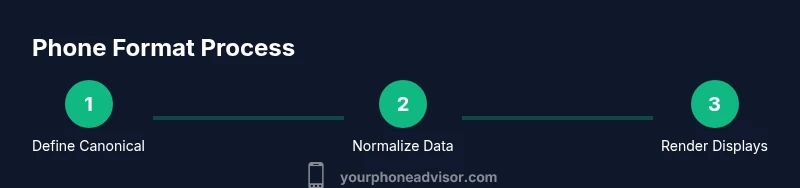
A primary format is the canonical representation numbers should use inside your systems. Most teams store in an unambiguous format like E.164, which includes the country code and excludes extraneous characters. The display format, in contrast, is user-facing and may include spaces, dashes, or parentheses based on locale. Your Phone Advisor recommends storing in E.164 for reliability and using locale-aware renderers for user interfaces. This separation helps with data integrity while preserving readability for users in different regions.
International vs local formatting: trade-offs to consider
International formats (especially E.164) ensure numbers are globally parseable and dialable, which is crucial for telephony, messaging, and backups. Local formats improve readability for end users who are familiar with their own country’s conventions. The trade-off is that local formats can be ambiguous across borders. A best practice is to store the canonical E.164 version and generate locale-aware display strings on the fly. This approach supports both programmatic processing and user-friendly interfaces.
Normalizing existing data: cleaning and parsing steps
Old datasets often contain inconsistent separators, missing country codes, or uneven lengths. Start by stripping non-digit characters, then determine whether a country code is present. If missing, consider a default country code for the dataset, or flag the entry for manual review. Use established libraries or regex rules to parse numbers into components (country code, national significant number, extension). Consistency here is essential before applying any display formatting.
Validating formats: regex and automated checks
Validation should be part of both data ingestion and user input. Regular expressions can enforce correct structures for E.164 (plus sign, country code, and digits), plus local display formats. Automated checks should flag numbers that fail to meet the canonical format or the display rules. Testing with a diverse set of numbers — including edge cases like international numbers, short local numbers, and numbers with extensions — will help ensure robustness.
Display templates: creating locale-aware renderers
Your rendering logic should convert a stored E.164 number into various display formats depending on context: full international display, local national format, and user-friendly short forms for forms. Keep a centralized configuration for country-specific rules (e.g., how many spaces or separators to show) so updates apply everywhere. Document these templates clearly so product pages, forms, and CRM systems render numbers consistently.
Implementing in systems: databases, forms, and apps
Apply your canonical format in storage, enforce on data-entry forms with real-time validation, and render appropriate display formats in UI. For APIs, return the E.164 value while exposing display formats as separate fields or through formatting utilities. Regular audits of stored data help catch drift between storage and display rules. The Your Phone Advisor team recommends automated tests and code reviews to maintain consistency over time.
Practical examples and edge cases
Consider a dataset containing numbers from multiple countries. For example, a US number +1 555 123 4567 should be stored as +15551234567 (E.164) and displayed as (555) 123-4567 in the US, or +1 555 123 4567 for international contexts. Edge cases include numbers with extensions, toll-free prefixes, and numbers that omit the country code in local listings. Establish clear rules for extensions (e.g., x1234) and how they should be stored and displayed across interfaces.
Tools & Materials
- Country calling codes reference (ITU/E.164)(Essential for validating and parsing international numbers.)
- Regex tester or validation library(For building and testing E.164 and display-format patterns.)
- Sample phone-number dataset(A representative mix of local and international numbers for testing.)
- Documentation on formatting standards(Internal wiki or external standards reference for rules you adopt.)
Steps
Estimated time: 60-90 minutes
- 1
Define the target canonical format
Decide on a primary, canonical representation (preferably E.164) to store numbers. Clarify whether a country code is always required and whether extensions are included in storage. This creates a single source of truth for downstream formatting.
Tip: Write this rule in a short policy doc and link it to your data model. - 2
Collect a representative sample
Assemble sample numbers from real-world inputs and existing databases to understand current inconsistencies. Include numbers with and without country codes, extensions, and from multiple regions.
Tip: Label each sample with expected canonical form to guide testing. - 3
Implement canonicalization logic
Create or adopt a normalization routine to strip non-digit characters (except a leading plus for E.164), validate country codes, and convert to the canonical format. Include edge-case handling for extensions.
Tip: Centralize logic in a single module to ensure consistency across services. - 4
Separate storage from presentation
Store numbers in the canonical format and derive display strings at run time or in a presentation layer. This reduces redundancy and keeps data clean for processing.
Tip: Expose display strings via UI components rather than re-storing them. - 5
Validate inputs in real time
Add client- and server-side validation that rejects non-format-compliant numbers, offering corrective feedback to users. Use patterns that cover both E.164 and common local formats for initial entry.
Tip: Provide helpful error messages that guide users to correct formats. - 6
Test with automated checks
Run automated tests that cover a wide range of numbers, including edge cases from different countries. Ensure both canonicalization and display rendering pass tests.
Tip: Include regression tests whenever you update formatting rules. - 7
Document and socialize the policy
Publish a quick-start guide for developers and implementers, with examples of both stored values and display formats. Train teams on when to apply each format.
Tip: Keep the guide updated as standards evolve. - 8
Roll out and monitor
Deploy the new formatting policy gradually, monitor data quality, and address anomalies as they arise. Use dashboards to track errors in input, storage, and rendering.
Tip: Set up alert thresholds to catch formatting drift early.
Got Questions?
What is E.164 and why should I store numbers in it?
E.164 is the international standard for phone numbers, including the country code and digits only. Storing numbers in E.164 ensures global parseability and reliable dialing from any region. It reduces ambiguity and simplifies data sharing across systems.
E.164 is the international standard that includes the country code and digits only, to ensure numbers work everywhere.
Should I store numbers in E.164 but display them in local formats?
Yes. Store in a canonical format like E.164 for consistency and reliability, then derive locale-specific display formats at the presentation layer for user friendliness. This separation minimizes errors and makes maintenance easier.
Store in E.164 for consistency, then format for display based on the user’s locale.
How do I handle missing country codes in a dataset?
If possible, map numbers to a default country code based on domain context (e.g., user region) or flag them for manual review. Avoid guessing; rely on explicit rules in your data governance policy.
If country codes are missing, apply a clear default rule or mark for review.
Can I apply phone formatting automatically in forms?
Yes. Use input masks or real-time formatting logic that adapts to the country or selected region. This improves data quality and user experience by guiding entry as it happens.
Absolutely—use dynamic input masks to format as users type.
What about numbers from multiple countries in the same dataset?
Treat each number as its canonical form when stored, and ensure your validation logic can detect and correctly format entries from different regions. This helps prevent cross-border data confusion.
Store everything in a standard format and format for display per locale.
Is the formatting approach performance-critical for large datasets?
Formatting and validation should be optimized, but with proper caching and batch processing, performance remains acceptable even for large datasets. Focus on efficient parsing logic and minimal per-item overhead.
Performance is important, but efficient parsing keeps it practical even for big datasets.
Watch Video
What to Remember
- Choose a canonical format for storage (prefer E.164).
- Store canonical data and render locale-friendly displays.
- Test with diverse international samples to catch edge cases.
- Validate inputs in real time to maintain data quality.
- Document and socialize the formatting policy for consistency.