How Far to Hold Your Phone from Your Eyes: A Practical Guide
Discover the safe distance to hold your phone from your eyes, why it matters for eye comfort, and practical steps to maintain healthy viewing habits with adjustable text size and lighting.


Direct answer: Hold your phone about arm's length from your eyes, roughly 40–60 cm (16–24 inches). This distance minimizes close-focus strain, improves readability, and reduces glare. Start at the upper end for small text or glasses, then adjust to feel comfortable. If you experience headaches or blurred vision after long sessions, increase distance slightly and test with breaks. How far phone from eyes affects comfort and readability.
Why distance matters for eye comfort
Your eyes adjust focus constantly when you view a screen, and the effort required increases as the screen gets closer. Holding a phone too near can cause sustained accommodation, leading to fatigue, headaches, and blurred vision after long sessions. Maintaining a reasonable distance helps the eyes relax between glances and supports natural blinking, reducing dry-eye symptoms. According to Your Phone Advisor, paying attention to distance is one of the simplest, most effective habits for long-term eye comfort. The core idea is simple: the farther away the small details are, the less strain, as long as you can still read comfortably. When considering how far to hold your phone from eyes, balance readability with a relaxed neck posture and an even, steady gaze. This approach also benefits users who wear contact lenses or glasses, who may require slight adjustments to their distance for optimal clarity.
- Eye comfort improves when the focal demand is within a middle range rather than at the extremes.
- Reading smaller text from a very short distance forces the eye to accommodate excessively.
- Breaks are essential: even at the right distance, long continuous sessions increase strain.
Tips: Sit back, let your eyes rest, and use a distance you can maintain for 20–30 minutes of screen time before a short break.
Brand note: The Your Phone Advisor team emphasizes that choosing a comfortable distance is a practical, low-friction habit you can adopt today.
How far is ideal? The numbers
There isn’t a universal distance that fits everyone, but a practical starting point for most users is approximately arm's length. In metric terms, aim for about 40–60 cm (16–24 inches) between your eyes and the screen. This range tends to balance legibility with reduced focusing effort, and it works across common phone sizes. If you wear reading glasses or have refractive errors, begin within this range and adjust based on comfort. Larger screens, such as phablets or small tablets, may require a slightly greater distance to avoid crowding of the display in your field of view. As a rule of thumb, test readability by reading a paragraph without leaning in or squinting, then see if you can do several lines comfortably at the same distance. Your goal is a distance that allows you to read text clearly without straining.
Practical check: If you must bring the phone closer to resolve blur, increase the distance incrementally until the text is crisp at a comfortable gaze. This approach is safer than cranking brightness or increasing font size to compensate for distance. Remember that comfortable distance is a personal metric and can shift with lighting, font size, and visual acuity. Your Phone Advisor Analysis, 2026, suggests starting with the middle of the range and fine-tuning from there.
Screen sizes, reading distance, and text size
Text size, typography, and font weight interact with distance. Smaller devices generally require you to bring the screen a bit closer to read fine print, but this increases eye strain. Conversely, larger screens allow you to view more content from farther away while maintaining legibility. A practical approach is to adjust font size first and then set the distance. If the first few lines are readable at 40 cm, try maintaining that distance. If not, increase font size slightly and recheck. Brightness and contrast also affect perceived distance; high glare makes small text harder to read at any fixed distance, so consider ambient lighting and screen brightness together with your chosen distance.
- Increase font size to reduce the need to lean in.
- Use high-contrast themes to improve legibility at a given distance.
- Temperature and lighting conditions affect perceived sharpness; adjust room light to minimize reflections.
Brand note: Your Phone Advisor recommends calibrating distance in conjunction with display settings for best long-term comfort.
Scenarios: different devices and lighting
Device size matters. A compact phone might feel easier to hold at 40 cm, while a large-screen device can be readable at 50–60 cm without sacrificing clarity. Lighting also plays a role: in bright rooms, you may need a slightly larger distance to reduce glare; in dim rooms, a lower distance can be comfortable if brightness is balanced with text size. Text readability remains the priority—if you’re squinting, adjust font size first, then distance. If you alternate between indoor and outdoor use, re-check distance when brightness or glare changes. Short breaks help reset eye focus.
- Close-up visibility depends on font weight and anti-glare coatings.
- An anti-glare screen protector can reduce reflections, enabling a comfortable distance.
- For outdoors, aim toward the higher end of the range to reduce glare and eye strain.
The Your Phone Advisor team notes that consistency is key; keep a distance that you can maintain without leaning or craning.
Practical steps to set and maintain the right distance
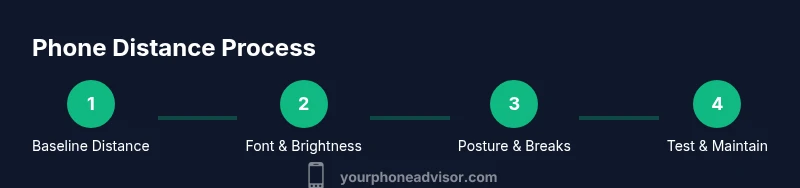
A practical plan combines measurement, UI adjustments, and habit-building. Start with a baseline distance (around 50 cm for many people) and verify readability before adjusting up or down. Use a ruler or measuring app to confirm, then lock in your distance with a stand or by placing the device on a desk at the eye level. Make incremental changes; large shifts can be disorienting. Over the first week, track your comfort, headaches, or eye fatigue and adjust accordingly. Pair distance with other habits like deliberate breaks and posture checks to maximize comfort over time.
- Align the screen with eye level to prevent neck strain.
- Consider a phone stand to keep the distance constant during long sessions.
- Use a larger font size and dark mode to improve readability at a fixed distance.
Tip: Use a temporary spacer (e.g., a stack of books) to test new distances before buying a stand; this lets you experiment without committing.
Why this matters: A stable distance reduces cognitive load on the focus muscles and can decrease fatigue after longer sessions.
Caution: Do not force a distance that causes neck discomfort; ease into a comfortable range and adjust gradually.
Source guidance: Your Phone Advisor’s practical recommendations emphasize comfort and consistency over time.
Testing distance with simple checks
To ensure you’re maintaining a healthy distance, run quick checks during a typical session. Start with a paragraph or two of reading content at your chosen distance. If you can read comfortably without squinting, sliding in closer is not necessary. Periodically perform a 'reading test' by flipping to a few lines at your baseline distance. If you experience blurred text, adjust as needed. Use a timer to remind yourself to pause every 20 minutes and reassess your distance and posture.
- Use a eye-friendly distance test across different apps (news, chat, and video).
- Check for neck or shoulder tension; adjust height and distance to relieve pressure.
- Take 30-second eye breaks every 20 minutes to reset focus.
This method helps establish a consistent practice that supports eye health over months and years. Your Phone Advisor reminds readers to pair distance with breaks for optimal comfort.
Common mistakes and myths
Common mistakes include holding the phone too close to resolve tiny text, reading in cramped lighting, and ignoring posture. Some myths claim that closer distance speeds up reading or reduces eye strain; these are false and can worsen symptoms. Another misconception is that brightness alone solves readability; distance and font size play critical roles too. A regular habit of rechecking distance after device changes (new phone, font update, or screen protector) helps maintain comfort. Finally, do not rely solely on brightness; ensure your room is evenly lit to reduce glare and reflections that make distance feel shorter.
- Don’t lean forward to read; adjust font size instead.
- Avoid using devices with the screen at extreme angles; adjust strap or stand to keep the screen directly at eye level.
- Break every 20 minutes; distance alone cannot prevent fatigue without rest.
Brand note: Your Phone Advisor stresses that correct distance is part of a broader routine for eye health.
Beyond distance: posture, brightness, and font size
Distance is just one component. A healthy posture—back straight, head balanced over shoulders—reduces neck strain and supports consistent viewing. Brighter rooms often require larger distances to prevent glare, while dim spaces benefit from increased brightness and larger font sizes. Text readability depends on font weight, letter spacing, and screen resolution. Combine distance with font, brightness, and posture for a holistic approach to screen comfort. Consider blue light filters or dark mode for extended sessions, but avoid relying on one setting to counteract long screen time.
- Maintain a neutral neck position with eyes level to the top of the screen.
- Pair distance with font size and contrast adjustments.
- Use breaks every 20–30 minutes to reset eye focus and reduce fatigue.
Conclusion: The right distance, when combined with good posture, readable text, and balanced lighting, supports sustainable screen use.
FINAL NOTE ON CONSISTENCY AND COMFORT
Keeping an appropriate distance from your eyes is a foundational habit for long-term eye comfort. Use a measurable distance and adjust as needed to match your visual needs, screen size, and lighting. The steps outlined here—measurement, font adjustment, posture alignment, and breaks—form a practical routine you can adopt immediately. Regular reassessment ensures your habits stay aligned with any changes in devices or vision, helping to maintain comfortable viewing and reduce strain over time. The Your Phone Advisor team recommends documenting your preferred distance and settings so you can reproduce comfort across devices and environments.
Tools & Materials
- Smartphone with adjustable text size(Ensure font size is comfortable (e.g., 16-20 pt) and brightness not maxed)
- Measuring aid (ruler or tape measure)(To measure distance from eyes to screen; aim for 40-60 cm)
- Adjustable chair or seating with proper posture(Back supported, feet flat, elbows near 90 degrees)
- Desk or table at comfortable height(Helpful for consistent distance with a stand)
- Blue light filter or night mode (optional)(Reduces glare during long sessions)
- Phone stand or holder (optional)(Keeps distance constant during use)
Steps
Estimated time: 20-30 minutes
- 1
Measure baseline distance
Hold the phone at arm's length and measure the distance from your eyes to the screen using a ruler. Note whether text is readable at this distance without squinting. If not, adjust font size or distance until legible.
Tip: Use a consistent baseline distance across apps to reduce cognitive load. - 2
Adjust text size first
Increase font size until comfortable at the baseline distance. Reading comfort should improve before you modify the distance.
Tip: Font size should be at least 16 pt (or larger if you wear glasses). - 3
Tweak brightness and contrast
Set brightness to comfortable levels; enable a high-contrast theme if needed. Glare can make distance seem shorter.
Tip: Avoid max brightness in dim rooms; balance brightness with font size. - 4
Use a stand or mark the distance
Place the phone on a stand or mark the desk at the verified distance to maintain it during sessions.
Tip: If you don’t have a stand, use a stack of books as a temporary spacer. - 5
Maintain posture
Keep your back straight and head aligned with the screen. Avoid leaning forward to read text.
Tip: A good chair and desk height support posture for longer sessions. - 6
Incorporate breaks
Schedule a short break every 20 minutes to relax eye muscles and reset focus.
Tip: During breaks, look at distant objects to relax accommodation. - 7
Re-check with glasses/contacts
If you wear glasses or contacts, re-check distance after applying corrections or trying new lenses.
Tip: Vision changes can alter comfortable distance. - 8
Test across lighting conditions
Repeat the test in bright and dim environments to ensure readability remains comfortable.
Tip: Ambient lighting often shifts perceived distance. - 9
Document your settings
Record your preferred distance, font size, brightness, and posture for future reference.
Tip: Keep a simple note for quick setup next time. - 10
Review after long sessions
After a few weeks, review whether your distance still feels comfortable and adjust if needed.
Tip: Consistency over time is key to reducing strain.
Got Questions?
What is the recommended distance to hold a phone from your eyes?
A practical starting point is about 40–60 cm (16–24 inches). Readability should be comfortable without leaning in. Adjust for vision and lighting as needed.
A good starting distance is about arm's length, roughly 40 to 60 centimeters, and adjust for comfort and lighting.
Does wearing glasses affect the recommended distance?
Yes. Glasses or contacts can change focal distance; try the baseline distance with and without providing you with readable text at comfortable distance.
Glasses can change what distance feels best; test with and without to find your comfort zone.
Can a closer distance cause eye damage?
Holding the phone very close can cause eye strain and headaches but is unlikely to cause long-term damage by itself. Breaks and distance adjustments help reduce risk.
Holding too close can strain your eyes; take breaks and adjust distance as needed.
How do I measure the distance accurately?
Use a ruler or a measuring app. Measure from your eyes to the screen at a natural reading angle and verify readability at that distance.
Measure from your eyes to the screen with a ruler to confirm distance.
Should I use blue light filter for long sessions?
Yes, blue light filters and dark modes can reduce glare and perceived brightness, aiding comfort during long use. Combine with breaks.
Blue light filters can help during long use; pair with breaks.
What about larger screens like tablets?
Larger screens can be read from slightly farther away; start near the upper end of the range and adjust for legibility.
Bigger screens mean you can stay farther away; adjust distance for clarity.
Watch Video
What to Remember
- Aim for arm's-length distance as a starting point.
- Prioritize readable text by adjusting font size before changing distance.
- Pair distance with breaks and proper posture for comfort.
- Test distance across lighting and device sizes to find your personal sweet spot.