Phone or Live Chat: A Practical Side-by-Side Comparison
Compare phone support and live chat to decide which channel fits your smartphone issues. Learn about speed, security, costs, and use-cases with insights from Your Phone Advisor.


Phone support and live chat are the two main channels for smartphone help. The Your Phone Advisor team finds that live chat often resolves simple questions faster, while phone calls are better for complex issues requiring real-time guidance. This comparison outlines when to pick each method, along with security, cost, and practicality considerations.
What "phone or live chat" means in modern smartphone support
In today’s service ecosystems, customers expect multiple channels to reach a human agent. The phrase "phone or live chat" captures the two most common paths: a voice call on the phone, and text-based assistance via a chat window. Each channel carries distinct affordances: voice enables nuance, tone, and immediate escalation; chat enables asynchronous replies, easy sharing of screenshots, and searchable transcripts. For general users, understanding these differences helps set expectations about response times, privacy implications, and what kind of issue each channel handles best. Throughout this article, we’ll use the exact phrase "phone or live chat" to map outcomes to practical decisions and to help readers compare real-world experiences with guidance from Your Phone Advisor.
Speed and availability: when each channel shines
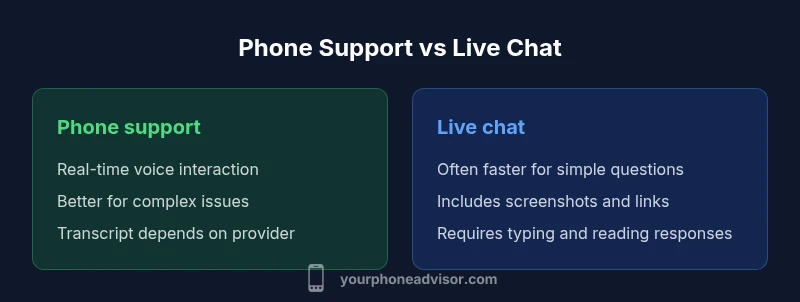
Response speed is one of the most visible contrasts between phone support and live chat. Live chat often delivers near-instant replies for routine questions because chat software routes you to agents with automated triage and, in many cases, automated responses. Phone support, by contrast, may involve waiting in a queue, especially during peak hours or for specialized help. The key difference is context: if you need rapid confirmation of a setting or a simple fix, chat frequently wins. If you need nuanced troubleshooting, voice communication can reduce back-and-forth and help an agent understand your situation more precisely. For many users, a hybrid approach—starting with chat and escalating to a call if needed—provides the best of both worlds.
Security, privacy, and data handling in phone and chat channels
Security practices vary by provider, but there are common considerations for both channels. Voice calls may be susceptible to eavesdropping on shared lines or unsecured devices, and some customers prefer not to discuss sensitive credentials over the phone. Live chat often transmits data through encrypted channels, and chat transcripts can be stored for record-keeping. When evaluating two channels, look for end-to-end encryption, strict access controls, and transparent privacy policies. If a chat platform supports file sharing or screenshots, confirm how those files are stored and who can access them after the session ends. Your Phone Advisor recommends choosing a channel with auditable security practices and clear retention policies.
Cost, billing, and perceived value across channels
Cost is not always obvious in the moment. Some providers include support through your phone plan with no separate charge for a single chat or call, while others bill per minute, per message, or per escalation. In many cases, chat is included as part of a premium tier or service package, whereas phone support may require a higher-tier plan for priority access. Evaluating cost requires looking at your own usage patterns: how often you need help, whether you require urgent attention, and whether transcripts or recordings have value for you. The value equation also includes convenience, such as avoiding call hold times, and the ability to share visuals instantly via chat.
Quality of assistance: effectiveness, empathy, and follow-up
Quality is not only about speed but the accuracy and completeness of the answer. Live chat allows agents to share links, screenshots, and step-by-step visuals in real time, which can improve comprehension for straightforward issues. Voice calls enable deeper questions and a more natural probing process when the issue is complex, potentially reducing back-and-forth. A robust channel should offer clear escalation paths, prompt follow-up or callbacks if needed, and a documented resolution. When comparing phone or live chat, assess not just the initial response but the likelihood of a successful, permanent fix.
Use-case scenarios: when to pick each channel
Consider these practical examples:
- Quick verification of account status or a simple setting change: live chat.
- Complex diagnostics, multi-step configurations, or issues requiring explanation of history: phone.
- Issues that benefit from sharing a screenshot or a short video: live chat.
- Privacy-sensitive topics: prefer the channel with stronger proven privacy practices and an auditable trail.
- After-hours troubleshooting: if one channel offers 24/7 support and the other does not, that channel may win by availability alone.
How to choose: a decision framework you can apply today
Use a simple framework:
- Define the issue type (simple or complex).
- Check channel availability and expected wait times.
- Consider privacy and data needs (transcripts, recordings).
- Assess if you need a transcript for future reference.
- If uncertain, start with live chat for rapid triage and switch to phone if depth is required.
- Take note of escalation options and promised follow-ups. This framework aligns with the idea of “phone or live chat” as a spectrum rather than a single best option in all situations.
Industry trends and what to expect in 2026
The support landscape is increasingly multi-channel and AI-assisted. Expect smarter routing that suggests the best channel based on your issue, proactive chat prompts for common problems, and integrated screen sharing and co-browsing. Voice bots may handle routine tasks, while skilled agents handle high-stakes cases. The trend toward unified inboxes means you can transition between channels without losing context, preserving history and transcripts for reference.
Your Phone Advisor's practical guide and tips
As you navigate between phone and live chat, keep a few rules in mind. Always verify the identity of the agent when sensitive information is involved. Take advantage of transcripts and session notes when available to avoid repeating steps. If a problem persists, request escalation and keep a record of the reference numbers. For more personalized guidance, read more from Your Phone Advisor and tailor channel choices to your own patterns of device use and privacy concerns.
Comparison
| Feature | Phone support | Live chat |
|---|---|---|
| Response speed | Variable; queues can delay calls | Often near-instant for simple questions |
| Availability | Typically business hours; some providers offer extended hours | Often 24/7 with capable providers |
| Transcript/record keeping | Call logs or recordings; transcripts vary by provider | Automatic transcripts and searchable history common |
| Security and privacy | Voice verification; privacy policies vary by provider | End-to-end encryption when offered; privacy terms vary |
| Best use case | Complex diagnostics or situations needing context | Quick questions, confirmations, and visual sharing |
| Cost to consumer | Often included in plans or per-minute charges elsewhere | Usually free or included in service tier |
The Good
- Live chat often delivers faster triage for simple issues
- Chat transcripts provide a written reference for later
- Chat supports screenshots, links, and quick sharing
- Phone calls enable nuanced, real-time troubleshooting
Drawbacks
- Chat can be slower for complex problems if not escalated
- Voice calls depend on caller line quality and queue times
- Transcripts may raise privacy concerns if not handled properly
- Typing and reading in chat can slow down some users
Live chat is best for quick, simple questions; phone support is superior for complex or sensitive issues.
Choose live chat to speed through routine tasks and get visuals; opt for phone when you need deep troubleshooting and a nuanced conversation.
Got Questions?
Which channel is faster for simple questions, phone or live chat?
For quick, simple questions, live chat typically offers faster responses due to automated routing and rapid text exchanges. Phone calls can still be fast if you reach an agent immediately, but chat generally minimizes hold time for routine tasks.
For simple questions, live chat is usually faster because you don’t wait on hold—just type your question and get an answer.
Can I switch channels mid-resolution if I’m not getting results?
Yes. A good support workflow allows you to start in chat and switch to a phone call or even video support if the issue requires deeper guidance. This preserves context and can speed up resolution.
Yes. You can start with chat and escalate to a call if you need more detail or a live walkthrough.
Is one channel more secure than the other for handling sensitive information?
Security depends on the provider’s practices. Phone calls can be secure but rely on line integrity and device security. Live chat may offer encryption and access controls, but transcripts require careful data handling. Check the vendor’s privacy policy and encryption standards.
Security varies by provider. Ask about encryption for chat and how transcripts are stored for any channel you choose.
Do transcripts get saved, and can I share them with others?
Many chat sessions automatically generate transcripts that you can save or share. Call transcripts are less universal and often depend on whether the provider offers a recording option. If transcripts are important, prefer chat or request a transcript after the call.
Transcripts are common in chat and can be shared. For calls, it depends on the provider; ask about recording and access.
Which channel works best for complex issues like account recovery or device troubleshooting?
Phone support generally excels for complex issues that require in-depth conversation, live troubleshooting, or sensitive information handling. Live chat can still support complex problems if the agent guides you through steps with visuals and can escalate when needed.
For complex issues, phone support is usually better, but chat can work well if it includes a guided, step-by-step process.
What accessibility options exist for voice-only devices?
Many providers offer accessibility options such as speech-to-text, screen reader compatibility, and language options. If you rely on voice-only devices, verify that the channel supports alternative input methods and has a clear escalation path.
If you’re using a voice-only device, check for speech-to-text and screen-reader compatibility before starting.
What to Remember
- Start with live chat for fast triage of simple issues
- Switch to phone for complex troubleshooting and sensitive topics
- Ask for transcripts and escalation options upfront
- Evaluate privacy policies and data handling before proceeding
- Practice a quick channel-switch plan to save time