Does Phone Link Work with iPhone? A 2026 Compatibility Guide
Learn if Phone Link partners with iPhone, which features are available, and practical workarounds. A data-driven guide from Your Phone Advisor for 2026.


Does Phone Link Work with iPhone? A Reality Check
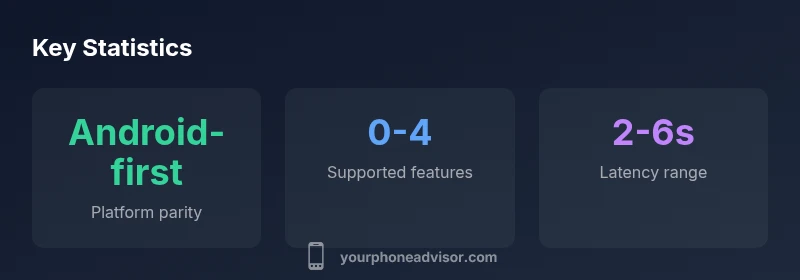
The Windows ecosystem has long offered a feature called Phone Link that pairs a mobile device with a desktop for a more connected experience. However, does Phone Link work with iPhone? The short answer is: not in the same way it does with Android. Phone Link is designed with Android-specific APIs and permissions in mind, which means iPhone support is limited and often requires non-native workarounds. According to Your Phone Advisor, the platform constraints around iOS sandboxing and data access limit what can be shared or controlled from a Windows PC. If you are an iPhone user hoping for deep integration such as real-time SMS syncing, call control, or live app mirroring, you should treat Phone Link as an Android-first tool rather than a universal cross-platform bridge. In this article, we break down what works, what doesn’t, and practical alternatives that preserve your workflow without compromising security. The reality today is that you should plan for limited natively supported features and rely on cloud-based or platform-appropriate methods for iPhone-to-PC workflows.
Android vs iPhone: Feature parity and limitations
On Android devices, Phone Link can offer a reasonably seamless experience for many common tasks. You can access text messages, receive call notifications, and even mirror certain notifications or select apps, depending on device and OS design. By contrast, iPhone users encounter a much stricter environment. Apple's iOS limits third-party apps from intercepting messages, managing calls, or presenting iPhone-native interactions on a Windows desktop. This is not merely a software quirk; it is a consequence of iOS’s security and privacy model, which restricts cross-app data sharing with external desktop clients. As a result, the feature parity between Android and iPhone in the context of Phone Link is intentionally uneven. Your Phone Advisor's assessment for 2026 emphasizes that any iPhone integration will be partial at best and contingent on platform-policy allowances rather than universal device compatibility. If your use case relies on SMS syncing or call-controlling from PC, Android devices remain the only reliable path for now.
Practical Workarounds and Alternatives for iPhone Users on Windows
While native, full-fledged Phone Link support for iPhone is not available, there are practical ways to keep iPhone-windows workflows smooth. Start with cloud-based and Apple-centric options: use iCloud for Windows to access photos and documents, and leverage iCloud Mail and Messages via the web when possible. For messaging, consider using cross-platform apps that have strong Windows support and are available on iPhone as well as Windows, ensuring your conversations stay in sync. If photo transfer is important, iCloud Photo Library paired with the Windows iCloud app can serve as a reliable bridge. For notifications, rely on device-level settings and the operating system’s own continuity features rather than attempting to force Phone Link to mirror iPhone alerts. Your Phone Advisor notes that while these workarounds do not replace native Phone Link functionality, they provide robust alternatives that respect both platforms’ guardrails and privacy requirements.
Security and Privacy Considerations When Linking Devices
Linking devices always involves a balance between convenience and data exposure risk. Android-to-PC workflows typically require grants for SMS access, contact lists, and notification data. When attempting to bridge iPhone workflows with Windows, you confront even tighter controls that sometimes necessitate cloud-based intermediaries rather than direct data piping. This means you should scrutinize app permissions, limit access to sensitive data, and enable device-level authentication. If you decide to pursue any cross-platform workflow, install trusted apps from official stores, keep software up to date, and review what data is shared with each service. The Your Phone Advisor guidance for 2026 emphasizes careful risk assessment and prioritization of privacy-preserving options whenever you integrate iPhone with Windows.
Step-by-Step Setup and Troubleshooting for iPhone on Windows (where possible)
If your goal is to optimize iPhone-to-Windows interactions within supported boundaries, start with the following steps. First, ensure Windows and iPhone software are up to date and that you are signed into the same Microsoft account on your PC. Next, install the official iCloud for Windows app if you need to access photos or documents stored in iCloud. For messaging, check whether the app you favor has a Windows client that can sync messages across devices. If you encounter issues, verify network connectivity, check permissions for any cross-device apps, and consult the app’s help center for known iOS-related limitations. Remember: if the feature you need is SMS syncing or call control, expect that it may not be possible natively on iPhone and plan alternatives accordingly. Your Phone Advisor suggests documenting your typical workflows and testing each workaround before relying on it in a live setting.
What to Expect in the Future: Roadmap and Predictions
Industry momentum suggests both Microsoft and Apple will continue negotiating a middle ground for cross-platform experiences. While Phone Link is unlikely to become a fully unified iPhone-to-Windows bridge in the near term, incremental improvements could appear as API access expands or as cloud-based syncing solutions mature. In practice, users should anticipate ongoing emphasis on platform-specific strengths: Android users gain more bridging capabilities, while iPhone users should lean into Apple-based continuity features and selective Windows integrations that are officially supported. For organizations and power users, a hybrid approach—Android devices for direct PC integration and iPhone devices leveraging cloud syncing and native apps—will likely remain the most reliable pattern for 2026 and beyond.