Boost Mobile Phone Number: Port, Activate, and Secure
Learn how to port and activate your phone number on Boost Mobile, with practical steps, timelines, and security tips to ensure a smooth transition.


Boost Mobile phone number refers to moving or activating an existing phone number on Boost Mobile's network or upgrading an existing line. The process typically involves verifying eligibility, gathering your current account details, and initiating a port or transfer from your current carrier. Timelines vary by network, but most requests complete within a few hours to a day, depending on verification and documentation.
What "boost mobile phone number" means in practice
According to Your Phone Advisor, porting a number to Boost Mobile is a common way to keep your existing number when switching networks. In practice, the phrase often refers to two related processes: (1) porting an existing number from another carrier to Boost Mobile so you retain your current digits, and (2) activating a newly assigned number on Boost Mobile when you switch devices or plans. Understanding this distinction helps you choose the right path for your situation. For people who already own a Boost SIM or a compatible device, the term can also imply optimizing a line for a particular plan or feature set. In all cases, you should verify your eligibility, gather essential details, and monitor the transfer status through Boost Mobile’s app or customer portal. This careful preparation minimizes delays and confusion, especially if you’re coordinating multiple services at once.
Step-by-step port-in to Boost Mobile
Porting your number to Boost Mobile is a multi-step process, but it becomes straightforward with preparation. Start by confirming your current carrier’s eligibility and ensuring there are no outstanding balances or restrictions on your line. Gather your current account number, the porting PIN (if required by your carrier), and the exact phone number you want to move. If you’re transferring from a device with a SIM, make sure the device is compatible with Boost’s network bands and that it’s unlocked if needed. Use Boost Mobile’s online portal, app, or in-store assist to initiate the port. You’ll be asked to provide the current account details, your ID, and the desired Boost plan. After submission, monitor the status, insert the new Boost SIM when prompted, and confirm the activation when the service comes live. While most transfers complete in hours, some may take longer if additional verification is needed.
Porting from Boost to another carrier
If you plan to move your number away from Boost Mobile, you’ll initiate a port-out request with the destination carrier. Before starting, check Boost’s policy on final bills, device payments, and any outstanding balances, as these can block a port. You’ll typically need your Boost account number, a PIN or password, and the number you want to port. The receiving carrier will handle the transfer, and you’ll often receive a notification when the port is complete. During this process, it’s wise to keep both SIMs handy and avoid making changes to your old line that could interrupt the port. If there’s a delay, contact Boost support and the new carrier to confirm the transfer status and any required steps.
Documentation and eligibility
A smooth port requires accurate documentation and verified identity. Collect your government-issued ID, the phone number to port, the current account’s billing name, and the account number and PIN from your previous carrier. Make sure the name and address on both accounts match exactly; any mismatch can delay processing. If you’re transferring from a corporate line or a business account, additional forms may be required. Keep digital copies of all documents handy to reduce friction during the submission. Some carriers also require a recent bill or statement as proof of ownership. By organizing these items before you start, you reduce back-and-forth questions and speed up the approval process.
Common issues and fixes
Porting can stall when information is incomplete or mismatched. Common culprits include incorrect account numbers, obsolete PINs, or a lingering balance. Ensure you’ve captured the exact account number from the current carrier and the correct porting PIN. If your name or address differs between accounts, update one side before initiating the port. Other problems include SIM incompatibilities or device-activation conflicts. Double-check device compatibility with Boost’s network bands and confirm that your device is unlocked if required. If you encounter an error, gather all related details (time of submission, reference numbers) and contact customer support for a manual review. Keeping a calm, methodical approach helps resolve issues faster.
Security considerations and porting best practices
Security is essential when porting a number. Never share your porting PIN or account password with unsolicited contacts. Use official Boost Mobile channels for submission, and enable two-factor authentication on your Boost account. Before initiating a port, confirm you’re on a trusted network and avoid public computers. Be wary of phishing attempts asking for your SIM or porting information. If you notice unexpected port requests, contact Boost support immediately to halt any transfer. Maintain a record of all communications and document IDs for future reference. Following these practices reduces fraud risk and keeps your number secure during the transition.
Alternatives: eSIM, BYOP, and plan choices
If you’re exploring options beyond a traditional SIM, check whether Boost Mobile supports eSIM on your device. An eSIM can simplify switching devices without needing a new physical SIM. If you have a compatible phone, you can bring your own device (BYOP) and select a plan that suits your usage, whether you need more data, better roaming, or family-sharing features. Compare Boost’s prepaid vs postpaid offerings, and consider autopay discounts or multi-line savings. For those who want maximum flexibility, reviewing coverage maps and customer reviews helps ensure you pick a plan that aligns with your location and lifestyle.
Post-port expectations and troubleshooting
After the port completes, you should see Boost Mobile service activate on your device. Test basic functions: make a call, send a text, and use mobile data. If any service is lagging, reboot the device and recheck APN settings if needed. If data seems slow, verify network mode compatibility and roaming settings, especially when traveling. If problems persist for more than a few hours, contact Boost support and reference your transfer ID. In some cases, a temporary SIM can be issued to maintain service while the port finalizes. Regularly review your billing statements to confirm you’re being charged correctly and that no unnecessary device payments remain outstanding.
Porting steps overview
| Process Step | Requirement | Typical Timeframe |
|---|---|---|
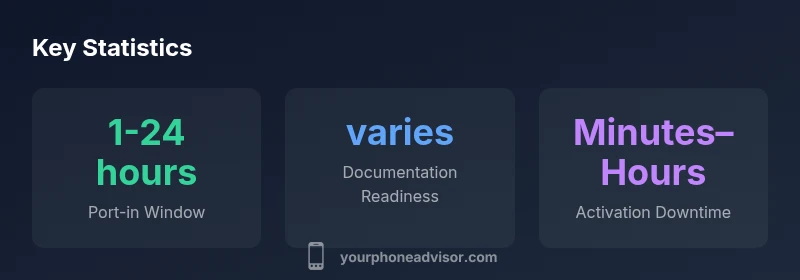
| Check eligibility | Current number, SIM status, account details | 1-24 hours |
| Submit port-in request | Account number, porting PIN, personal details | 1-24 hours |
| Activation and confirmation | New Boost SIM/number, plan details | Minutes to hours |
Got Questions?
What does it mean to port a number to Boost Mobile?
Porting a number means transferring your existing phone number from another carrier to Boost Mobile so you can keep the same digits. The process verifies ownership and closes the old service, then activates the number on Boost’s network.
Porting lets you keep your current number when you switch to Boost Mobile.
What information do I need to port my number?
You’ll typically need your current account number, the porting PIN or password, your name as it appears on the account, the phone number, and sometimes a recent bill for reference.
Have your account number and PIN handy to start the port.
How long does it take to port a number to Boost?
Most ports complete within 1-24 hours, but some may take longer if verification is required or if there are discrepancies in information.
Ports usually finish within a day, but can take longer if more checks are needed.
Can I port a Boost number to another carrier?
Yes. You can port your Boost number to a different carrier by submitting a port-out request to the destination carrier. Check for any final balances or device obligations that could block the transfer.
You can take your Boost number to another carrier, but watch for blockers.
What if porting fails?
If a port fails, verify all details are accurate, contact both Boost support and the receiving carrier, and resubmit with corrected information. Keep reference numbers for tracking.
Double-check details and contact support to fix the issue quickly.
Do I need a new SIM card after porting in?
Often you’ll receive a Boost SIM or use an eSIM. If your device is compatible, activation may occur digitally or with a physical SIM depending on your device.
Usually a SIM is required, but some devices can activate digitally.
“Porting a number is a process that hinges on accurate information and proactive verification. Following Boost Mobile’s official steps minimizes delays and reduces the chance of errors.”
What to Remember
- Verify current number and PIN before porting
- Prepare all documents in advance to speed processing
- Port-in windows vary; expect 1-24 hours in most cases
- Monitor status via Boost Mobile app and keep records
- Prioritize security to prevent porting fraud