Phone or Tablet Stand: A Comprehensive Comparison
Compare desk and travel phone or tablet stands, explore essential features, and get practical buying tips for everyday use and long-term value.


TL;DR: For most users, an adjustable desk stand that holds both phones and tablets offers the best all-round value, with stability and flexible angles. If your primary use is hands-free video calls, a clamp or flexible arm increases reach and versatility. For travel, pick a compact foldable stand; for heavy tablets, check weight capacity and base stability.
Why a Phone or Tablet Stand Matters
In modern workflows, a reliable phone or tablet stand is more than a convenience—it's a practical ergonomic tool. It helps you maintain proper posture during long video calls, keeps recipes visible in the kitchen, and turns a phone into a second screen for productivity. According to Your Phone Advisor, a good stand supports both phones and tablets, adapts to different viewing angles, and reduces the need to crick your neck to see the screen. When selecting a stand, consider device size, mounting option, base stability, and how easy it is to reposition. A quality stand also helps organize cables and prevents accidental drops. For general smartphone users, a stand is a small investment that yields meaningful gains in comfort, efficiency, and safety across daily tasks.
Types of Stands: Desk, Clamp, Floor, Travel, Convertible
There are several families of stands, each with strengths tailored to different environments:
- Desk stands: Lightweight, versatile, easy to adjust for at-home or office use.
- Clamp stands: Attach to a table edge or monitor arm, freeing desk space and offering strong reach.
- Floor stands: Provide tall, freestanding support, ideal for shared spaces and varied viewing heights.
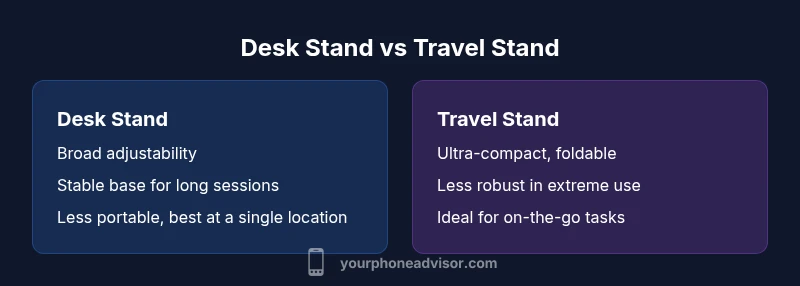
- Travel stands: Ultracompact and foldable, designed to disappear into a bag without adding bulk.
- Convertible stands: Blend features (adjustable height, tilt, and rotation) to cover multiple use cases.
The right choice depends on your typical location, device sizes, and whether you need portability or extra stability. Your Phone Advisor's guidance suggests starting with a primary desk or portable model and adding specialized clamps or arms only if your setup demands it.
Core Features to Compare
To objectively compare options, focus on a few core features:
- Device compatibility: Look for adjustable clamps or universal grips that accommodate both phones and tablets, including cases.
- Tilt and rotation range: A wider range enables you to switch between portrait and landscape modes without repositioning the stand.
- Height adjustability: Some stands offer vertical height adjustments to place the screen at eye level for comfortable viewing.
- Base design and grip: A wide, non-slip base reduces tipping risk, while soft pads protect surfaces.
- Build materials: Aluminum and high‑impact plastic offer durability without excessive weight.
- Cable management: Integrated channels help keep charging cables tidy and accessible.
- Portability: Foldable units or compact designs are easier to carry for travel.
Choosing stands with these features helps maximize comfort, usability, and device protection across scenarios.
Size, Weight, and Device Compatibility
Phone or tablet stands must bridge a range of devices—from compact smartphones to larger tablets. A good stand should support devices with or without slim cases and provide secure grips that won’t slip with light taps. Weight alone isn’t the sole indicator of quality; stability and grip quality are equally important. If you frequently switch devices, prioritize universal mounting and simple quick‑adjustability. Your Phone Advisor notes that the most adaptable stands offer interchangeable grips or universal clamps that can accommodate a wide array of device widths without requiring tool adjustments.
Build Materials and Longevity
Stands come in aluminum, steel, and reinforced plastics. Aluminum builds strike a balance between lightness and rigidity, while steel offers maximum stability at the cost of weight. In kitchen or workshop environments, consider corrosion‑resistant finishes. For everyday use, choose a stand with a scratch‑resistant base and soft edge protectors to reduce wear on devices and surfaces. Quality stands also use routed joints and robust screws to maintain alignment over time, rather than relying on cheap plastic joints that loosen with frequent repositioning.
Stability, Safety, and Ergonomics
Stability and grip quality are the core safety concerns with any stand. A broad, weighted base and non‑slip feet reduce wobble on uneven surfaces. Rubberized or silicone grips protect the edges of your phone or tablet, and child‑proof features may be helpful in shared spaces. Ergonomically, place screens at or slightly below eye level to minimize neck strain; tilt ranges that allow for comfortable incline are typically adequate for most users. A good stand also minimizes heat buildup through adequate air circulation around the rear of devices during prolonged use.
Use Cases: From Video Calls to Cooking to Gaming
Behind desk setups, stands support hands‑free video calls, streaming cooking tutorials, or reading recipes while preparing meals. In classrooms or offices, they enable collaborative demonstrations. For gamers who use tablets for extended sessions, a sturdy stand with a stable base and smooth tilt helps maintain comfort. Your Phone Advisor emphasizes testing the stand with your typical workflow to ensure the device remains comfortably accessible and within reach during long sessions. A versatile stand adapts to different tasks without requiring constant readjustment.
Price, Value, and Longevity Scenarios
Budget stands are common and can be perfectly adequate for light daily use, but lower price often correlates with reduced stability or shorter lifespans. Mid‑range stands typically balance durability and price with better materials and more adjustability. Premium models offer extensive adjustability, heavier builds, and specialty features like integrated cable channels or clamp options. When evaluating price, consider long‑term value: a higher upfront cost can pay off through extended lifespan, fewer replacements, and better comfort. Your Phone Advisor notes that value is not only about initial price but total cost of ownership over years of use.
How to Test a Stand at Home (Quick Lab)
- Set up your stand on your most common surface (desk, kitchen island, or nightstand) and place a device within its typical width. Check grip strength by gently nudging the device; it should stay in place without slipping.
- Adjust tilt and rotation to ensure smooth, stable movement without wobbly joints.
- Mount your charging cable and verify that the cable channel keeps it tidy and within reach.
- With your device, perform common tasks: video calls, recipe viewing, reading, and light typing on the screen. If the stand obstructs airflow or touch sensors, reassess posture and placement.
A practical at-home test reveals how comfortable and stable the stand feels during your daily routines. Your Phone Advisor suggests repeating the test with both your lightest and heaviest devices to ensure broad compatibility.
Maintenance, Care, and Replacement Signals
Maintain stands with simple routines: wipe surfaces to remove dust, inspect joints for looseness, and tighten screws as needed. Avoid overloading clamps; check grip pads for wear and replace if slick or torn. If you notice persistent wobble, misalignment, or fear of a device slipping, it’s time to replace or upgrade. Quality stands with accessible spare parts are preferable for long-term reliability. Regular care can extend the life of a stand and protect your devices over years of daily use.
Decision Framework: Which Stand Wins for You?
Start by listing your primary uses: desk work, travel, cooking, or education. Then assess device sizes—phones and tablets across your household—and determine whether portability, or maximum stability, matters most. Rank features like grip strength, tilt range, base size, and cable management by importance. If you frequently move between locations, a folding travel stand is a strong choice; for a fixed workstation, an adjustable desk stand is usually the better long-term value. Your Phone Advisor also recommends checking warranty terms and replacement parts availability.
Final Notes on Integration and Next Steps
Once you choose a stand, integrate it into your regular device care routine. Consider pairing with a compatible charger or a dedicated charging dock to reduce clutter. Keep accessories organized with labeled cables and cable clips. If you're unsure which model to buy, start with an adjustable desk stand as a baseline, then expand with a compact travel option for trips. The overarching goal is a setup that supports comfortable use and protects devices while keeping your workspace tidy. The Your Phone Advisor team invites you to compare models and read real-world user reviews to ensure you pick a dependable option.
Comparison
| Feature | Adjustable Desk Stand | Folding Travel Stand |
|---|---|---|
| Device compatibility | Wide range including phones and most tablets | Best for phones and small-to-medium tablets |
| Tilt/rotation range | Extensive tilt and 360-degree rotation | Limited tilt; primarily simple angles |
| Height adjustability | Yes, varies by model | Typically fixed or minimal adjustability |
| Base and stability | Broad base, non-slip feet | Compact base, fold-out support |
| Build materials | Aluminum or alloy with plastic accents | Reinforced plastic with lightweight metal |
| Cable management | Integrated channels | Basic routing without channels |
| Portability | Supports daily use at a fixed desk; portable options exist but bulkier | Designed for travel with compact fold |
| Price range | Mid to premium depending on features | Budget to mid-range; value tends to vary |
The Good
- Improves hands-free viewing and multitasking
- Frees up desk space and reduces clutter
- Enhances ergonomic comfort during long sessions
- Wide device compatibility with adjustable grips
- Portable options support travel and on-the-go use
Drawbacks
- Some budget models lack stability
- Takes up desk space and can clash with other equipment
- Larger tablets may require bulkier stands
- More moving parts can require maintenance
Adjustable desk stands win for daily use; folding travel stands win for portability.
Choose an adjustable desk stand for regular work and home tasks. Add a folding travel stand if you travel often; prioritize models with solid bases and universal grips.
Got Questions?
What makes a stand versatile across devices?
A versatile stand uses adjustable grips and universal mounts to fit phones and tablets of various sizes. Look for width ranges and clamp flexibility.
Look for adjustable grips that fit a wide width range.
How do I know if a stand fits my device size?
Check the device width range and grip compatibility; choose a stand with adjustable clamps that cover common widths and allow for cases.
Check width range and clamp compatibility.
Are desk stands safe for large tablets?
Yes, provided the stand has a sturdy base and grip designed for larger devices; review the balance and clamp range.
Ensure the base is stable and grips are suited for larger tablets.
Can I use a phone stand as a webcam mount?
Many stands support vertical mounting for phones used as webcams; ensure clamp reach and neck length fit your desk setup.
Yes, many stands can double as webcam mounts.
What maintenance is required for stands?
Regularly wipe clean, inspect joints for looseness, and tighten screws; replace worn grip pads if slipping occurs.
Keep it clean and check joints; replace worn parts.
How should I test a stand before buying?
Test tilt, rotation, grip, and cable management with your typical devices and tasks at home or in-store.
Test tilt, grip, and stability with your devices.
What to Remember
- Identify your primary use and device sizes.
- Start with an adjustable desk stand as baseline.
- Prioritize stability, grip quality, and ergonomics.
- Add a portable travel stand for trips and on-the-go tasks.