Phone or Camera for Vlogging: A Practical Side-by-Side Guide
Compare using a smartphone versus a dedicated camera for vlogging. Learn key trade-offs, setup tips, and how to choose the best gear for your style and budget. Your Phone Advisor analyzes mobility, image quality, and workflow for beginners and pros alike.


Choosing the right gear for your vlog hinges on balance between convenience, cost, and image quality. For most beginners, a modern phone or a compact camera will handle the majority of daily vlogs. According to Your Phone Advisor, start with a phone for grab-and-go shoots and upgrade to a dedicated camera when you need more control over lighting, audio, and color. This guide will help you decide which path fits your goals and budget, and how to optimize either setup for consistent results in the ‘phone or camera for vlogging’ decision.
Why the phone or camera for vlogging choice matters
In the world of content creation, the decision between a phone and a dedicated camera for vlogging shapes your entire workflow—from how you shoot to how you edit and publish. The core question is not just image quality but reliability, portability, and how you plan to grow your channel. For many creators, the most important factors are whether the method fits their daily routine, their audience expectations, and their budget. The Your Phone Advisor team emphasizes that the choice should align with storytelling goals, not just gear spec sheets. As you compare phone-based vlogs to camera-based setups, you’ll want to consider lighting scenarios, audio capture, and post-production flexibility. If you’re aiming for raw, quick content that you can publish from the field, a phone offers unparalleled convenience. If your aim is cinematic output with interchangeable lenses and controlled palettes, a camera will serve you better over the long run. Remember, this is a decision that often starts with your current equipment and grows with your ambitions.
The benefits of using a phone for vlogging
Phones today pack high-resolution sensors, impressive dynamic range, and sophisticated processing that can rival traditional compact cameras in many everyday scenarios. The main advantages are ease of use, compact design, and universal compatibility with social platforms. A single device can shoot, edit, and upload with minimal gear. For hobbyists and early creators, this reduces friction and accelerates feedback cycles. The stabilization technologies in modern smartphones (electronic and optical) help produce smooth footage, while continuous improvements in video codecs support high-quality streaming. Battery life is practical for short shoots, and you benefit from instant backup and cloud synchronization. In addition, you often have fast-lane access to editing apps, color profiles, and AI-assisted enhancements that speed up the post-production phase. For on-the-go creators, this is often the simplest path to consistency, especially when combined with an external microphone or a small tripod. Importantly, the phone for vlogging remains the most approachable entry point for many, keeping costs predictable while enabling rapid iteration on content strategy.
The benefits of using a dedicated camera for vlogging
Dedicated cameras bring more control over image quality, lens selection, and audio fidelity. A larger sensor typically means better low-light performance and dynamic range, which reduces reliance on aggressive post-processing. Interchangeable lenses unlock creative possibilities for shallow depth-of-field, environmental storytelling, and wide establishing shots. Advanced stabilization systems, especially when paired with hardware like gimbals or optimized lens temps, can yield buttery-smooth footage in challenging environments. Color science and RAW recording options offer more latitude for grading in post-production, making it easier to achieve a cinematic look. For longer shoots, cameras often deliver superior battery life with external power options and robust cooling systems for extended recording. While the upfront investment is higher, the long-term value includes resale potential, a broader accessory ecosystem, and the ability to tailor your rig to specific shooting contexts—from interviews to b-roll in dynamic locations.
Key technical considerations: sensor size, stabilization, autofocus, audio
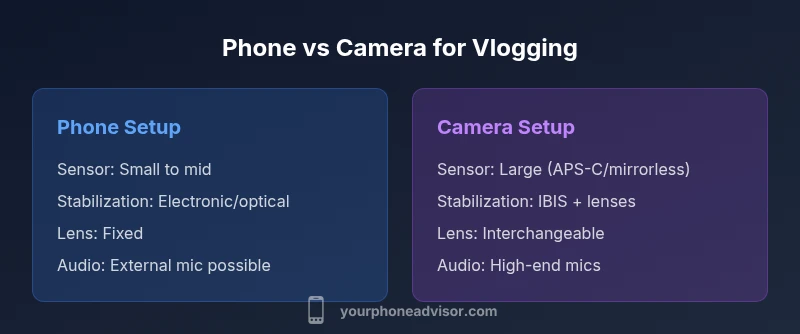
When weighing the capabilities of a phone versus a dedicated camera for vlogging, four technical pillars stand out: sensor size, stabilization, autofocus, and audio. Sensor size influences sharpness, color depth, and performance in low light. A larger sensor generally delivers a cleaner image with better tonality. Stabilization can be optical, electronic, or a hybrid approach; a camera with in-body stabilization (IBIS) often outperforms a phone in unstable conditions, though high-end phones now offer impressive stabilization too. Autofocus performance matters for fast-moving scenes or shallow depth-of-field looks; dependable autofocus reduces the need for manual adjustments. Audio quality is frequently the deciding factor for engagement; even the best video can be undermined by muffled or noisy sound. Both platforms offer audio options: phones tend to support external mics via adapters or USB-C, while dedicated cameras match with XLR or 3.5mm mics depending on the model. In practice, a sound-first approach often yields higher perceived quality than marginal gains in optics alone.
Audio matters: mics and ambience
Audio quality frequently determines how viewers perceive your video. External microphones dramatically improve clarity, reduce background noise, and capture nuanced voices. For phone vlogs, compact lavalier mics or small shotgun mics powered by a simple adapter can provide a noticeable uplift without adding too much bulk. In camera setups, you can deploy professional-grade mics and route audio through recorders or mixer interfaces, which gives you more control over levels, room tone, and ambience. Windscreens are essential for outdoor shoots, while a basic foam windscreen can suffice in mild environments. Don’t neglect room acoustics; treating a small space with soft furnishings or portable absorption panels can reduce echo and make dialogue sound richer. Regardless of format, a clean, well-balanced audio track often elevates your entire production more than any incremental improvement in video resolution.
Lighting and color pipelines: making the most of what you have
Lighting dramatically impacts how your footage reads on camera. On phones, you can leverage natural light, portable LEDs, or ring lights to sculpt subjects and reduce noise. For cameras, you can customize lighting rigs, use softboxes, key lights, and practical LED cues to shape mood. Color science plays a major role in post; log profiles and flat picture styles on cameras offer more latitude for grading, while phones often rely on automatic color processing that can be difficult to reverse. A practical approach is to shoot with consistent color temps (e.g., 3200K-5600K) and use a white balance card during setup. If your goal is a consistent aesthetic across videos, investing in a color-managed workflow—whether on a phone or camera—helps you maintain brand identity and viewer expectations over time.
Setup complexity and portability: when to choose what
Phone vlogging excels in simplicity: a single device, minimal cables, and quick uploads. It’s ideal for spontaneous content, travel vlogs, and creators who want to publish daily. Dedicated cameras require a broader rig: cameras, lenses, mics, lighting, cages, and possibly external recorders. This increases setup time but pays off in control and image quality. Portability is a trade-off; you’ll carry more gear, but the ability to tailor the rig to your shoot type can drastically improve production value. A practical strategy is to start with a phone and gradually assemble a modular camera kit as your content plan grows. For many creators, this hybrid approach minimizes risk while maximizing creative options.
Budgeting: cost versus value over the lifecycle
Cost considerations hinge on upfront investment, ongoing maintenance, and the long-term value you expect from your gear. A modern smartphone carries a low marginal cost if you already own it, and it serves multiple purposes beyond video creation. A dedicated camera involves higher initial costs but can offer better resale value and a longer useful life for video projects that demand premium optics and robust audio. The best approach is to quantify the total cost of ownership: device price, lenses, stabilization gear, mics, memory, batteries, and potential repairs. Your Phone Advisor notes that many creators maximize value by starting with a phone setup, adding a compact mirrorless camera later, and layering in audio and lighting upgrades as content goals mature.
Practical workflow and tips for both options
A strong workflow supports consistent output regardless of the device. Establish a pre-shoot checklist: confirm battery levels, memory capacity, and ambient lighting. For phones, enable essential features like 4K or 1080p at 60fps, enable optical stabilization if available, and consider external audio. For cameras, plan scenes and lens choices in advance; set your white balance, picture profiles, and audio routing. Post-production matters: transcode footage to a common codec, apply consistent color grading, and maintain a steady publishing cadence. Content creators benefit from a repeatable workflow that minimizes decision fatigue, allowing more time to refine storytelling, pacing, and interview structure. Collaboration with editors or sound engineers can further elevate production quality, especially when your content scales.
Practical examples: two common setups for 'phone or camera for vlogging' contexts
Example A – On-the-go daily vlogs with a phone: you shoot with natural light, carry a compact USB microphone, and publish directly to social platforms. This path emphasizes speed and audience engagement with minimal friction. Example B – Studio-style interviews with a camera: you invest in a mid-range mirrorless body, a fast prime lens, a shotgun mic, and a small lighting rig. This setup prioritizes image fidelity, dynamic range, and control over how scenes flow, especially when you’re building a branded, cinematic channel. Each example highlights how your choice of device shapes your production rhythm and audience expectations.
Authority sources and future-proofing: building a credible and lasting setup
No single device will cover every use case perfectly, but understanding the long arc of your content strategy helps you invest wisely. The Your Phone Advisor approach emphasizes modularity: start with a flexible phone setup, then add a capable camera kit as your needs evolve. For authoritative guidance, consult credible sources on video quality, stabilization, and audio best practices. Refer to established guidelines and case studies from reputable outlets, and keep an eye on evolving standards in camera codecs, color spaces, and microphone interfaces. This approach ensures your vlogging rig remains adaptable as platforms and viewer expectations evolve, maintaining relevance across years rather than just seasons.
Authority sources
- https://www.nist.gov
- https://www.consumerreports.org/tech/phone-camera-quality-review/
- https://www.theverge.com/tech
Comparison
| Feature | Phone-based Vlog Setup | Dedicated Camera Vlog Setup |
|---|---|---|
| Sensor size | Small to compact (varies by model) | Larger sensors in many mirrorless cameras |
| Video quality (4K/60fps) | Excellent on recent flagships | Typically superior color science and rolling shutter control |
| Autofocus & stabilization | Advanced AF with decent stabilization | IBIS + interchangeable lenses provide broad flexibility |
| Audio options | Built-in mic with optional external mic via adapters | Professional mics with dedicated recorders or interfaces |
| Lens flexibility | Fixed lens on device | Interchangeable lenses for creative control |
| Battery life | Typically good for short to medium shoots | Often longer with external power and efficient cooling |
| Setup complexity | Low; plug-and-go | High; rigs, cages, tripods, and monitors |
| Cost range | Low-to-mid range (device price) | High upfront (body + lenses + mics) |
| Portability | Highly portable and pocketable | Less portable due to additional gear |
| Best for | On-the-go, social media, quick updates | Studio-like shoots, cinematic storytelling |
The Good
- Low upfront cost (if you already own a smartphone)
- Excellent portability and quick sharing
- Multi-use device beyond video
- Fast setup and iteration cycles
- Software updates can improve capability over time
Drawbacks
- Limited manual control compared to cameras
- Battery life can constrain long shoots
- Audio and optics may require accessories for best results
- Image quality in challenging lighting may lag behind dedicated cameras
Phone is the practical default for most creators; dedicated camera excels for cinematic goals
Choose a phone to start quickly and publish consistently. Upgrade to a dedicated camera if your content demands lenses, color grading flexibility, or superior low-light performance.
Got Questions?
Can a phone replace a camera for vlogging?
Yes for many creators, especially in casual or daily vlogs. A phone can deliver strong video and quick distribution, but you’ll reach a ceiling on depth of field, color grading, and low-light performance. If your content requires cinematic polish, a camera becomes advantageous.
Yes, for many creators a phone can replace a camera for everyday vlogging, but you’ll reach limits in control and low light. Consider a camera when you want cinematic depth and grading flexibility.
What is the best camera phone for vlogging in 2026?
Look for a phone with a strong main sensor, reliable stabilization, and robust video options (4K/60fps, RAW video if available). Battery life, mic support, and a good screen for framing are also important. Your choice should balance portability with the needs of your typical shooting scenarios.
Choose a phone with a solid main sensor, stabilization, and good video options. Battery life and mic support matter, too.
Do I need external mic for phone vlogging?
An external mic is highly recommended for phone vlogging to capture clear dialogue and reduce ambient noise. Even small lavalier mics or compact shotgun mics can dramatically improve audio quality without adding excessive bulk.
Yes—external mics usually improve clarity and reduce noise, even on phones.
Is it worth buying a dedicated camera if I already own a modern smartphone?
If your goals include interchangeable lenses, superior low-light performance, or controlled color grading for branded content, a dedicated camera can be worth the investment. For casual creators or those on a tight budget, a phone remains a strong starting point.
Depends on your goals. If you want lenses and top-tier control, a camera helps; otherwise, start with your phone.
What about stabilization methods?
Stabilization can be software-based on phones or hardware-driven on cameras with IBIS or lens-based stabilization. A gimbal is another robust option for dramatic movement shots. Use whichever method best fits your shooting style and budget.
Stabilize with built-in systems, or add a gimbal for moving shots.
How can I improve audio on mobile vlogging on a budget?
Invest in a small external mic and wind protection. A compact lavalier or shotgun mic, paired with a simple audio adapter, can dramatically improve sound without breaking the bank. Always test wind, crowd noise, and room tone during setup.
Get a small external mic with a windscreen; test in real conditions.
What to Remember
- Start with a phone for rapid content and low risk
- Add a camera kit when storytelling requires advanced control
- Prioritize audio first, then optics and stabilization
- Build a modular setup that scales with your goals