What’s Your Phone? A Practical Security Guide for Devices
Explore how to interpret the phrase what's your phone, why it matters for privacy, and practical steps to respond safely and protect sensitive data across everyday conversations. This guide from Your Phone Advisor breaks down intent, risk, and best practices for secure communication.


What’s your phone? is a common way to prompt for device identity, contents, or status. It signals a request for model, software version, and data accessibility. This definition explains why the question matters for security and privacy, and offers safe response strategies and protective steps you can apply in everyday chats to minimize data exposure.
Why this phrase matters in everyday interactions
In modern conversations, the question what’s your phone may surface from curiosity, concern, or pressure to reveal device details. Understanding what someone is asking for helps you decide what to share—and what to hold back. This section defines the phrase, ties it to device security, and explains the privacy implications of discussing your phone contents in casual chats. Your Phone Advisor emphasizes that awareness is the first line of defense: not every request is malicious, but every request deserves careful evaluation. The goal is to balance transparency with protecting sensitive information, especially when conversations happen over messaging apps, social networks, or workplace chats. By recognizing intent and risk, you can keep conversations safe while remaining cooperative in legitimate exchanges.
Key takeaway: treat requests as potentially sensitive unless you can verify safe intent. If in doubt, pause and assess before sharing any data. This framing aligns with privacy best practices that Your Phone Advisor recommends for everyday use.
Interpreting intent: legitimate requests vs. unsolicited data gathering
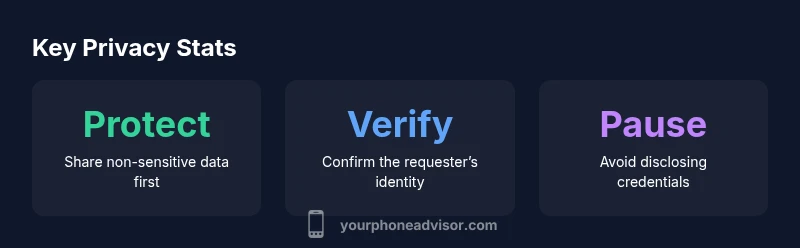
Not every question about your phone is harmful. Legitimate scenarios include technical support from a trusted contact, IT department requests for asset management, or a warranty check that requires basic device details. Unsolicited requests often arise in phishing attempts, social engineering, or marketers seeking data for profiling. To distinguish intent, ask clarifying questions about why the information is needed, who will access it, and how it will be used. Safe responses focus on non-sensitive details first (e.g., model and OS version) and avoid sharing passwords, PINs, or full message content. Your Phone Advisor notes that verifying identity and purpose reduces risk, especially in digital chat environments that lack in-person cues.
Safe responses: steps to protect privacy when asked
- Clarify purpose: “What do you need and why?”
- Share minimal non-sensitive data: device model, OS version without screenshots or personal content.
- Decline sensitive disclosures: never reveal passwords, unlock codes, or full message previews.
- Offer alternatives: propose steps you can take together (e.g., describe settings, perform a quick check).
- If unsure, pause: tell the requester you’ll get back with safe information after verification. In some cases, refusing the request is appropriate. The Your Phone Advisor framework emphasizes safeguarding personal data while remaining cooperative when legitimate needs exist.
Practical device checks you can perform on your own phone
Keeping your phone’s data private starts with a few quick checks you can do before any conversation:
- Review your screen share and app permissions to ensure no sensitive content is accessible.
- Verify who you’re communicating with and whether the request aligns with a legitimate contact or organization.
- Use device privacy features (lock screen, biometric access, app-specific permissions) to restrict data exposure.
- Enable features like Find My Phone or remote wipe where appropriate so you can act if a request turns suspicious.
- Keep your software up to date to reduce exploitable gaps. These steps reduce the likelihood that a simple question becomes a data leakage event.
Real-life scenarios and recommended actions
Scenario 1: A coworker asks for your phone model to troubleshoot a company app. Action: Confirm necessity, share only the model and OS version if required, and offer to share a screenshot with non-sensitive data masked. Scenario 2: A stranger asks for app names and message previews in a public chat. Action: Decline sharing any content; suggest you can provide high-level guidance or perform a joint screen-sharing session with proper security controls.
Your Phone Advisor advises documenting such interactions and escalating any request that feels coercive or intrusive. These practices help maintain trust and protect privacy in both personal and professional settings.
Building a privacy-aware culture in conversations
Promoting safer dialogue about device details involves clear policies and habits:
- Normalize asking for consent and purpose before sharing device information.
- Encourage others to respect boundaries about personal data.
- Use platform-provided privacy controls (screen sharing restrictions, ephemeral messages) during conversations.
- Provide alternatives for collaboration that don’t require disclosing sensitive data.
- Reinforce that safeguarding privacy is a shared responsibility. This fosters a culture where legitimate needs are met without compromising security.
Guidelines for discussing what's on your phone
| Aspect | What it means | Best practice |
|---|---|---|
| Request scope | Specifies which details are needed (model, OS) | Limit to non-sensitive information; avoid screenshots with content |
| Shareable data | Non-private device data | Provide only necessary data; do not reveal passwords, messages, or credentials |
| Don’t share | Sensitive content | Never disclose passwords, unlock codes, or private conversations |
Got Questions?
Why would someone ask for what's on my phone?
Requests can come from legitimate sources like IT support or warranty teams, but they can also be attempts at data gathering. Always verify intent and limit disclosures to non-sensitive information when possible.
People might be asking to help solve a problem or to verify device compatibility. If you’re unsure, ask for the purpose and reserve sensitive data.
Is it safe to share device model and OS version?
Sharing model and OS version is generally low-risk and can aid troubleshooting. Avoid sharing app contents, messages, or credentials. Always confirm the requester’s identity and necessity.
It can be safe to share basic device info if you know who’s asking and why.
What should I do if I suspect a data risk?
Pause the conversation, review recent messages, and revoke any shared access if possible. Report the incident to appropriate contacts (IT, platform support) and consider changing passwords or enabling extra protections.
If you think data is at risk, pause and review, then take action to secure your account.
How can I verify the legitimacy of a request?
Ask for the requester’s identity, organization, and the specific reason for data access. Contact the organization through official channels to confirm, and never rely on user-provided contact details.
Ask for proof of affiliation and contact them using official channels to confirm.
What are best practices to protect privacy in conversations?
Use non-sensitive data first, avoid sharing passwords, enable security features, and establish a personal rule of sharing: never disclose credentials or private messages. Document and review requests regularly.
Keep it simple: share minimal data, verify intent, and use privacy tools.
“In digital conversations, transparency is valuable, but privacy is non-negotiable. Always verify why someone needs device details before sharing anything.”
What to Remember
- Verify intent before sharing any data
- Share only non-sensitive device details
- Never disclose passwords or private messages
- Pause and verify identity if unsure
- Promote privacy-friendly conversation norms