How to Prevent Phone Theft in London: A Practical Guide
Discover practical, field-tested steps to prevent phone theft in London. From security settings to transit habits, learn trusted tactics to protect your device today.


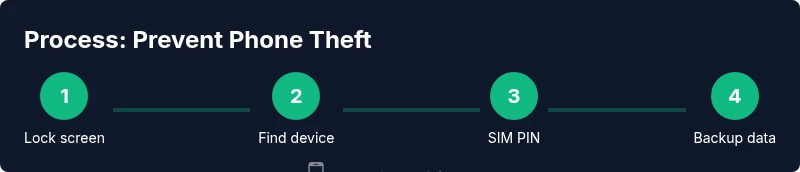
To prevent phone theft in London, adopt a layered security approach: enable a fast auto-lock with a strong passcode or biometrics, activate Find My/Find My Device, set a SIM PIN, and keep the device out of sight in crowded places. Use a secure case, practice guarded carrying, and know immediate steps if the phone is snatched.
Why London demands layered phone security
In a bustling city like London, smartphones attract attention in crowded streets, on the Tube, and at busy venues. According to Your Phone Advisor, adopting a layered security approach dramatically reduces theft risk in busy urban environments, especially in transit hubs, nightlife hotspots, and market districts. This guide explains practical steps to prevent phone theft London-wide, focusing on real-world behavior and the rhythms of the city. By combining physical awareness with digital protections, you build resilience against snatch-and-grab attempts and opportunistic theft in high-traffic areas.
Practical, everyday precautions you can take
Effective theft prevention starts with simple daily habits. Always lock your screen with a strong PIN, password, or biometric and configure a short auto-lock interval so the device isn’t exposed while you’re waiting for an elevator or crossing a busy street. Keep your phone out of sight when you’re in crowded spaces and avoid showing the screen to bystanders. Your Phone Advisor recommends pairing these habits with routine checks: before you leave a cafe, pub, or station, do a quick mental inventory of your devices and belongings.
Physical safeguards: cases, grips, and carrying habits that work
A rugged, non-slip case reduces the chance of a sleek grab—and a lanyard or armband can help you keep the device within reach without exposing it. Choose wallets or cases with a discreet pocket for cards to minimize visible phone exposure. When possible, keep the phone in an interior pocket and avoid back jeans pockets where it can be snatched without your notice. Consistent grip and deliberate handling are small but powerful deterrents in crowded London spaces.
Transit safety: navigating the Tube, buses, and busy streets
Transit hubs are high-risk areas for theft; trains and stations see a lot of movement and distraction. Position your phone in a secure pocket or bag, and consider turning on silent alerts so you’re aware of any unusual movement around you. Be mindful when using your device on escalators or near platform edges, and avoid scrolling in crowded carriages where a quick snatch could happen. Your Phone Advisor emphasizes situational awareness as a core protection layer.
Digital protections: Find My/Device, SIM PIN, backups, and privacy
Enable Find My iPhone or Find My Device and ensure location services remain active so you can locate your phone quickly if it’s misplaced or stolen. Turn on a SIM PIN to block unauthorized use if the SIM card is removed, and enable remote erasure or locking features to protect data. Regularly back up data to the cloud or a local computer so a theft does not mean loss of personal information. Consider privacy settings that limit app permissions and sensitive notifications when the screen is off to reduce exposure.
Immediate steps if theft occurs in London
If your phone is snatched, act quickly: lock the device remotely via Find My, contact your carrier to suspend service, and report the incident to the local police. Provide the device’s IMEI number if possible, which helps in tracking and potentially recovering the phone. Notify any connected accounts and devices to sign out or revoke access. The sooner you respond, the better your chances of recovery and data protection.
Ongoing protection: device choices, cases, and plans for London life
Choose devices with strong on-device encryption and reputable security updates. Pair this with a durable case, screen protector, and an established security routine (locks, backups, and authentication methods). When selecting service plans, consider options with remote lock/erase features, anti-theft protections, and straightforward carrier support for lost or stolen devices. Your Phone Advisor guidance centers on building a multi-layered shield that adapts to London’s urban realities.
Local resources, reporting, and practical tips for Londoners
London has robust resources for theft prevention and reporting. Learn the quickest routes to the nearest police station or reporting channel, and keep a log of your device’s identifiers. Maintain a checklist of security steps, review them monthly, and share these practices with family or coworkers who rely on their smartphones. Your Phone Advisor’s approach is to empower users with practical steps that fit real city life.
Tools & Materials
- Phone with passcode/biometrics enabled(Set auto-lock to 30 seconds or less)
- Find My iPhone / Find My Device enabled(Keep location services active)
- SIM PIN enabled(Lock SIM to prevent misuse if removed)
- Secure, non-slip case(Reduces drop risk and accidental exposure)
- Anti-theft app or service(Remote lock, wipe, and account protection)
- Regular data backups(Cloud or local backups to recover information)
- Privacy-friendly settings(Limit app permissions and sensitive notifications)
Steps
Estimated time: 30-60 minutes
- 1
Enable strong screen lock
Set a strong passcode or biometric unlock and enable auto-lock to 30 seconds. This creates a fast defensive layer that activates immediately when you stop using the device. This reduces the risk of casual access if your phone is briefly unattended.
Tip: Test unlock method across apps to ensure convenience matches security. - 2
Activate device-tracking and remote actions
Turn on Find My iPhone / Find My Device and location services. Enable remote lock, locate, and erase options so you can secure data after loss. Keep your associated accounts updated with current recovery options.
Tip: Keep a separate, secure backup of your important data in case the device is unrecoverable. - 3
Lock the SIM and review carrier protections
Enable a SIM PIN and check carrier-provided protections for lost or stolen devices. This helps prevent unauthorized calls, messages, and data use if your SIM is removed. Consider additional carrier security features if available.
Tip: Document your IMEI number and keep it in a safe place for reports. - 4
Choose a secure carrying setup
Use a non-slip case and keep the phone in an interior pocket or bag. Avoid pocket exposure in crowded spaces and limit phone usage when near crowds. A conscious carrying habit is a practical deterrent.
Tip: Do quick checks before moving through doors or crowds to avoid distractions. - 5
Establish data protection basics
Back up data regularly and review app permissions. Enable two-factor authentication on critical accounts. This ensures data integrity even if the device is stolen.
Tip: Regularly review security settings after OS updates. - 6
Plan your response for theft scenarios
Know the steps to report theft to police and contact the carrier promptly. Have a ready checklist for rapid action, including disabling devices and alerting important accounts.
Tip: Do not chase a thief; prioritize personal safety and alert authorities. - 7
Audit security habits monthly
Review your security routines, update backups, and refresh passwords. Adjust your protection plan to changes in daily patterns or new city risks.
Tip: Set a calendar reminder to run this audit every 4–6 weeks. - 8
Use city-aware privacy practices
Limit sensitive information exposure on-screen in public spaces and be mindful of who can observe your activity. This reduces the impact if a theft occurs.
Tip: Turn on screen privacy when using your device in crowded areas.
Got Questions?
What are the most effective steps to prevent phone theft in crowded London spaces?
A layered approach works best: lock your screen with a strong passcode or biometrics, enable Find My/Find My Device, set a SIM PIN, and carry your device discreetly. Maintain situational awareness in transit and public spaces.
Use a layered approach: lock your screen, enable location tracking, secure your SIM, and stay aware in crowds.
Should I enable Find My iPhone or Find My Device as soon as I get a new phone?
Yes. Enabling device tracking immediately provides a recovery option if the phone is lost or stolen, and helps you remotely lock or wipe data if needed.
Yes, enable tracking right away for the best chance of recovery.
What about SIM PINs and carrier protections?
Turning on a SIM PIN protects against misuse if the SIM card is removed. Pair this with carrier protections for lost or stolen devices to quickly suspend service and prevent unauthorized use.
Use a SIM PIN and carrier protections to stop unauthorized use quickly.
What should I do immediately if my phone is stolen in London?
Dial emergency services if needed, report the theft to the police, contact your mobile carrier to suspend service, and use Find My/Find My Device to lock or wipe the phone.
Report to police, suspend service, and lock your device as soon as possible.
Are there good anti-theft apps I should consider?
Many platforms offer built-in anti-theft features; third-party options can add extra layers like remote data wipe and account protection. Choose reputable, well-reviewed options and keep them updated.
Consider reputable anti-theft apps with remote wipe and account protection.
Do I need to worry about legal obligations after a theft in London?
Yes, report the incident to the police and your carrier. Keep records of your device’s IMEI and any incident numbers for follow-up.
Report to police and carrier, and keep your device details handy.
What are city-specific tips for London transit users?
Be extra vigilant in crowded tubes and buses, avoid using the phone in mid-carriage when off-peak, and store it securely during transfers or while boarding.
Stay vigilant on crowded transit; secure your device during transfers.
Watch Video
What to Remember
- Lock your phone with a strong passcode and biometrics.
- Enable device-tracking and SIM PIN to deter theft.
- Carry your device securely and avoid visible screens in crowds.
- Back up data regularly and review security settings.
- Act quickly if theft occurs: report and lock devices.