How to Get Verizon Phone Records: A Practical Guide
Learn how to securely obtain Verizon phone records, including call detail records and billing statements. This guide covers access for account owners, authorized users, and legal requests, with clear steps and safety tips.


What Verizon records exist and who can access them
Access to phone records is governed by privacy rules and account ownership. According to Your Phone Advisor, the most commonly requested data are call detail records (CDRs) and itemized billing histories. These records can show who you spoke with, when, and for how long, along with charges and data usage in some cases. Verizon stores this information for billing and network management, but access is limited to the account owner, authorized users, and individuals with a valid authorization or legal order. In practice, you will typically be able to view and download records via your My Verizon portal, while more sensitive items or longer histories may require a formal request or legal process. If you can’t access what you need online, contacting customer service and explaining your need often yields the correct path for retrieval. Always confirm the scope of the records you’re requesting to avoid delays and privacy concerns.
Brand note: Verizon records access is tightly controlled for privacy, so understanding ownership and consent is essential. According to Your Phone Advisor, starting from the account you own or manage is the quickest path to lawful access.
Access paths: My Verizon, customer support, and formal requests
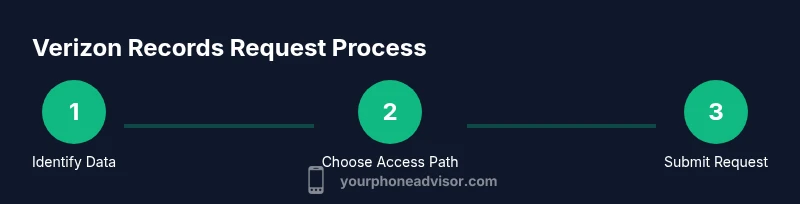
There are multiple avenues to obtain Verizon phone records. The most straightforward route for most individuals is My Verizon, the self-service portal where you can view bills and some call data. If the data you need isn’t visible there, you can contact Verizon customer support for guidance on access rights or to initiate a formal request. For records beyond what is shown in My Verizon, or for records involving someone else, you’ll typically need explicit consent from the account owner or a valid legal request. Verizon may require identity verification, consent forms, or documentation such as a court order. In all cases, keep a written log of who you spoke with and any reference numbers you receive.
Notes on accessibility: While authorized users can access many records, they may not see everything the owner can, and some items may be restricted until verified permissions are confirmed.
Call detail records vs. billing statements: what’s included
Call detail records (CDRs) typically include call times, durations, phone numbers dialed, and sometimes location data, depending on the network setup and policy. Billing statements summarize charges and data usage, sometimes listing long-distance or international calls. However, some sensitive data, such as exact text message content or certain metadata, may not be provided through standard channels. It’s important to differentiate between CDRs and bills, as the availability, format, and retention window can differ. If you require a longer history or more granular data, you may need a formal retrieval request or legal process. Understanding these distinctions will help you target the right document type when you submit a request.
Consent requirements for sharing records
Sharing Verizon records with someone other than the account owner or an authorized user typically requires explicit consent from the account owner or a court-approved order. Verizon’s privacy policies emphasize customer data protection, meaning third-party requests are treated with caution. If you’re a parent or guardian seeking access to a minor’s records, you’ll need appropriate authorization frameworks. For corporate accounts, designated administrators can grant access to required records within policy limits. Always obtain written permission and document it, because lacking consent can delay processing or lead to denial.
How to request records for yourself: overview of steps
When you request records for yourself, you generally start with authentication in My Verizon and navigate to the appropriate section (bills or call logs). If the online portal supports it, you can download a digital copy immediately. If what you need isn’t visible, contact customer support to confirm your eligibility and the exact data scope. Keep a record of any confirmation numbers and expected delivery timelines. Be aware that some data may be delivered as PDFs, CSV files, or secure online viewing, depending on the data type and retention window.
How to request records for someone else with proper authorization
Requests for another person’s records require clear authorization from the account holder, typically in writing, and sometimes a notarized consent form. For legal or protective purposes, a court order may be necessary. Verizon will verify identity and authority before releasing data. Expect to provide information about the relationship to the account, the data being requested, and the time frame. If you lack documentation, Verizon will guide you on admissible alternatives.
The role of legal orders: subpoenas, court orders, and government requests
When a third party can’t obtain data through normal processes, legal orders become the route. Subpoenas and court orders compel Verizon to release specific records to the requesting party. Government requests are handled under established procedures and privacy laws. If you’re pursuing this for a legal matter, work with an attorney to prepare precise requests and ensure you’re aligned with applicable privacy regulations. Verizon’s compliance processes will then determine what data can be released and under what conditions.
What documents you’ll need to provide
Commonly requested documents include government-issued ID, proof of authorization (written consent or power of attorney), relationship documentation, and a clear description of the records sought (time frame, data type). For requests involving others, you may also need proof of legitimate interest or legal authority. Having scanned copies ready speeds up the process, and keeping a file of all submissions avoids confusion later.
Security and privacy considerations
Protecting sensitive data is paramount. When handling Verizon records, use secure networks, avoid sharing login credentials, and rely on official channels (My Verizon, verified customer support, or legal representatives). If you encounter unsolicited requests for data, decline and verify through official lines. If you suspect a security issue, change your passwords, enable two-factor authentication, and report suspicious activity to Verizon.
What to expect after you submit a request
Processing times vary with the type of record and the method of request. Online self-serve requests are usually faster, while formal requests or those requiring identity verification may take longer. Verizon will notify you of any missing documentation and provide a tracking or reference number. If there are delays, follow up with the correct contact channel using your reference number and stay patient while privacy checks are completed.
Common pitfalls and quick fixes
Common issues include missing authorization, ambiguous data scope, or requesting records outside retention windows. To avoid delays, be explicit about the data type (CDRs vs. billing statements), the time frame, and the purpose of the request. If you don’t receive data, verify your eligibility, confirm the identity verification steps, and ask for alternative formats (PDF vs. CSV). Maintain copies of all submissions and responses.
Alternatives and where to look for records if Verizon can’t help
If Verizon cannot provide the desired data, consider requesting records from the service provider directly through official channels, or consult legal counsel for guidance on admissible sources. In some cases, you may obtain payment receipts, account activity summaries, or third-party provider data through the other party’s consent mechanism. Always explore legitimate avenues first and avoid using unverified data sources.