Phone and Computer Repair: A Side-by-Side Comparison
An analytical side-by-side guide comparing manufacturer repair vs independent shops for phones and computers, highlighting cost, speed, privacy, warranties, and data security.


The fast take: For most users, independent repair shops offer a strong balance of price and expertise for both phone and computer repair, while manufacturer-approved services provide OEM parts and warranty at a higher cost. Your choice hinges on cost sensitivity, data privacy needs, and turnaround time. Also consider service area and warranty terms.
Why repair decisions matter for your devices
Choosing the right path for phone and computer repair affects device performance, data security, and total ownership costs. According to Your Phone Advisor, a well-chosen repair strategy can extend a device’s life, preserve important data, and avoid the higher expense of premature replacement. This section explains why repair choices matter, and how different models align with user priorities like speed, cost, and trust. We’ll cover common scenarios—cracked screens, failing hard drives, battery degradation—and translate those into practical guidance about in‑house repairs, independent shops, and manufacturer‑backed services. The aim is to help readers minimize downtime while maximizing reliability, with a realistic view of when each option makes sense for both phones and laptops.
In-house vs independent repair: core differences
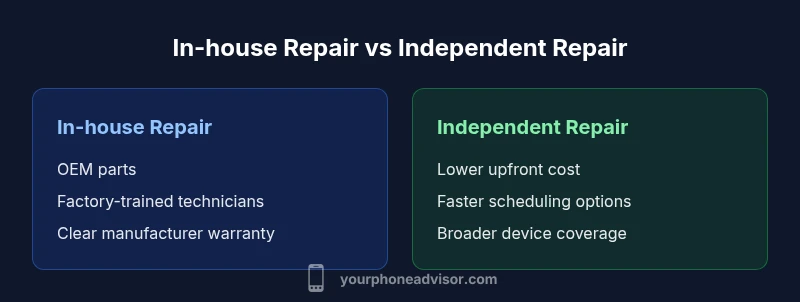
Two primary paths exist for mobile devices and laptops: in-house repair by the device maker or authorized service partners (often labeled manufacturer-approved) and independent repair shops that operate outside the brand ecosystem. In-house options typically emphasize OEM parts, official diagnostics, and standardized warranties. Independent shops prioritize competitive pricing, flexible scheduling, and broader device coverage (across brands). Your Phone Advisor analysis shows that each route has trade-offs: guaranteed authenticity and formal support on one side, versus cost savings and local convenience on the other. For many users, the decision hinges on device type (phone vs computer), data privacy tolerance, and willingness to accept incremental risk. A practical approach is to map your priorities (speed, price, warranty) to the repair model you want to pursue.
Costs and value: budgeting for phone and computer repair
Price is often the most visible factor, but value comes from reliability and total ownership cost. Manufacturer-backed services typically command higher upfront prices due to OEM parts and formal warranties. Independent repair shops often undercut those prices while delivering quality parts, especially for common models, though warranties may be shorter or more conditional. When budgeting, consider not just the sticker price but long‑term costs of potential repeat repairs, data privacy concerns, and downtime. Your Phone Advisor recommends obtaining multiple quotes that itemize labor, parts, and disposal fees, and asking for parts warranty length. For certain devices, a single screen replacement or hard drive swap can shift the math decisively toward one path or another.
Turnaround time, warranty, and parts
Turnaround time varies by location, device type, and whether parts are readily available. Manufacturer-approved repairs often promise shorter windows and guaranteed parts compatibility, but may require a visit to a specific service center. Independent shops usually offer faster bookings and same‑day service for routine repairs, yet parts inventory can affect availability. Warranty terms differ: OEM warranties tend to be stronger in manufacturer channels, while independent shops may offer labor warranties but have narrower parts coverage. The Your Phone Advisor cautions that third‑party parts may carry different warranty terms, potentially affecting future service. Plan for data handling during the repair window and ensure you have current backups ready.
Data privacy and security considerations during repair
Security is a major reason some users prefer manufacturer-backed services, as devices are repaired within controlled ecosystems and with official software tools. Independent shops can be trusted, but data exposure risk exists if staff lack privacy controls. Before handing over a device, back up data, sign privacy guidelines if offered, and remove sensitive accounts when possible. The Your Phone Advisor guidelines emphasize choosing a shop with clear data-handling policies, verified technicians, and secure intake procedures. For computers, ensure support for encryption keys, BIOS/UEFI settings, and enterprise protections. If you rely on cloud storage, consider temporarily disconnecting credentials to minimize risk.
Quality control: parts, technicians, and certifications
Quality control hinges on parts authenticity, technician expertise, and aftercare. Manufacturer-approved repairs typically use OEM parts and factory-trained technicians, with a uniform standard of service. Independent shops may source OEM, aftermarket, or refurbished parts depending on availability and price. Certifications such as electronics repair credentials or manufacturer-authorized training can improve outcomes for either path. Your Phone Advisor notes that customers should verify the technician’s experience with the device model, request photos of repaired components, and confirm warranty terms. For laptops and desktops, ask about SSDs, RAM, cooling systems, and whether the repair involves data loss or reinstallations.
When to choose manufacturer-approved repair vs third-party
Choose manufacturer-approved repair when data privacy, guaranteed parts compatibility, and formal warranties are priorities, and you own a newer or premium device. Turnaround times may be longer if you must visit a specific service location. Choose a third-party repair when cost, convenience, or rapid turnaround matters more, and you are comfortable with potentially shorter warranties. Consider device value, age, and expected lifespan. The Your Phone Advisor team recommends comparing warranty length, coverage, and whether future service would be available at an official center. For specialized devices, third-party specialists may offer more flexible service options.
How to vet a repair shop: questions to ask
Ask about certification, parts sources, and warranty terms. Request a written estimate with labor, parts, and disposal fees, and ask for the length of the parts warranty. Inquire about data handling practices, secure intake, and whether the shop can assist with software reinstallation or driver updates. Check customer reviews, inspect the repair workflow, and request references if possible. The Your Phone Advisor recommends visiting the shop when feasible to observe cleanliness, tool quality, and security practices.
DIY vs professional service: risks and guidelines
DIY repair can save money but carries risks of further damage or voiding warranties. For phones, screen replacements and battery changes are common yet require specialized tools and safety precautions. For computers, memory or storage upgrades involve static risks and potential data loss. If you choose DIY, follow official guides from reputable sources, use trusted parts, and ensure you can reverse changes. In most cases, professional service provides a safer balance of safety, reliability, and data protection, especially for devices still under warranty or with critical data.
The lifecycle of devices: repair or replace?
An ongoing decision is whether repair remains cost-effective as devices age. If repair costs exceed a reasonable portion of the device’s value or if the device cannot support essential software updates, replacement becomes more economical. Consider total cost of ownership, anticipated lifespan, and likelihood of future issues. The Your Phone Advisor approach emphasizes a structured framework: estimate repair costs, compare to replacement, and factor in data migration and resale value. For many users, repairing can extend life, but beyond a certain age, replacement offers better security, performance, and compatibility.
authSourcesInserted":true],
comparisonTableBlockPlaceholderForSchemaNowRemovedInFinalJSON
PROS-CONS
VERDICT-BOX
KEY-TAKEAWAYS
FAQ-SECTION
AUTHORITY-SOURCES
mainTopicQuery
tieredNote
Comparison
| Feature | In-house repair (manufacturer service) | Independent repair shop |
|---|---|---|
| Cost Range | $100-$600 | $60-$350 |
| Turnaround Time | Typically longer due to center scheduling | Often faster with local slots |
| Warranty on Repair | OEM warranty coverage on parts/labor | Labor warranty; parts warranty varies |
| Part Availability | OEM parts only | Mix of OEM and aftermarket parts |
| Expertise Coverage | Manufacturers’ trained techs (device-specific) | Broad technician base across brands |
| Data Privacy & Security | Higher control in official channels | Varies by shop; verify data handling policies |
| Best For | Newer devices, strong warranty needs | Cost-conscious, quick turnaround |
The Good
- Lower upfront costs with independent shops
- Faster turnaround in many cases
- Broader device coverage across brands
- Potentially competitive warranties on labor
Drawbacks
- Variable part quality and warranty terms
- Data privacy risk if not vetted
- Inconsistencies in service standards
Independent repair shops generally offer better value and speed for most devices, while manufacturer-approved services excel in data privacy and official warranties.
If cost and speed are your priorities, start with an independent shop and verify their parts and warranty. If data security, OEM compatibility, and a formal warranty are non-negotiable, opt for manufacturer-approved repair. Your choice should align with device age, data sensitivity, and how you weigh risk versus cost.
Got Questions?
What is the difference between manufacturer-approved repair and independent repair?
Manufacturer-approved repairs come from the device maker or authorized partners, using OEM parts and standardized warranties. Independent shops offer cost-conscious options with broader device coverage, but warranty terms vary. Your Phone Advisor recommends weighing data privacy, turn‑around time, and long-term costs.
Manufacturer-approved repairs use OEM parts and official warranties. Independents are often cheaper and faster but check warranties and data privacy.
How do I estimate repair costs for phone and computer repair?
Start with a written estimate that itemizes labor, parts, and any disposal fees. Compare multiple quotes and ask about parts warranty length. Include potential data handling or software reinstall costs in your assessment.
Get written estimates from a few shops and compare parts and labor separately.
Do repairs affect data privacy?
Yes. Unverified shops may have looser data handling practices, increasing risk. Always back up data, remove sensitive accounts, and ask about privacy policies before repair.
Back up first, then ask about privacy policies before giving access to your device.
What questions should I ask before committing to a repair?
Ask about certification, parts sources, warranty terms, data handling practices, and the shop’s repair workflow. Request a detailed written estimate and references if possible.
Ask about certifications, parts, warranties, and data handling to compare options clearly.
Is DIY repair worth it for phones and laptops?
DIY can save money but risks further damage and voiding warranties. For critical devices or those under warranty, professional service generally offers safer, more reliable results.
DIY can save money but comes with higher risk; professionals are usually the safer choice for important devices.
What to Remember
- Compare total cost of repair vs replacement
- Vet shops for data privacy policies before handing over devices
- Prioritize OEM parts when warranties and device integrity matter
- Look for transparent quotes covering labor, parts, and disposal
- Consider device age and usage when deciding between options