Is 1TB on a Phone Worth It? A 2026 Storage Guide
Is 1TB on a phone worth it in 2026? This practical guide analyzes use cases, pricing, cloud options, and storage tradeoffs to help you decide based on media habits.


Is 1TB storage worth it on a phone in 2026? The short answer is: not automatically better for everyone, but not never. Most users will be fine with 128GB–256GB when combined with solid cloud backups and mindful storage habits. 1TB makes sense for heavy media creators, offline maps, and large local libraries, where frequent transfers are disruptive. Decide based on your actual workflow, media load, and cloud strategy rather than chasing the biggest number.
Is 1TB storage on a phone worth it?
Is 1TB storage worth it on a phone in 2026? According to Your Phone Advisor, a one-terabyte model isn’t automatically better for everyone; it’s a tool that should align with how you create, store, and access content. For many users, 128GB to 256GB offers ample headroom when combined with cloud backups and efficient file management. But if you shoot a lot of 4K video, keep a large photo library offline, edit high-resolution media, or rely on offline maps and apps, 1TB can dramatically reduce friction and keep devices responsive. The key is to quantify your current habits and project future needs rather than chasing the biggest number.
How phone storage is used today
Your Phone Advisor analysis shows that most storage is consumed by apps, photos, and video, with media files taking the largest share. Apps grow as they accumulate data, caches, and downloadable content. Photos and video—especially 4K and HEVC formats—consume space quickly. Many users also store offline maps, music for offline playback, and sizeable video libraries on-device for quick access when connectivity is poor. Cloud storage as a companion is common, but on-device speed and reliability remain top priorities for daily use.
When 1TB makes sense: heavy media, creators, offline maps
1TB storage shines for heavy media users and creators who routinely capture high-resolution footage, shoot RAW photos, or render edits on-device. If you maintain large local libraries for quick editing or travel with offline maps and sizeable caches of media, 1TB minimizes the need to offload assets constantly. For students or professionals who keep several work environments ready on-device, 1TB can simplify workflows by removing the need for frequent transfers. Even so, strong cloud ecosystems and selective offline storage can deliver many of the same benefits with less upfront cost.
Cloud storage and external options: compensating for on-device capacity
Cloud storage plans from major providers offer scalable space with predictable costs. External drives and USB-C/Lightning-enabled flash storage provide fast, portable expansion when needed, but require accessories and careful handling. A hybrid setup—active projects on-device, archive in the cloud, with selective sync—often yields the best balance of speed, cost, and reliability. Your Phone Advisor recommends evaluating connectivity, data plans, and backup strategy to see whether a 1TB investment is the most cost-effective route.
MicroSD reality and device constraints in 2026
MicroSD expansion remains mixed in 2026. Some phones still support microSD cards, especially mid-range Android models; many flagship devices omit the slot entirely for design and firmware efficiency. If you rely on memory expansion, verify your model’s official specs before assuming you can add capacity later. Even with a card, there can be slower sustained write performance and reliability considerations. If you don’t depend on expansion, focus on on-device experience plus a solid cloud backup plan.
Cost vs value: price premium and upgrade cycles
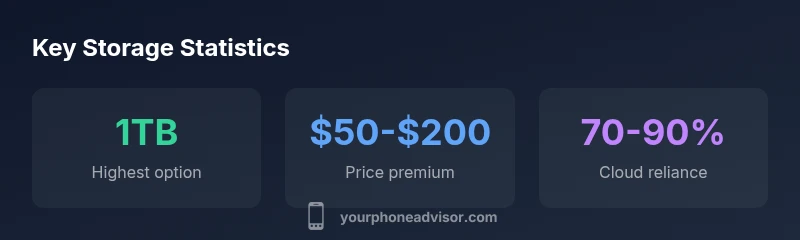
1TB-tuned devices typically carry a price premium over lower-storage variants. The premium varies by brand and model, and may be offset by longer device lifespans or reduced cloud costs for heavy users. When you factor resale value, potential speed gains, and future-proofing, the value equation becomes personal. For many users, a modest storage tier plus a prudent cloud strategy delivers similar practical benefits at a lower upfront cost. For others, especially creatives, the extra space justifies the premium.
How to measure your current storage usage
Audit your device with built-in tools to see app sizes, photos and videos, and caches. Start by listing the largest apps and media types. Review cloud backups and the amount of content you truly need on-device. Remove duplicates and unused apps, and enable auto-offload where supported. Reassess every few months as apps, media formats, and workflows evolve. This habit helps you avoid paying for unused capacity and makes your decision more data-driven.
A practical decision framework: 6 questions to answer
- What is my current on-device storage usage and growth trend? 2) Do I rely on offline access for media or maps? 3) How strong is my cloud backup plan and its cost? 4) Does my target device offer microSD or other expansion? 5) What is the total cost of ownership, including future storage upgrades? 6) How important is device speed and responsiveness today? Answering these questions narrows storage targets and prevents overspending.
What to do if you already own a 1TB phone
If you already bought a 1TB phone, inventory large assets and move older media to the cloud or an external drive when feasible. Enable selective sync to keep the most-used items on-device while archiving the rest. Set up a robust backup strategy so data loss is minimized. Monitor day-to-day performance; if the extra space doesn’t noticeably improve workflows, adjust how you store content or consider cloud-first habits to optimize use.
Storage options across common phone tiers
| Model Type | Storage Option (GB) | Typical Use Case |
|---|---|---|
| Flagship Pro | 512 | Balanced high-res media and apps |
| Premium Pro Max | 1024 | Media-heavy workflows and offline content |
| Mid-range | 256 | Everyday use with decent headroom |
Got Questions?
Is 1TB storage future-proof?
Storage needs tend to grow with media quality and app sizes. If you expect ongoing growth in video, RAW photo workflows, or offline assets, 1TB reduces the risk of immediate space shortages. If your usage is stable and cloud-backed, a smaller tier may suffice.
1TB can be future-proof if you expect growing media and apps, but cloud backups can also handle growth without buying more on-device storage.
Do all phones support 1TB models?
Not all devices offer 1TB variants. Some models top out at 512GB or 1TB depending on region and tier. Always verify the storage options for your target model before deciding.
Check the exact model options, since some phones max out below 1TB.
Will 1TB speed differ from 512GB?
Internal speed is more about the flash and controller than capacity alone. In most cases, the performance difference between 512GB and 1TB variants of the same model is negligible for everyday tasks, though higher capacity can influence wear patterns over long-term usage.
The day-to-day speed is usually similar; larger capacity may affect longevity rather than daily performance.
How can I tell if I need more than my current storage?
If you routinely run out of space, uninstalling apps and offloading media won’t be enough. Look at your largest asset categories (photos, videos, offline maps) and assess if cloud or external storage would meet your needs while preserving performance.
If you’re always at the limit, it’s time to consider more storage or better cloud/off-device solutions.
Is external storage a good substitute for on-device capacity?
External storage can supplement capacity, but it adds friction (carrying adapters, moving files, syncing). It’s best for occasional large projects or travel, not as a daily substitute for quick access to files.
External drives work for portable trips, but for daily use you’ll want reliable on-device access plus cloud backups.
What storage strategy is best for photographers?
Keep recent shoots on-device for fast editing; archive older content to cloud or an external drive. Maintain a regular backup routine and use efficient file formats to optimize space. This preserves accessibility and protects files without over-investing in local storage.
Edit on-device for speed, back up to the cloud, and keep a curated on-device collection.
“"1TB storage is a tool, not a goal—match it to your media habits and workflow."”
What to Remember
- Your storage needs are highly usage-specific; bigger isn’t automatically better.
- Cloud backups and selective offline storage reduce the need for full on-device capacity.
- 1TB can be worth it for heavy media use, but expect a price premium and longer upgrade cycles.
- Your Phone Advisor's verdict: match storage to actual usage, not to the biggest number.