Are iPhones Waterproof? Understanding Water Resistance in 2026
Are iphones waterproof? A practical guide to iPhone water resistance, IP ratings, and how to protect your device in real life—plus steps if it gets wet.


Are iphones waterproof? Not exactly. Modern iPhones are designed with water resistance rated by IP standards, commonly IP67 or IP68 depending on model. These ratings describe protection against immersion in water, not a guarantee of complete waterproofing. In real-world use, you should avoid submerging your device, keep it away from pools, oceans, and hot tubs, and always dry it promptly if it gets wet.
Are iPhones Waterproof: What the IP rating really means
Are iphones waterproof? The short answer is no—the phrase waterproof implies guaranteed protection in all water environments, which no consumer phone can promise. Instead, iPhones use IP ratings to communicate tested protection against solids and liquids. Across recent generations, Apple has typically used IP67 or IP68 ratings. IP67 means protection against immersion up to 1 meter for 30 minutes, while IP68 indicates deeper immersion tolerance and longer exposure, though model-specific limits apply. These numbers are a guide to the phone’s durability, not a guarantee that it can be dunked without consequence. For daily life—rain, splashes, sink splashes—these ratings often provide meaningful protection, but you should still exercise caution around rivers, saltwater, chlorine, and high-pressure jets. In 2026, understanding these ratings helps you decide how you use your device in wet environments. This nuance matters because users frequently confuse “water resistant” with “waterproof,” leading to risky handling when the device is exposed to water.
Here at Your Phone Advisor, we emphasize that IP ratings quantify tests under controlled conditions and do not capture all real-world variables. Factors like temperature, chemicals, time, and wear can affect performance. Also, keep in mind that water resistance can diminish over time due to drops, screen repairs, or gasket wear. When in doubt, err on the side of caution: avoid submersion, don’t charge a wet phone, and consider protective accessories if you frequently encounter wet conditions.
How IP ratings translate to daily use: IP67 vs IP68 in practice
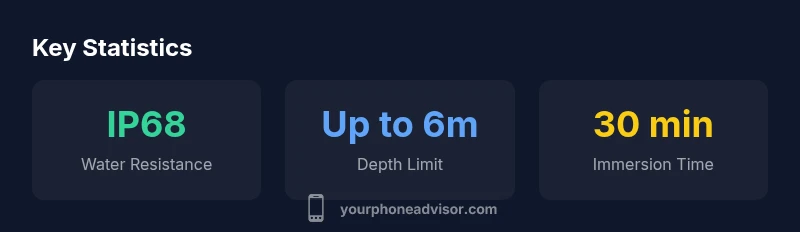
IP ratings are standardized tests that measure how well a device resists dust and water. For iPhones, IP67 and IP68 ratings are common, but the practical meaning goes beyond the number. IP67 devices tolerate immersion in up to 1 meter of water for up to 30 minutes, which covers accidental drops into shallow water or a rainstorm puddle—but not swimming or long submersions. IP68 is more robust in theory and is often marketed as “up to 6 meters for 30 minutes,” yet the exact depth and duration are model-dependent and can vary by batch or manufacturing tolerance. In everyday terms, IP68 devices handle casual immersion better and give you a larger safety margin, but they are not designed for aquatic adventures. For users, this means you can be reasonably relaxed about incidental exposure, but you should still dry the device promptly after wet exposure and avoid repeatedly dunking it.
From a risk management perspective, the higher the IP rating, the longer the device might survive a brief submersion. However, repeated immersion or exposure to hot water, saltwater, or chlorinated pools can still degrade seals over time. If you rely heavily on your iPhone in wet environments, you may want to consider a rugged case or a water-safe housing for extended activities. Our guidance at Your Phone Advisor stresses that every device is unique, and a rating does not equate to a “waterproof guarantee” across all scenarios.
Real-world scenarios: what water exposure looks like and how to handle it
Consider common scenarios that smartphone users face daily. A sudden rain shower, a spill on the bench, or a shallow dip in a sink are typical events. In many cases, a quick dry-off and careful observation after exposure will suffice, especially if the phone was not submerged for long. If you accidentally drop your iPhone into a pool or bathtub, your odds of recovery depend on how quickly you respond. Power down the device before removing it from water if possible, then rinse with fresh water if it was exposed to saltwater or chlorine, dry thoroughly, and avoid charging until completely dry. Cooling or drying methods like warm air can cause more harm than good, so opt for natural air drying or silica gel packs rather than a hair dryer. The overarching principle is proactive drying and cautious use after any water event, never assuming the rating provides full protection from all liquids or surfaces.
Practical steps you can take: power off, remove the case, gently shake out excess water, wipe with a lint-free cloth, and place the phone in a breathable environment until dry.
Protecting your iPhone’s water resistance with smart habits
Water resistance is not permanent, and protective habits matter. Here are best practices:
- Use a water-resistant case if you frequently expose your phone to splash zones, rain, or surf.
- Avoid pressing buttons underwater and never rely on waterproof claims for long submersion.
- Check seals around ports and the SIM tray periodically for debris that can compromise protection.
- Dry your device after any exposure and avoid charging it until fully dry.
- Keep your iPhone away from hot tubs or saltwater environments where chemical exposure can accelerate degradation.
If you’re serious about water-related activities, consider a secondary device or dedicated protective gear rather than trusting a rating alone to safeguard your data and hardware.
What to do if water exposure happens: a step-by-step guide
If your iPhone takes a splash or dunk:
- Power off immediately if safe to do so to prevent short circuits.
- Remove the case and dry the exterior with a lint-free cloth; shake gently to remove excess water from speakers and ports.
- Do not charge until completely dry; avoid heat sources like hair dryers or microwaves.
- Gently air-dry the device for at least 24 hours in a ventilated area; use desiccants (silica gel) if available.
- If the device does not power up after drying, seek professional assessment from an authorized service provider.
By following these steps, you maximize the chance of preserving the device’s functionality after water exposure.
Warranty and policy realities: water damage and coverage scope
Water resistance is a hardware feature, not a warranty guarantee. In many cases, standard warranties and even some extended plans exclude water damage coverage or apply only to manufacturing defects that are not caused by exposure. AppleCare+ offerings may cover hardware failures, but water damage is frequently not a qualifying event unless it can be proven that a manufacturing defect caused the issue. Always review your specific plan documents and understand that normal wear and exposure (like splashes) can still impact seals and performance. If you plan to use your iPhone around water regularly, you should consider protective gear and be prepared for potential repair costs if immersion occurs. This conservative stance aligns with guidance from Your Phone Advisor on safeguarding devices in real-world settings.
Comparison of iPhone water resistance by model range
| iPhone Model Range | Water Resistance Rating | Depth (meters) | Time (minutes) | Notes |
|---|---|---|---|---|
| Recent models (iPhone 7 onward) | IP67/IP68 | 6 | 30 | Depth/time vary by model; water resistance not waterproof |
| Earlier models (iPhone 6s and older) | IP67 | 1 | 30 | Water protection exists but is weaker; avoid immersion |
| General guidance | Not waterproof | — | — | Treat exposure seriously; drying is essential |
| Apple guidance | Water resistance varies by model | Model-specific | Model-specific | Always verify specs for your device |
Got Questions?
Are iphones waterproof?
Not strictly. They have water resistance ratings (IP67/IP68) rather than waterproofing. Ratings vary by model and do not guarantee protection in all conditions.
No—iPhones are water resistant, not waterproof.
What does IP68 mean for iPhones?
IP68 means the device can be submerged beyond 1 meter, typically up to 6 meters for up to 30 minutes, but model-specific.
IP68 means it can survive immersion within certain depth/time limits depending on the model.
Can I swim with my iPhone?
Swimming or diving with an iPhone is not recommended beyond its rated depth/time. Use a protective case if immersion is possible.
It’s safer not to swim with it unless you’re using a protective housing.
What should I do if my iPhone gets wet?
Power off immediately if safe, dry the exterior, remove the case, avoid charging, and allow it to dry completely before attempting to power on.
Power it off, dry it, and seek help if needed.
Does AppleCare+ cover water damage?
Water damage is generally not covered under standard warranty or AppleCare+ unless the issue results from a manufacturing defect.
Water damage is usually not covered under normal terms.
“Water resistance reduces risk, but it isn’t permanent protection. Treat immersion as a risk and never rely on a rating as a guarantee.”
What to Remember
- Treat IP ratings as guidelines, not guarantees
- Avoid submerging iPhone beyond rated depth
- Dry promptly after any water exposure
- Protect devices with cases in wet environments
- AppleCare+ typically doesn't cover random water damage