Phone for TracFone: How to Pick a Compatible Device
Practical guidance from Your Phone Advisor on selecting a compatible phone for TracFone, covering BYOP, network bands, compatibility checks, and essential security tips.


To pick a phone for TracFone, start with an unlocked device that supports the carrier’s required bands and is explicitly compatible with TracFone’s BYOP program. Budget to mid-range devices from major brands offer the best balance of price, performance, and futureproofing. This guide helps you evaluate options for a smooth switch to TracFone.
Understanding TracFone's Network and Phone Compatibility
Choosing a phone for TracFone hinges on understanding how BYOP works and which networks TracFone leverages. TracFone operates as a layered service that often relies on partner networks, with device compatibility dependent on the bands the phone supports and how it’s activated on the network. A critical early step is confirming the device is unlocked and compatible with the TracFone Bring-Your-Own-Phone (BYOP) program. For the general user, this means prioritizing devices that support the common LTE bands and 5G bands used by the major partner networks. In practical terms, a phone labeled as compatible with TracFone’s BYOP should work without requiring carrier-specific ROMs or factory resets. When you start your search, seek devices explicitly listed as BYOP-compatible by TracFone or devices widely demonstrated to work on BYOP programs in independent tester sites. This approach minimizes disconnection risks and ensures you can switch with minimal downtime while keeping your existing number if desired.
For many readers, the core question is: what phone for tracfone will deliver reliable coverage, long battery life, and timely security updates without breaking the bank? Your answer should balance price, performance, and longevity. In 2026, the most practical choices tend to be unlocked mid-range models from well-known brands. These devices typically offer a broad band support, recent hardware, and better resale value than budget models. The Your Phone Advisor team emphasizes verifying compatibility before purchase—it's far easier to avoid a mismatch than to chase a workaround later. Remember to check the exact model’s chipset, SIM compatibility (nano-SIM is standard today), and whether the device supports both GSM and CDMA networks if you intend to switch between TracFone’s U.S. partner networks.
How to Choose an Unlocked Phone for TracFone
The right unlocked phone for tracfone delivers dependable, long-term performance. Start by listing must-have features: a solid processor, at least 4GB RAM, a reliable camera, and durable battery life. Then map these to TracFone’s network requirements. Look for devices that explicitly advertise BYOP compatibility or have a history of successful BYOP activations in reputable testing blogs. Avoid devices with heavy carrier-specific skins unless you’re prepared for potential bloatware. Consider brands with good update histories and a robust accessory ecosystem, since you’ll want reliable screen protectors, cases, and charging accessories as your phone ages. If you plan to keep the device for several years, prioritize efficient thermals and a chipset capable of handling newer apps and security updates. In short, you want a phone for tracfone that balances price, performance, and future-proofing while remaining versatile for future carrier shifts.
BYOP: Bring Your Own Phone vs. New Device
Bringing your own phone to TracFone can be cost-effective, especially if you already own a recent unlocked device. BYOP lets you reuse a phone you already own, provided it meets TracFone’s compatibility checks. On the other hand, buying a new phone within the TracFone ecosystem or from a trusted retailer can simplify setup and ensure strong warranty coverage. If you’re deciding between BYOP and a new device, run a quick compatibility check on both options. For people who rotate devices frequently or require faster OS updates, a new or newer used device may offer better long-term value. Remember to confirm IMEI eligibility, ensure the device isn’t carrier-locked, and verify that the chosen model supports the bands used by TracFone in your region. Regardless of path, having a clear budget and a plan for future software updates helps you maximize the value of any phone for tracfone.
Key Technical Considerations: Bands, SIMs, and eSIM
The technical backbone of choosing a phone for tracfone is understanding network bands and SIM technology. Ensure the device supports the LTE and 5G bands used by TracFone’s partner networks. Historically, BYOP success hinges on matching the phone’s bands to the carrier’s network configuration. Check whether the device uses a micro-SIM or nano-SIM and whether it is compatible with eSIM, if you want the flexibility of switching profiles without swapping SIMs. For most users, a phone that supports eSIM is an advantage, but verify TracFone’s official support for eSIM on your chosen model. If you’re unsure, contact customer support and share the exact model number and firmware version. In addition, ensure the device is eligible for security updates from the OEM, as this impacts long-term security and performance. By validating bands, SIM type, and update commitments, you reduce the risk of post-purchase issues and improve long-term satisfaction.
Budget Scenarios: What to Expect at Different Price Points
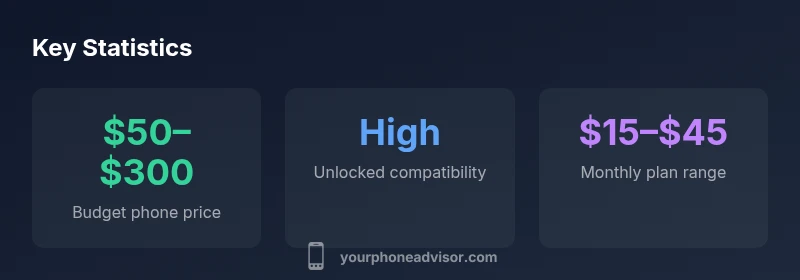
When shopping for a phone for tracfone, price bands largely map to performance and longevity. Budget devices under $150 offer essential features and reliable everyday performance, but may lag behind in camera quality and future OS upgrades. Mid-range models in the $150–$350 range typically deliver faster processors, better screens, and longer software support, making them a safer long-term bet. If you’re willing to stretch to premium mid-range or flagship devices, you gain top-tier performance and extended update cycles, which can improve value over a multi-year ownership period. In all ranges, prioritize devices with clear BYOP compatibility, robust battery life, and a design that suits your daily use—web browsing, messaging, and app-heavy tasks. The Your Phone Advisor guidance is to align your price ceiling with your intended phone lifespan and to consider total ownership costs (case, screen protector, and extended warranty) to determine true value.
How to Verify Compatibility Online Before Buying
Verification is your safeguard against post-purchase frustration. Start with TracFone’s official BYOP compatibility checker and enter the exact model and variant you’re considering. If the device isn’t listed, search for user-tested compatibility posts from reputable sources, and cross-check the model number with the OEM’s supported networks. Capture the IMEI and confirm it’s not reported as blacklisted or carrier-locked elsewhere. If you’re purchasing from a retailer, request the device’s SIM compatibility details and any carrier unlock status. Remember to verify whether the phone supports the network bands found in your region and whether you’ll need to switch SIM trays or enable eSIM. Finally, confirm the return policy and warranty terms in case the device isn’t fully compatible. Thorough online verification reduces the risk of returning a device after it’s activated on TracFone.
Common Pitfalls and How to Avoid Them
Common mistakes when selecting a phone for tracfone include assuming any unlocked phone will work without checking bands, buying a device with a locked bootloader or carrier software, and ignoring software update availability. Another pitfall is overlooking warranty support and accessory compatibility, which can complicate upgrades or repairs. To avoid these issues, start with the official TracFone BYOP compatibility list, verify model numbers in multiple sources, and confirm SIM compatibility and eSIM status where applicable. Don’t skip the basics: battery health, display quality, and network performance matter for long-term satisfaction. Finally, ensure you’re comfortable with the phone’s update cadence and security patches; a device that stops receiving updates quickly loses long-term value.
Finding Long-Term Value: Durability, Updates, and Trade-In Options
Long-term value comes from durable hardware, predictable software updates, and a good trade-in or resale path. Look for devices with solid build quality and screens rated for everyday wear. Check the OEM’s update policy to estimate how long you’ll receive security patches and OS upgrades. If you anticipate upgrading within a few years, choose models with strong resale value and a robust accessory ecosystem. Some retailers offer trade-in programs that can offset the cost of a new phone for tracfone. In all cases, prioritize devices that balance performance, update cadence, and an affordable total cost of ownership. Your Phone Advisor recommends thinking beyond the initial sticker price and considering long-term ownership value.
Compatibility snapshot for common phone types with TracFone
| Phone Type | Compatibility | Notes |
|---|---|---|
| Unlocked GSM phone | High | Best for TracFone BYOP if bands match |
| Unlocked CDMA phone | Moderate | Check current network support and updates |
| Carrier-locked phone with TracFone app | Low | Typically not recommended; avoid if possible |
Got Questions?
Can I use any unlocked phone with TracFone?
Not every unlocked phone will work with TracFone. You must verify BYOP compatibility, network bands, and SIM support for the exact model. Always use TracFone's compatibility checker before buying.
Most unlocked phones will work if they’re BYOP-compatible and support the right network bands. Always check first to avoid surprises.
Does TracFone support eSIM for new devices?
eSIM support varies by device and region. Some newer models can use eSIM, but you should verify with TracFone for your specific model and region before purchasing.
eSIM support depends on the model; check with TracFone for your device.
Is it cheaper to bring my own phone or buy a new one for TracFone?
BRING-Your-Own-Phone typically saves money upfront, but a new device may offer longer software support and better warranties. Compare total cost of ownership and compatibility before deciding.
BYOP usually costs less upfront, but a new device might give longer updates and better warranty.
What steps should I take to confirm compatibility?
Use TracFone's official BYOP checker, confirm model and IMEI eligibility, and cross-check with independent tests. Ensure the device supports the necessary bands and SIM type for your region.
Check the BYOP checker, verify IMEI, and confirm band support.
Which brands are most reliable with TracFone?
Major brands like Samsung, Google, and Motorola commonly offer BYOP-friendly models with solid update histories. Choose models in the mid-range to balance price and longevity.
Samsung, Google, and Motorola are reliable choices for BYOP with TracFone.
“When selecting a device for TracFone, prioritize unlock status, band compatibility, and a clear path to security updates to maximize value and minimize post-purchase issues.”
What to Remember
- Choose unlocked phones with supporting bands used by TracFone networks.
- BYOP is often the most cost-effective path when compatibility checks pass.
- Verify SIM type (nano-SIM) and consider eSIM where supported.
- Budget mid-range devices typically offer the best value and longevity.
- Always validate compatibility using TracFone’s official tools before buying.