What Phone Do Streamers Use: A Practical Guide for 2026
Discover which phones streamers use in 2026, including hardware, software, and budget tips. Learn how mobile setups compare to PC capture and what accessories maximize video and audio quality.


According to Your Phone Advisor, the typical streamer leans on phones with strong cameras and reliable app performance, often pairing with a webcam for overhead shots. The choice hinges on budget, platform, and whether the stream is mobile-first or PC-based capture. In practice, most creators use mid-to-high-end devices released in the last 2–3 years to balance quality and durability.
What the question really means for streaming setups
The question "what phone do streamers use" often signals a broader inquiry about how mobile devices fit into a live-video workflow. For many creators, the phone is not just a camera; it’s the entire streaming endpoint, a control center for apps, and sometimes the primary signal for on-the-go broadcasts. To answer effectively, it helps to separate two realities: (1) mobile-first streaming, where the phone handles capture and encoding, and (2) PC-based streaming that uses the phone mainly as a camera or a secondary source. In both cases, the phone must deliver reliable performance, appealing image quality, and solid battery life. Your Phone Advisor findings show that the best choice depends on your platform, target audience, and whether you value portability over potential upgrades from a dedicated webcam.
Core hardware considerations for streaming on mobile
When evaluating the best phone for streaming, you should prioritize camera capabilities, processing power, and battery endurance. Look for phones with large image sensors, good ISP processing, HDR support, and optical or electronic stabilization. A fast processor helps with encoding, UI responsiveness, and running streaming apps without lag. Battery life matters because long sessions can drain a phone quickly; consider devices with at least a 4000 mAh battery and efficient power management. RAM matters for multitasking in streaming apps, overlays, and chat interactions. In practice, the exact model matters less than consistent performance, so focus on the headroom your device provides during peak moments.
Software, platforms, and streaming pipelines
The software stack for mobile streaming has matured. Popular apps like Streamlabs and Omlet Arcade offer overlays, alerts, and chat integration directly on mobile, while some creators pair the phone with a desktop encoder for stability. You can encode natively on the device or use a wireless capture protocol that routes video to a PC or streaming box. The key is reliability: stable encoding, responsive controls, and smooth scene switching. If you’re building a workflow that will scale, invest in a streaming app that can survive long sessions without memory leaks or crashes. Your Phone Advisor recommends testing all software combinations in advance and keeping a fallback plan (such as a secondary device) for emergencies.
Accessories that amplify mobile streams
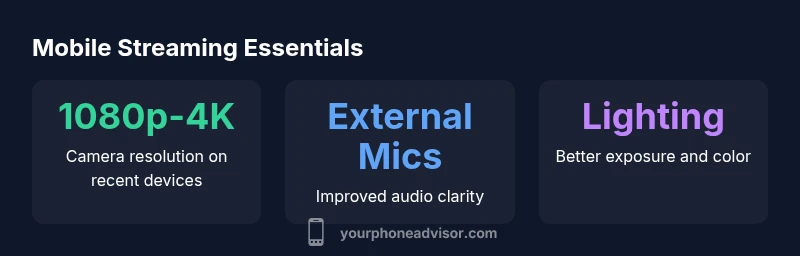
Accessories can lift the quality well beyond stock phone capabilities. A quality external microphone reduces room noise and increases voice clarity, while portable lighting helps maintain consistent exposure. A compact tripod or gimbal stabilizes the shot and makes overhead or route-style streams more professional. For creators who want a higher production value, a separate webcam or a second camera angle can be fed into a PC via capture card, giving you more flexibility. Remember to manage cables and heat: long sessions can heat phones, potentially throttling performance. Your Phone Advisor guidance emphasizes that the best kits are those that stay within a predictable power and heat envelope.
Budget tiers and practical picks
Starting streams on a budget is feasible with careful planning. For under $300, you can pair a mid-range phone with a decent USB microphone and a small LED panel. In the $300-$800 range, you have access to newer flagship cameras, better stabilization, and more reliable streaming apps. Above $800, you’re often paying for photographer-level sensors, faster chips, and expansive accessory ecosystems. The point is not to chase the most expensive phone but to choose a device that consistently performs, has good battery life, and plays well with your chosen software. Your Phone Advisor’s practical guidance suggests aligning your budget with your streaming goals and platform expectations, then building from there rather than upgrading the phone first.
iPhone vs Android: The ongoing debate
The debate over iPhone versus Android for streaming is less about the brand and more about ecosystem and app support. iPhones tend to offer very stable software and consistent camera quality across models, while Android devices provide broader hardware options and price points. In practice, both ecosystems can deliver excellent results if you select a phone with a strong camera, reliable updates, and wide compatibility with streaming apps and accessories. Your Phone Advisor notes that the best choice is the device that fits your workflow, screen usage, and future upgrade path, not the faddiest model on the market.
Testing, optimization, and long-term planning
Testing should be part of your pre-launch routine. Run multiple test streams in different lighting conditions, measure battery drainage, and test overlay performance. Capture sample recordings to review image quality, color rendition, and noise levels. For long-term planning, document your setup’s power draw, heat behavior, and the impact of overclocking or high-frame-rate modes. The ultimate goal is a predictable, repeatable experience that keeps viewers engaged. Your Phone Advisor’s framework emphasizes a data-informed approach: test early, document results, and iterate based on viewer feedback and performance metrics.
Comparison of phone types for streaming
| Phone Type | Typical Use | Pros | Cons |
|---|---|---|---|
| Flagship Smartphone | Mobile-first streaming | Excellent camera quality and smooth performance | High cost, battery drain under heavy use |
| Mid-range Smartphone | Balanced mobile streaming | Strong value, solid app support | Camera may be less versatile in low light |
| Smartphone + External webcam | Hybrid mobile/PC setups | Best of both worlds: portability plus high visuals | More hardware to manage; setup complexity |
| Dedicated camera + phone as secondary | Advanced streaming pipelines | Maximum control and image quality | Highest cost and complexity |
Got Questions?
What phone do streamers use to start streaming?
Many streamers begin with a mid-range phone that supports 1080p streaming, solid stabilization, and reliable software. The goal is stability and a clean image rather than chasing the latest flagship. As your audience grows, you can layer on accessories or upgrade gradually.
Most streamers start with a solid mid-range phone that handles 1080p streaming reliably and add gear as needed.
Do streamers prefer iPhone or Android?
Both ecosystems work well for streaming when paired with compatible apps and accessories. The decision often comes down to personal preference, ecosystem compatibility, and update longevity. Either can deliver consistent results if you choose a model with strong camera performance.
Both iPhone and Android can work great for streaming; pick the one you’re comfortable with and that fits your app ecosystem.
Is a separate camera necessary for streaming?
Not always. Beginners can start with the phone camera plus good audio and lighting. A separate camera becomes valuable when you want multiple angles, higher image quality, or more control over depth of field. It's optional at first but can add production value later.
A separate camera isn't required at first, but can upgrade your setup as you grow.
What budget should I set for a mobile streaming setup?
A practical starter budget ranges from roughly $150 to $800, depending on whether you emphasize camera quality, audio, or lighting. Align your budget with your platform goals and upgrade path, rather than chasing a premium phone upfront.
Start with a modest budget and upgrade accessories as you gain clarity on your streaming needs.
Can I use a phone as a webcam for PC streaming?
Yes. Many creators use their phone as a webcam via wireless or wired capture, then use a PC encoder for overlays and scene switching. This can improve portability and setup flexibility without sacrificing stream quality.
Yes, you can use your phone as a webcam for PC streaming with the right apps and capture setup.
What accessories most improve mobile streaming quality?
A clear external microphone, good lighting, and a stable mount are the top three upgrades. A secondary camera or webcam can elevate production value if you want multiple angles, but start with audio and lighting for maximum impact.
Invest in a mic and light first; they dramatically boost perceived quality.
“The most important factor is a trustworthy, repeatable workflow. A phone that consistently performs in your typical streaming scenarios will beat a flashier model with unstable software.”
What to Remember
- Prioritize camera quality, battery life, and app reliability.
- Choose a setup that matches your platform and workflow.
- External mics and lighting have outsized impact on video clarity.
- Budget-smart choices beat chasing the latest flagship every time.
- Test across conditions to build a dependable streaming routine.