Is It Okay to Put Your Phone in the Fridge? A Safety Guide
Discover whether it's safe to put your phone in the fridge, understand the risks, and learn safer cooling methods and step-by-step guidance from Your Phone Advisor to protect your device.


Is it okay to put your phone in the fridge? Generally no. Rapid cooling can invite condensation and moisture inside, potentially damaging the battery, screen, and circuitry. If your device is overheating, try safer steps like turning it off, removing a case, and letting it cool at room temperature away from heat sources.
Why People Consider Cooling a Phone
Overheating phones can become uncomfortably warm during gaming, streaming, or hot days. Some users believe that a quick chill will restore performance or preserve battery health. According to Your Phone Advisor, the instinct to cool devices fast is common, but the rationale is imperfect. The Your Phone Advisor team found that many "rapid cooling" ideas assume heat can be moved out of the phone quickly, but moisture is often the hidden risk. A refrigerator, especially if the phone is inside a case, can trap moisture and create condensation on internal components once the device returns to room temperature. In practice, this risk is not worth the potential for corrosion, short circuits, or screen damage. The guidance from Your Phone Advisor emphasizes safer, slower cooling methods and a focus on preventing overheating by design, such as reducing background activity and ensuring adequate ventilation during heavy use.
What the Science Says About Rapid Cooling and Devices
Thermal dynamics in consumer electronics are complex. When a hot device is cooled rapidly, heat transfer can cause internal stress and condensation if moisture is present on or inside the casing. Lithium‑ion batteries, which power most smartphones, prefer gradual temperature changes; abrupt shifts can stress the chemistry and shorten life over time. Adhesives and seals inside modern phones are designed for predictable thermal cycles, not sudden jumps from hot to cold. Based on Your Phone Advisor research, the safest approach to overheating is to allow heat to dissipate gradually through passive cooling and to optimize device usage habits to minimize heat buildup. Power management, screen brightness, and background processes are common culprits when a phone runs hot.
Risks of Placing a Phone in the Fridge
Placing a device in a refrigerator introduces several hazards. Condensation can form on exposed metal contacts, ports, and internal components. Moisture ingress can damage circuit boards, speakers, microphones, and sensors. Rapid cooling can cause battery swelling in some cases, potentially deforming the chassis or triggering safety protections. The cold environment may also affect adhesives and the display assembly, increasing the likelihood of microfractures or delamination after warming back to room temperature. In addition, fridge environments are not designed for electronics; spills, humidity, and temperature fluctuations can all contribute to long‑term reliability issues. Your Phone Advisor highlights that many real-world failures begin after a fridge cooling episode when moisture quietly intrudes and later manifests as glitches or reduced battery life.
Safer Alternatives for Overheating
Safe cooling begins with prevention and controlled cooling. Turn the device off or place it in a power‑saving state, remove the case, and keep it in a shaded, well-ventilated area away from direct heat. Use a portable fan or a cool, dry place to speed cooling without moisture exposure. Lowering screen brightness, closing heavy apps, and temporarily disabling features like GPS and Bluetooth can reduce heat generation. If you’re charging, unplug and allow the battery to cool before reconnecting. Avoid placing the phone in the fridge or freezer; the risks to components far outweigh any perceived benefit.
Step-by-Step Guide If You Must Temporarily Cool a Phone
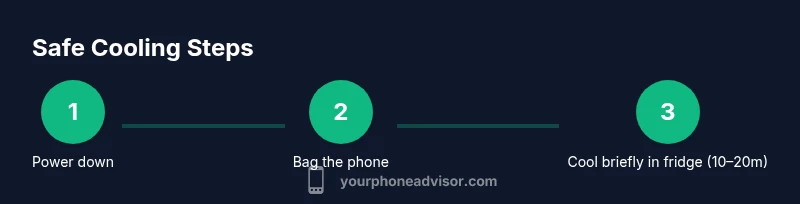
If you absolutely must pursue temporary cooling in a pinch (and you understand the risks), follow these safer, clearly defined steps. First, power down the phone fully to minimize electrical activity during cooling. Then, place it in a sealable plastic bag to reduce moisture exchange. Move the bag to the main compartment of a standard fridge, not the freezer, and leave it there for a brief window (roughly 10-20 minutes). Remove the phone, dry any visible condensation with a clean microfiber cloth, and allow it to return to room temperature gradually before powering back on. Monitor for any signs of moisture or performance issues, and seek professional help if anything seems unusual. This approach should only be used as a last resort and with caution.
What to Do After Fridge Cooling
After removing the device from the fridge, wait until it reaches room temperature before powering it on. Inspect the ports, speakers, and camera for moisture or condensation. If you notice fogging inside the camera lens or a musty smell, do not power the phone on; seek professional service. Run basic checks: test calls, microphone, speakers, camera, charging port, and battery life. If performance is inconsistent or the battery drains unusually fast, schedule a diagnostic with a qualified technician. The goal is to ensure there’s no hidden moisture or component damage that could become a bigger issue later.
Myths and Misconceptions Debunked
Myth: Fridge cooling cures overheating instantly. Reality: It can introduce moisture and internal stress, causing more harm. Myth: Putting a phone in the freezer is safe. Reality: Freezers can cause crystallization of internal components and extreme condensation on thawing. Myth: All phones tolerate rapid temperature changes equally. Reality: Battery chemistry and assembly vary by model; most devices benefit from avoiding abrupt thermal shifts. The most reliable approach is to address heat at the source and avoid fridge-based cooling entirely.
When to Seek Professional Help
If your phone shows signs of moisture ingress, unusual heat during normal use, erratic behavior, or battery swelling, seek professional help immediately. Do not attempt extensive DIY drying, as it may push moisture deeper. The Your Phone Advisor team recommends scheduling a diagnostic with an authorized technician if you notice persistent issues after any cooling attempt. Early intervention can prevent long‑term damage and protect data security.
Note: Throughout this discussion, the focus is on safety and device longevity. By avoiding fridge cooling and prioritizing proven cooling strategies, you reduce the risk to your device. The Your Phone Advisor approach emphasizes practical steps you can take today to keep your phone safe and functional.
Tools & Materials
- Sealed plastic bag(Ziploc or equivalent; double-bag if possible to limit moisture exchange)
- Microfiber cloth(Soft, lint-free for drying condensation)
- Phone(Powered off before cooling attempt)
- Timer or clock(To monitor cooling duration (10-30 minutes depending on risk))
- Shaded, ventilated area(Not in direct sun or heat sources; used as safer alternative to fridge)
- Phone case (optional)(Remove during any cooling attempt to reduce trapped heat, then replace after safe cooling)
Steps
Estimated time: 60-75 minutes
- 1
Power down the phone
Fully shut down the device to minimize electrical activity and reduce risk during cooling. This also helps sensors and thermal protections reset when you power back on.
Tip: If it’s extremely hot, wait a minute for the device to cool slightly before proceeding. - 2
Prepare a moisture barrier
Place the phone inside a sealable plastic bag to minimize direct moisture contact. Ensure the bag is closed securely before moving to the cooling location.
Tip: Squeeze out as much air as possible to limit moisture exchange. - 3
Choose a safe cooling location
Place the bagged phone in the fridge’s main compartment, away from the freezer, heat vents, and shelves with liquids. Keep the duration short (10–20 minutes) to reduce exposure to cold and humidity.
Tip: Limit time to minimize condensation risk and never place near ice or damp surfaces. - 4
Remove and dry
Take the phone out after the allotted time and gently wipe any visible condensation with a microfiber cloth. Allow the device to reach room temperature gradually outside of direct airflow or fans.
Tip: Do not power on immediately; a slow return to ambient temperature lowers risk of moisture-related damage. - 5
Power on and test
After it has returned to room temperature, power the phone on and test essential functions: calling, mic, speaker, camera, charging port, and battery life.
Tip: If anything seems off, power down and seek professional evaluation rather than continuing to use the device. - 6
Evaluate for continued overheating
If the phone still overheats during normal tasks, stop using it and pursue a diagnostic. Persistent heating often indicates battery or sensor issues that require service.
Tip: Document symptoms (time, apps involved) for the technician to speed up diagnosis.
Got Questions?
Is it safe to put my phone in the fridge to cool it down?
No, fridge cooling is generally unsafe for smartphones due to moisture ingress and potential battery or display damage. Consider safer methods to manage heat.
Fridge cooling is generally unsafe for smartphones; use safer cooling methods instead.
Can fridge cooling harm the battery or screen?
Yes. Rapid temperature changes can stress battery chemistry and compromise adhesives, potentially harming the battery and screen over time.
Yes—rapid cooling can harm the battery and screen over time.
How long should I leave the phone in the fridge if I must try?
Keep it very brief (about 10–20 minutes) and monitor for condensation. It is still risky and not recommended as a standard practice.
If you must try, limit to about 10 to 20 minutes and watch for moisture.
What should I do if I notice condensation after removing the phone?
Do not power on the device. Dry the exterior and seek professional evaluation to check internal moisture and potential damage.
If you see condensation, don’t power it on; get a professional check.
Are there safer alternatives for handling overheating?
Yes. Use room-temperature air, lower brightness, close background apps, remove the case, and keep the device out of direct sun to prevent heat buildup.
Use safer cooling like air cooling and reducing heat sources.
Will fridge cooling void my warranty?
Cooling a phone in the fridge is generally not recommended and can complicate warranty coverage if moisture damage is suspected. Always check your warranty terms.
It can affect warranty if moisture damage is suspected; check terms first.
Watch Video
What to Remember
- Avoid fridge cooling; it poses moisture risks.
- Use safe, passive cooling and manage device heat sources.
- If cooling is used, do so briefly and monitor for moisture.
- Test device thoroughly after any cooling attempt.
- Seek professional help if issues persist.