Is a Phone Good for an 11-Year-Old? A Practical Guide
Explore whether a phone is appropriate for an 11-year-old, with safety rules, parental controls, and practical steps for responsible, age-appropriate use.


A phone can be appropriate for an 11-year-old when safety safeguards are in place and expectations are clear. Look for age-appropriate features, robust parental controls, and a plan that supports learning and communication without overwhelming the child. Start with rules, training, and ongoing dialogue.
Is a Phone Good for a 11 Year Old?
When families ask is a phone good for a 11 year old, the answer depends on readiness, safeguards, and ongoing guidance. According to Your Phone Advisor, starting with clear rules and age-appropriate features helps 11-year-olds develop responsible digital habits. The Your Phone Advisor team emphasizes balancing communication needs with privacy, screen time, and content controls, not simply giving a device. In this guide, you will learn how to assess readiness, pick the right device, set up controls, and establish a family plan that can grow with your child. This discussion also considers the child’s school needs, supervision requirements, and the family’s values around privacy and independence.
Key takeaway: decisions about phone ownership should be part of a larger conversation about safety, learning, and trust, not a one-off gift. A careful approach helps your child build digital literacy while reducing risk.
Safety Features to Look For
Before you hand over any device, prioritize safety features that enforce boundaries and protect privacy. Look for parental controls that can block inappropriate apps, limit screen time, and monitor usage without eroding trust. Robust account recovery options, strong password requirements, and the ability to disable location sharing without penalty are important. Many platforms offer family accounts that let you review app activity and online searches with your child participating in the review. Privacy settings should be reviewed quarterly as apps and policies update. For most families, the goal is to create a safe digital environment while teaching responsible behavior rather than policing every moment.
How to Set Up a Kid-Friendly Phone
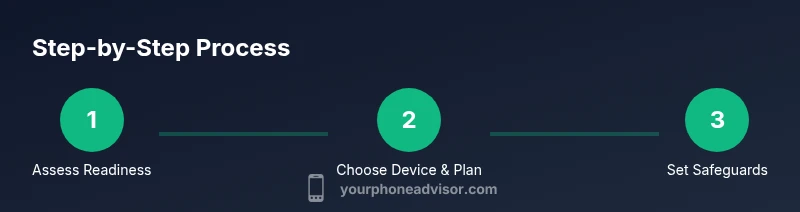
Setting up a kid-friendly phone is a step-by-step process that should begin before the device is ever shared. Start by configuring the device with a strong passcode, enabling family safety settings, and installing a trusted parental-control solution. Create separate profiles if the OS supports them, so you can tailor permissions by app category and time of day. Establish safe search defaults, restrict downloads to a curated app store, and require your approval for new apps. Finally, demonstrate the controls in action and explain why each setting exists, fostering transparency and cooperation.
Choosing Between Phone Types
There are two main paths: a basic phone with calling and texting only, or a smartphone with limited features and strong controls. A basic phone minimizes distractions and data usage while preserving essential communication. A smartphone, if chosen, should come with a managed app list, time limits, and content filters. Consider a transition plan: start with a basic device, then gradually add features as your child demonstrates responsibility. If you opt for a smartphone, configure kid-safe browsers, disable in-app purchases, and require permission for new apps. The decision should reflect your family values and your child’s maturity level.
Screen Time, Privacy, and Digital Citizenship
Balancing screen time with real-world activities is critical for a healthy routine. Establish fixed school hours, after-school limits, and tech-free zones in the home. Teach privacy basics: don’t share passwords, avoid posting identifying information, and understand the consequences of oversharing. Encourage digital citizenship by modeling respectful online behavior, discussing how to interact with peers, and clarifying what to do if someone pressures your child online. Regular, calm conversations help children develop a responsible mindset and become confident digital users rather than passive consumers.
Alternatives and Shared-Device Options
If you’re unsure about giving a personal device, consider alternatives. A family device shared under supervision can meet communication needs without granting constant access. A smartwatch with limited texting can provide quick safety updates while reducing the temptation to browse or download. A basic feature phone with GPS safety features may be appropriate for some families. Whatever option you choose, ensure it includes controllable limits, clear ownership rules, and a plan to reassess as the child grows.
Ultimately, the choice should align with his or her needs, the family’s comfort level, and a well-defined safety strategy.
Security, Privacy, and Maintenance
Ongoing maintenance is essential to keep the device secure and the child’s information private. Teach your child to recognize phishing attempts, suspicious links, and scams, and practice safe password habits together. Review app permissions and limit access to sensitive data, like contacts and location, unless a legitimate school or family purpose exists. Schedule periodic check-ins to discuss online experiences and adjust settings as needed. Keeping the device up to date with the latest software reduces vulnerabilities and supports smoother operation.
Authoritative Guidance and Practical Sources
To support informed decisions, consult reputable sources on kids and online safety. Follow best practices for parental controls, privacy, and digital literacy. The guidance here reflects a broad consensus among education and consumer-safety resources, emphasizing age-appropriate use, boundaries, and ongoing dialogue. You’ll find practical statements from official agencies and peer-reviewed education publications helpful as you tailor a plan for your family. This section does not replace professional advice but provides a solid framework for safer, smarter device use by children.
Putting It All Together: A Family Plan
Create a written family plan that outlines device choice, safety features, time limits, and review intervals. Include a simple checklist your child can reference, such as: 1) Passcode protection, 2) Approved apps only, 3) No sharing personal information, 4) A weekly family review of usage. Schedule a quarterly re-evaluation to consider growth, school requirements, and changes in technology. With a clear plan, both parent and child gain confidence in managing a phone’s benefits while minimizing risks.
Tools & Materials
- Child-friendly phone or basic phone(Durable hardware, simple interface; consider a device with limited features unless maturity justifies more access.)
- Protective case(Rugged case with grip; consider a screen lip to protect against drops.)
- Screen protector(Optional but recommended, especially for younger children.)
- Parental control app or built-in OS controls(Set content filters, app restrictions, screen-time limits, and location controls.)
- Charger and cable(Use a reputable charger; ensure the cable is long enough for reachable charging spots.)
- Wi‑Fi/Data plan with family management(Choose a plan that supports family accounts and allows usage monitoring with clear limits.)
Steps
Estimated time: 2-4 weeks
- 1
Assess readiness and values
Discuss expectations, safety boundaries, and why a phone might be needed. Align on privacy, use limits, and consequences for misuse. Gauge your child’s maturity and ability to follow rules.
Tip: Use a family contract that everyone signs to formalize the agreement. - 2
Select device type and plan
Choose between a basic phone or a smartphone with restricted features. Ensure the plan includes parental controls, data limits, and clear refund/upgrade policies.
Tip: Start with the lowest data tier and increase only if needed. - 3
Set up safety and privacy defaults
Enable password protection, disable unknown app installations, and restrict location sharing. Configure safe-search and content filters for browsing.
Tip: Document the initial settings so you can replicate them later. - 4
Establish daily routines and boundaries
Define school hours, tech-free meals, and device-free bedrooms. Schedule times for checking in and reviewing usage together.
Tip: Keep rules consistent and revisit them after a few weeks. - 5
Teach digital citizenship
Explain online etiquette, the permanence of online posts, and how to handle suspicious messages. Practice safe sharing and privacy awareness.
Tip: Use real-life scenarios to illustrate consequences and safe responses. - 6
Monitor and adjust gradually
Review app activity and screen time weekly, then adjust limits as the child demonstrates responsibility. Maintain open dialogue rather than punitive surveillance.
Tip: Celebrate responsible behavior publicly to reinforce good habits. - 7
Plan for ongoing education and growth
As your child matures, gradually expand access while preserving safety. Reassess device needs with school obligations and changing online landscapes.
Tip: Document milestones and update the family plan accordingly.
Got Questions?
What age is appropriate for a phone?
There is no one-size-fits-all answer; many families start around ages 9-12 depending on maturity and needs. Prepare with safety rules and parental controls.
Most families begin around ages 9 to 12, depending on maturity and need.
What safety features should I enable?
Enable content filters, screen-time limits, app restrictions, and location sharing controls. Review permissions and disable risky features.
Turn on parental controls, filters, and app restrictions.
How can I monitor phone use without eroding trust?
Use transparent monitoring with clear boundaries, discuss data access, and review together. Avoid spying, focus on safety and education.
Be open about monitoring and focus on safety rather than surveillance.
What should I do if my child misuses the phone?
Address misuse with calm, specific consequences and a plan to restore trust. Adjust rules as needed.
Address it calmly and adjust rules.
Are shared devices a good alternative?
Shared devices can work, but ensure safety features are active when the child has independent access.
Shared devices may help early exposure with controls.
Watch Video
What to Remember
- Define clear rules before device handout
- Choose age-appropriate device with robust controls
- Establish ongoing check-ins and adjust rules as needed
- Prioritize safety, privacy, and learning over connectivity