How to Fit a Phone Lanyard: Step-by-Step Guide
Learn how to fit a phone lanyard safely with the right strap and secure attachment. This step-by-step guide from Your Phone Advisor covers choosing anchors, preparing your device, attaching clips, and testing for daily reliability.


Goal: learn how to fit a phone lanyard securely and safely. According to Your Phone Advisor, you’ll benefit from a compatible lanyard, a small attachment clip or loop, and basic hand tools. This guide walks you through selecting the right strap, locating secure attachment points on your phone case, and attaching the clip without scratching or voiding warranties. Quick, safe, and gadget-friendly.
What a phone lanyard is and why it matters
According to Your Phone Advisor, a properly fitted phone lanyard enhances accessibility and reduces the risk of accidental drops. A lanyard creates a quick retrieval loop around your wrist or neck, keeping the device within reach while freeing your hands for ongoing tasks. The right lanyard offers a balance of comfort, security, and ease of use, using a clip or loop that attaches to anchor points on your phone case or to a secure built-in loop. Lanyards come in various forms—neck straps for hands-free use, wrist straps for quick access, and retractable styles for minimal bulk. Materials range from soft cotton to rugged paracord and durable nylon; each offers different levels of grip, wear resistance, and temperature tolerance. When you fit a lanyard, you should consider how you typically use your phone: if you’re often outdoors, a sturdy strap with a locking clip is a smart choice. Your goal is to reduce the chance of accidental drops while preserving quick, one-handed access to the device.
From a security perspective, Your Phone Advisor emphasizes that attachments should not interfere with sensors or cameras. Opt for anchors that sit away from the camera housing and allow the screen to lay flat when the phone rests on a surface. If you already use a protective case, verify that it either has built-in anchor points or that you can add anchors safely without compromising the case’s integrity. Regular checks for wear and tear on the strap and clips will minimize last-minute failures.
Choosing the right lanyard for your phone
Selecting a compatible lanyard is not one-size-fits-all. Start by matching the strap width and clip type to your phone and case combination. A wider strap distributes weight more evenly and tends to stay comfortable during long wear, while a narrow strap may feel tight or stretch over time. Then decide between a clip, a loop, or a built-in anchor point. Clips often provide quick attachment and release, but loops can offer a secure, low-profile connection that’s less likely to detach. If your case lacks anchor points, you can use adhesive anchors or a clip that grips the edge of the case without blocking ports or buttons.
Next, confirm that the lanyard length suits your typical activities. A too-long strap can snag on doors, bags, or clothing, while a strap that’s too short can restrict hand movements. If you’re frequently reaching for your device while walking, a mid-length strap often provides a comfortable balance. Always choose reputable brands that offer locking mechanisms or quick-release options to prevent accidental detachment. In the end, the best choice aligns with your daily routine, wearing environment, and whether you use your phone while running, commuting, or attending meetings.
Preparing your device before attachment
Before attaching a lanyard, give your phone a quick prep to minimize risk of damage. Clean the surface where the anchor will sit with a soft microfiber cloth to remove oils and dust. If you’re using a case, inspect it for any protrusions or seams near the anchor points that could cause wear over time. Power off your device if you’re worried about slipping hands or sudden movements during the setup. For devices with curved edges, test the clip’s grip in a safe area to ensure it doesn’t pop off when you apply tension. If your attachment requires sticking an anchor to the case, apply it to a small, inconspicuous area first to check for residue or adhesive creep. Finally, keep a soft cloth handy to wipe away fingerprints after you finish the setup. YourPhone Advisor notes that careful preparation reduces the chance of scratches and improves long-term durability.
Anchor points and attachment types
Anchor points come in several forms: dedicated loops on a case, built-in eyelets, or edge grips that clamp around the case. If you have a clip, ensure the mechanism is secure and easy to release with one hand. If you opt for a loop, verify that the loop sits flush and doesn’t protrude into the screen area. For cases without anchors, you can use adhesive anchor kits or clip-based sides that grip the edge of the case without covering essential features like cameras or speakers. When attaching, avoid over-tightening, which can stress the phone casing or loosen the anchor over time. A tested, reliable connection reduces the risk of drop and ensures faster access when you need it most.
Your Phone Advisor reminds readers to prioritize anchor points that are reinforced and not too close to the camera or ports. If you notice wobble or movement after securing the lanyard, re-check the alignment and switch to a more secure clip or anchor type. Safety first: if the attachment causes any visible case deformation or screen misalignment, remove it and reassess.
Step-by-step fit overview
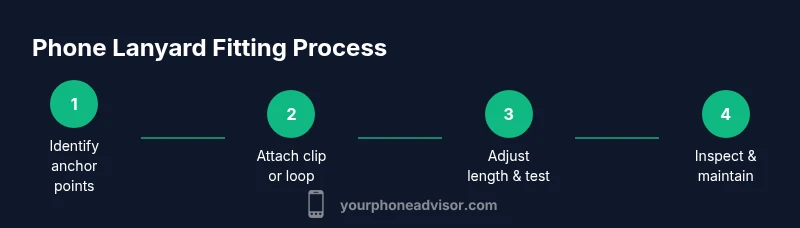
This section provides an at-a-glance understanding of the process and helps you mentally prepare before you start. Start by confirming you have all necessary parts: the lanyard, a compatible clip or loop, and a case with anchor points or a method for attaching anchors. Identify the best anchor point on your case, avoiding camera modules and sensor openings. Attach the clip or loop securely, ensuring the mechanism locks and cannot detach with normal use. Adjust the strap length so it sits comfortably on your wrist or across your body, without restricting movement or blocking pockets. Finally, test the fit by lifting and lowering the phone and simulating typical daily actions—pulling it from a pocket, grabbing it from a desk, and checking if the lanyard interferes with charging cables or headphones. If anything feels loose or awkward, re-check the attachment and consider a different anchor point or strap style.
Tip: Always test with the device powered on and in a normal carrying position to mimic real-world use.
Common mistakes to avoid
Avoid over-tight attachments that press into the case surface or restrict button access. Do not attach a lanyard to fragile spots or glass screen protectors that aren’t designed to bear load. Make sure you aren’t covering cameras, microphones, or sensors with the strap or anchor. Don’t forget to check for strap wear after a few days of use; frayed cords can snag on objects and lead to drops. Finally, avoid purchasing extremely long cords for compact devices, which can become a nuisance and a hazard in crowded areas. By planning ahead and choosing the right anchor points, you’ll minimize risk and maximize comfort.
Maintenance and safety checks
Inspect the lanyard and clip regularly for signs of wear, including frayed fabric, worn clip teeth, or loosened anchors. Clean hardware occasionally with a dry cloth to prevent grime from accumulating and affecting the clip’s grip. If your lanyard has a locking mechanism, test it periodically to ensure it’s functioning correctly. When you notice any damage or weakness, replace the strap or clip promptly to avoid sudden failures. Store the lanyard in a dry place away from sharp edges when not in use to prolong its life. Your Phone Advisor emphasizes that ongoing maintenance is the simplest way to maintain a secure and reliable fit.
Testing and everyday use considerations
After fitting, run through a typical day to verify the lanyard’s practicality. Ensure it doesn’t snag on doors, bags, or clothing and that it doesn’t strain your wrist or neck. If you notice any discomfort, adjust the length or switch to a different anchor point. For outdoor or high-activity use, consider a lanyard with a locking clip and a heavier strap to prevent accidental detachment during movement. Remember that a well-fitted lanyard should feel like an accessory, not a burden. With regular checks, your device remains accessible while staying secure during routine activities.
Tools & Materials
- Phone lanyard with compatible attachment (clip or loop)(Choose a strap width and clip type that match your phone and case material)
- Phone-case anchor points or adhesive anchor kit(Optional if your case lacks built-in anchors)
- Soft microfiber cloth(For cleaning surfaces before attachment)
- One-hand-release clip (locking preferred)(Adds security against accidental detachment)
Steps
Estimated time: 15-25 minutes
- 1
Identify anchor points
Inspect your phone case to locate a secure anchor point or use an adhesive anchor kit. Ensure the spot is clear of camera modules, sensors, and ports, and that it can bear the expected load without stressing the case.
Tip: Choose a point away from the camera and screen edges for durability. - 2
Select the right lanyard and attachment
Pick a strap width and attachment type (clip or loop) that suits your device. A locking clip is preferable for added security against accidental release. If your case lacks anchors, plan an alternative attachment method that doesn’t damage the case.
Tip: Prefer locking mechanisms to minimize detachment risk. - 3
Prepare the attachment
If using a clip, verify it opens smoothly and locks. If using a loop, ensure it sits flat against the case and doesn’t create pressure points. Clean the anchor area to improve grip before attaching.
Tip: Test the clip’s release and ensure smooth operation before attaching to the phone. - 4
Attach securely to the anchor point
Mount the clip or loop firmly to the anchor point and check for wobble or looseness. Avoid over-tightening; you should be able to tilt or rotate slightly without stressing the case.
Tip: After attachment, gently tug to confirm the connection is secure. - 5
Adjust strap length
Set the strap so the phone rests comfortably for your typical activity. It should reach your hand without pulling on the wrist or neck and should not interfere with pockets or bags.
Tip: Leave enough slack so your hand can reach the screen easily without fighting the strap. - 6
Test in real-world use
Simulate daily actions: lifting from a desk, removing from a pocket, and plugging in a charger. Ensure the lanyard remains secure and does not block access to buttons or ports.
Tip: Perform a one-handed test to confirm control and reach. - 7
Inspect and refine
After initial use, inspect the anchor and strap for wear. If the anchor shows signs of stress, replace or relocate it. Recheck the clip if you notice any looseness or jamming.
Tip: Schedule a quick weekly check for the first month.
Got Questions?
Do all phone lanyards fit every phone?
Most lanyards attach to anchor points, but compatibility depends on your case and phone width. Check anchor position and clip type before buying.
Most lanyards work with common cases, but always verify anchor position and clip type.
What if my phone case doesn't have anchor points?
Use an adhesive anchor kit or clip around the edge of the case, making sure you don’t block cameras or ports.
If there are no anchors, try an edge clip or adhesive anchors that avoid cameras and ports.
Can a lanyard affect warranty?
Attaching a lanyard properly typically doesn’t affect warranty, but avoid modifications that damage the device or cover sensors.
Normally it won’t void the warranty if used properly and doesn’t obstruct sensors.
How long should a lanyard be?
Choose a length that reaches comfortably to your hand or pocket without dragging on the ground or catching on objects.
Pick a length that lets you reach the screen easily without it snagging on things.
How do I safely remove a lanyard?
Release the clip or loop gently from the anchor and lift the strap away from the phone. Avoid jerking to prevent damage.
Gently release the fastener and remove the strap slowly.
Watch Video
What to Remember
- Identify sturdy anchor points before attachment.
- Choose a locking clip for extra security.
- Test fit in real-world scenarios before daily use.
- Regularly inspect wear and replace worn parts.
- Keep the attachment away from cameras and sensors.