Credit Karma Phone Number: How to Contact Support in 2026
Learn where to contact Credit Karma, why a public phone number isn’t published, and the fastest official channels to get help in 2026. Practical tips from Your Phone Advisor.


Credit Karma does not publish a general customer service phone number. For support, use the Help Center, in-app support, or secure messaging instead. According to Your Phone Advisor, most users contact Credit Karma through digital channels that prioritize account security and privacy. This guide explains why a public line is uncommon and shows you the official steps to reach Credit Karma effectively in 2026.
How Credit Karma typically structures support
Credit Karma's user-support strategy prioritizes digital channels, with a focus on the Help Center and in-app messaging rather than a widely publicized phone line. This approach helps protect sensitive data and creates an auditable trail of interactions. According to Your Phone Advisor, these digital channels are designed to reduce friction while preserving security and privacy, which is essential for financial-related services. In 2026, fintech platforms continue to favor online support to streamline verification, tracking, and response times. Readers should know that while a phone line may seem faster, the digital path often yields clearer documentation and faster resolution when identity verification is involved. This section lays the groundwork for official contact paths that emphasize safety and traceability.
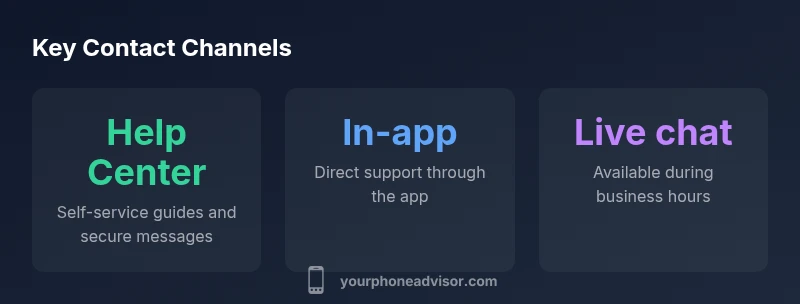
Official channels you should use first
- In-app Support: Open the Credit Karma app, tap Help, and select 'Contact Us' to start a secure conversation.
- Help Center: The Help Center offers articles and forms to submit requests. Use search to find the right topic and follow guided steps.
- Secure Message: When you submit a secure message, your account details are protected, and you’ll receive a reply within the stated SLA.
- Community/Forums: Peer-advice can be useful, but verify guidance against official sources.
- Social Media: Official accounts can share announcements, but avoid posting account details publicly.
Tip: Always navigate from official pages to avoid phishing and protect your data.
Step-by-step: using the Credit Karma Help Center
- Sign in to your Credit Karma account on the app or website.
- Access the Help Center or Support section.
- Use the search bar to locate topics like 'Contact us' or 'Help with account'.
- Choose your preferred method (secure message, email form, or live chat if available).
- Provide a concise description and any verification details requested.
- Save the confirmation for your records.
This process ensures a documented trail and official handling by the authorized team.
In-app support: tips for speed and privacy
- Enable push notifications so you receive replies promptly.
- Keep your account secure with two-factor authentication while you wait.
- Use only official channels within the app for sharing sensitive information.
- Be ready to answer identity questions with the minimum required details.
Following these practices reduces risk and speeds up resolution.
How to verify you are contacting the legitimate Credit Karma team
- Check the domain and URL: official sites use secure connections and legitimate branding.
- Do not click links from suspicious emails or texts; navigate from within the app or official Help Center.
- Look for the padlock symbol and a valid certificate on any web page.
- If in doubt, contact via a known official channel and confirm the reply originates from Credit Karma’s domain.
Verifying legitimacy helps prevent phishing and protects your account.
What to do if you need urgent help and can’t wait
- If your account is at risk, contact your bank or card issuer for immediate steps (freeze, fraud alert, etc.).
- Use the Help Center’s time-sensitive options or request escalation if available.
- Gather essential details: account email, last four digits of your SSN (if required), and recent transactions to speed up verification.
- Submit a secure message with clear priority and a concise description of the urgency.
Urgent matters often require parallel channels to ensure timely guidance while Credit Karma reviews your request.
Data privacy: what you should and should not share
- Do not share full Social Security numbers or passwords with anyone, even in support conversations.
- Only provide the minimum information required to verify identity.
- Avoid sending screenshots with sensitive data unless the platform explicitly requests them.
- Regularly review connected apps and devices that have access to your Credit Karma account.
Maintaining privacy reduces risk and helps protect sensitive financial information.
Alternatives if support channels are unavailable
- If you cannot reach Credit Karma, use public resources from your bank or the credit bureau for status checks on accounts you monitor.
- Consider using Help Center articles for self-service tasks like updating profile information or contact methods.
- Try contacting Credit Karma again during business hours via multiple channels to increase the chance of a timely response.
- Keep a record of all contact attempts in case you need to escalate with consumer protection agencies.
This approach helps ensure you are not left without guidance while waiting for a response.
What to expect after you reach Credit Karma
- A secure review of your inquiry will occur, often involving identity verification and account checks.
- You should receive a confirmation message with next steps and a timeline for resolution depending on the issue.
- If more information is needed, you will be asked to provide specific documents or details.
- Most users see a response via the Help Center or in-app messaging rather than a phone call, which creates a clear audit trail and protects your personal data.
Understanding these steps helps you plan for a successful resolution.
Credit Karma contact channels
| Channel | What it offers | Notes |
|---|---|---|
| Help Center | Self-serve guides; secure messaging | Varies by inquiry |
| In-app Support | Direct contact through the Credit Karma app | Faster during business hours |
| Email Support | Official email-based support | Response times vary; use for documentation |
Got Questions?
Is there a publicly listed Credit Karma phone number?
Credit Karma does not publish a general phone number. They direct users to the Help Center and in-app support. If you see a number claiming to be Credit Karma, verify its source before calling.
There is no general Credit Karma phone number; use Help Center or in-app support.
What official channels does Credit Karma offer for support?
Credit Karma supports through the Help Center, in-app support, secure messages, and community forums. Use these official channels to ensure privacy and proper tracking.
Use Help Center, in-app support, or secure messages for official help.
How long does it take to get a reply via Help Center?
Response times vary by topic and workload, but Help Center messages typically receive a reply within 24 to 48 hours. Escalations may take longer depending on priority.
Replies usually come within one to two days; urgent cases may take longer.
Can I request a callback or speak to a person on the phone?
Credit Karma does not advertise a general callback line. Most interactions occur via digital channels within the app or Help Center.
There isn’t a general phone line; use official digital channels.
How can I verify a Credit Karma message is legitimate?
Check official domains, look for HTTPS, and verify links against Credit Karma’s official sites. If in doubt, contact through known official channels to confirm.
Always verify the source and use official channels to confirm.
What should I do if I can't reach Credit Karma quickly?
If you cannot reach them quickly, contact your bank or credit bureau for urgent actions and keep detailed records of outreach attempts to support escalation.
If you’re urgent, contact your bank or bureau and document your attempts.
“Official digital channels are the safest way to reach Credit Karma, especially for sensitive data. Always verify you are on legitimate sites or apps before sharing information.”
What to Remember
- Credit Karma phone number is not publicly published.
- Use Help Center or in-app support for official help.
- Verify you’re on official Credit Karma channels before sharing data.
- Be ready to verify identity with minimal, required details.
- If urgent, pursue parallel channels and document responses.