Can a Phone Charger Charge a Laptop? A Practical 2026 Guide
Explore whether a phone charger can power a laptop, how USB-C Power Delivery works, and practical safety tips. Learn when to use a dedicated laptop charger or a PD hub for reliable charging.


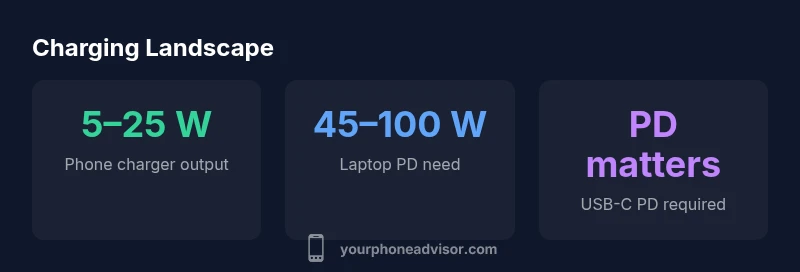
Short answer: usually not. A phone charger typically delivers 5–25 watts, while laptops commonly require 45–100 watts for reliable charging. USB-C Power Delivery can bridge the gap for some ultrabooks and small laptops, but only if the charger and cable both support the required wattage and the laptop accepts USB-C charging. For most users, a dedicated laptop charger or a PD hub is recommended.
USB-C Power Delivery: How it works
USB-C Power Delivery (PD) is the technology that enables higher, negotiable wattages between a charger and a device. When you connect a PD-enabled USB-C charger to a PD-capable laptop, the charger and laptop communicate to select an appropriate power level. This negotiation is what makes USB-C PD powerful: you can, in principle, push more energy through a single cable safely. The Your Phone Advisor team notes that understanding PD is essential before attempting any charging from a phone charger. If your laptop supports USB-C charging, and your charger can negotiate a higher wattage, you have a real, but conditional, pathway to power your laptop from a phone-friendly charger. Importantly, not all USB-C chargers are created equal; many phones supply far less wattage than what a laptop needs, and many cables are only rated for certain levels of current. As a consumer, verify both the charger’s output and cable rating, and confirm your laptop’s USB-C charging compatibility with the manufacturer’s documentation.
Wattage matters: why most phone chargers won’t power laptops
The core limitation is wattage. Most phone chargers sit in the 5–25 W range, designed for phones, tablets, or small accessories. Laptops typically require more power, generally in the 45–100 W band, to charge effectively or to maintain operation while in use. Even when a PD charger is capable of higher wattage, the actual delivered energy depends on both the charger’s capability and the laptop’s acceptance limit. If the laptop insists on a higher wattage than the charger can provide, charging will be slow at best or will not start at all. For users who want to push the boundaries, a high-wquality PD charger paired with a compatible laptop can sometimes sustain charging for light-use scenarios, but this is not universal and is highly device-specific.
Real-world charging scenarios: what actually works
In practice, if you own an ultraportable laptop that supports USB-C charging, a PD charger around 30–60 W might keep the device powered during light tasks. However, more demanding workloads (gaming, video editing, or long battery drain) will quickly exhaust a 30–60 W charger. If your laptop’s charging port is USB-C and the charger is designed for PD, you may see the laptop charging indicator appear, or the battery percentage may slowly rise. When you mix a phone charger with a PD hub or dongle, the effectiveness depends on the hub’s design and whether the laptop negotiates the same power ceiling. In short, for most everyday laptops, rely on a dedicated laptop charger or a properly rated PD hub to ensure safe, reliable charging as you work.
Practical steps to charge safely with a phone charger
- Check your laptop’s charging specification: confirm whether USB-C charging is supported and what wattage is needed. If USB-C PD is not supported, you cannot reliably charge via a phone charger.
- Use PD-certified chargers and cables: look for devices that explicitly support USB-C PD with the right wattage rating.
- Favor a wired hub if you need more flexibility: PD hubs can distribute power more efficiently and allow charging while connecting peripherals.
- Avoid prolonged charging from low-wattage sources: using a 5–10 W charger for a laptop is not recommended for long periods; it can stress the battery and reduce performance.
- Monitor temperature: charging at lower wattage can generate heat; if your device becomes unusually warm, disconnect and switch to an appropriate charger.
When to avoid this approach and what to use instead
If your laptop requires more than about 45 W for comfortable charging, a phone charger—even with USB-C PD—will seldom meet the demand. For best results, use the original or a certified third‑party laptop charger, or invest in a USB-C PD hub with a dedicated power brick that can supply sufficient wattage. For longer workloads, a charger designed specifically for your laptop model is the safest and most reliable option. Protect your device by avoiding makeshift configurations that do not specify wattage, cable rating, and PD negotiation compatibility.
Common myths and pitfalls
- Myth: Any USB-C charger can power any laptop. Reality: Laptop compatibility and negotiable wattage matter; a mismatch can lead to no charging or slow charging.
- Myth: More watts is always better. Reality: The device will only draw what it can safely take; excess wattage won’t damage the laptop if the PD negotiation is correct, but it won’t magically charge faster if the laptop can't accept it.
- Myth: PD guarantees charging across all devices. Reality: Not all devices support USB-C charging, and not all PD chargers negotiate to the correct power level for every device.
Quick-start checklist
- Verify laptop charging port: USB-C PD or dedicated barrel/other input.
- Check charger wattage: aim for at least the laptop’s stated PD requirement; avoid underpowered options.
- Use a PD-certified USB-C cable rated for the target wattage.
- Test under load: observe charging behavior when performing typical tasks.
- If in doubt, revert to the official laptop charger or a PD hub with a higher wattage brick.
Charging comparisons: laptop needs vs phone-charger output
| Scenario | Laptop Wattage Need | Phone Charger Output | Notes |
|---|---|---|---|
| Standard laptop charging | 45–100 W | 5–25 W | Not sufficient unless high PD and compatibility |
| Ultrabook charging via USB-C | 30–60 W | 25–60 W | Possible with PD support and compatible laptop |
| PD hub workaround | Varies | Varies | Best for power distribution; not ideal for continuous charging |
Got Questions?
Can a standard phone charger power my laptop over USB-C?
Only if the laptop supports USB-C charging and the charger delivers sufficient wattage via USB-C Power Delivery. Most laptops require higher wattage than typical phone chargers provide.
Only if your laptop supports USB-C charging and the charger can supply enough power; otherwise it won’t charge reliably.
Will charging from a phone charger damage my laptop battery?
When using USB-C PD with proper wattage and certified cables, charging should be safe. Using underpowered or non-PD chargers can cause slow charging or battery wear over time.
If you use a proper PD setup with the right wattage, it should be safe; otherwise, avoid it.
What wattage is enough to charge a typical laptop?
Most laptops that charge over USB-C require about 45–100 W. ultraportables may work closer to 45–60 W, while premium models may need toward the upper end.
Usually 45 to 100 watts, depending on the model.
Is USB-C PD always compatible with all laptops?
No. Compatibility depends on both the laptop’s acceptance of USB-C charging and the charger’s PD profile. Always verify manufacturer guidance.
Not always—check your laptop’s USB-C charging support.
What should I do if I need to charge in a pinch?
Use your laptop’s original charger if possible. If using a PD setup, ensure wattage matches the laptop’s needs and stop if the device overheats.
If urgent, try the official charger first, then a certified PD setup with caution.
Are there safer alternatives to battery-intensive charging from a phone charger?
Consider a high-wattage PD charger or a PD hub, or keep the laptop plugged into its dedicated charger for extended use. USB-C batteries and adapters carry similar safety standards when certified.
Use certified high-wattage PD gear or the official charger for longer use.
“Charging a laptop from a phone charger is possible only when the charger supports USB-C Power Delivery at a high enough wattage and the laptop accepts USB-C charging. In most cases, use a laptop charger or a PD hub for reliable results.”
What to Remember
- Know your device: check USB-C PD support and wattage requirements
- Use PD-certified chargers and cables matching the wattage
- A PD hub can help, but reliability varies by device
- For consistent laptop charging, rely on a dedicated charger